8. Capturing Images 110
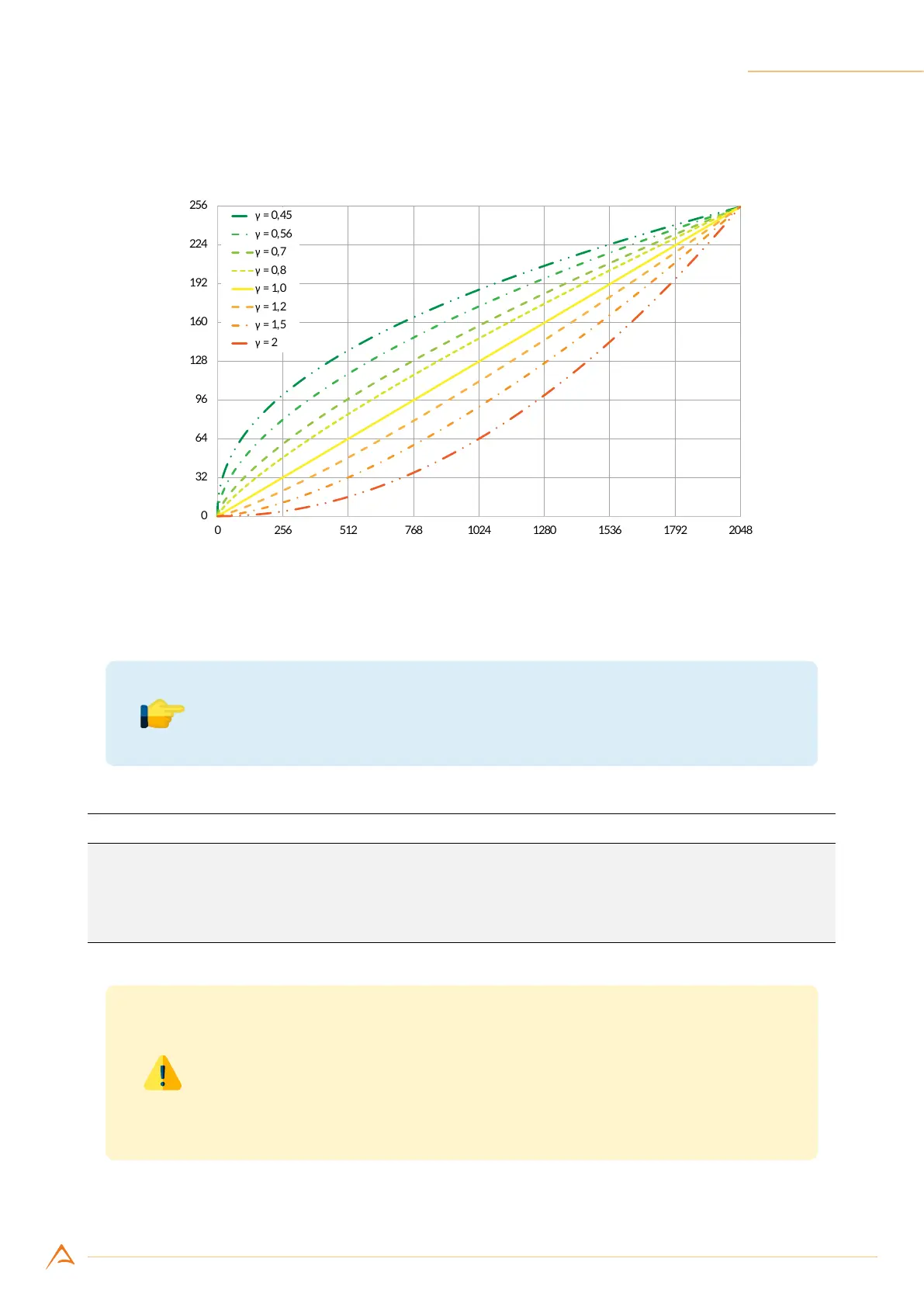
The γ exponent can be selected in a range from 0.40 to 4.00 with a granularity of 0.01.
Gamma correction
Input pixel (11bit)
Output pixel (8bit)
Figure 8.15: Gamma correction representations
Note
γ = 1 corresponds to the neutral correction (i.e. no correction applied).
Example Code 8.22 | Set gamma
UnitInfo unit = device.GetFeatureUnitInfo(Feature.Gamma);
double gamma = 1.23;
device.Gamma = (uint)(gamma / unit.Factor); // Convert to Gamma units
device.GammaEnabled = true; // Enable Gamma Correction
Warning
User LUT and gamma correction share the same processing chain resources
and cannot be used simultaneously. At power-on, NECTA uses γ = 1.00 (neu-
tral correction); disabling gamma correction will automatically enable user
LUT.



 To Next Page