8. Capturing Images 98
Note
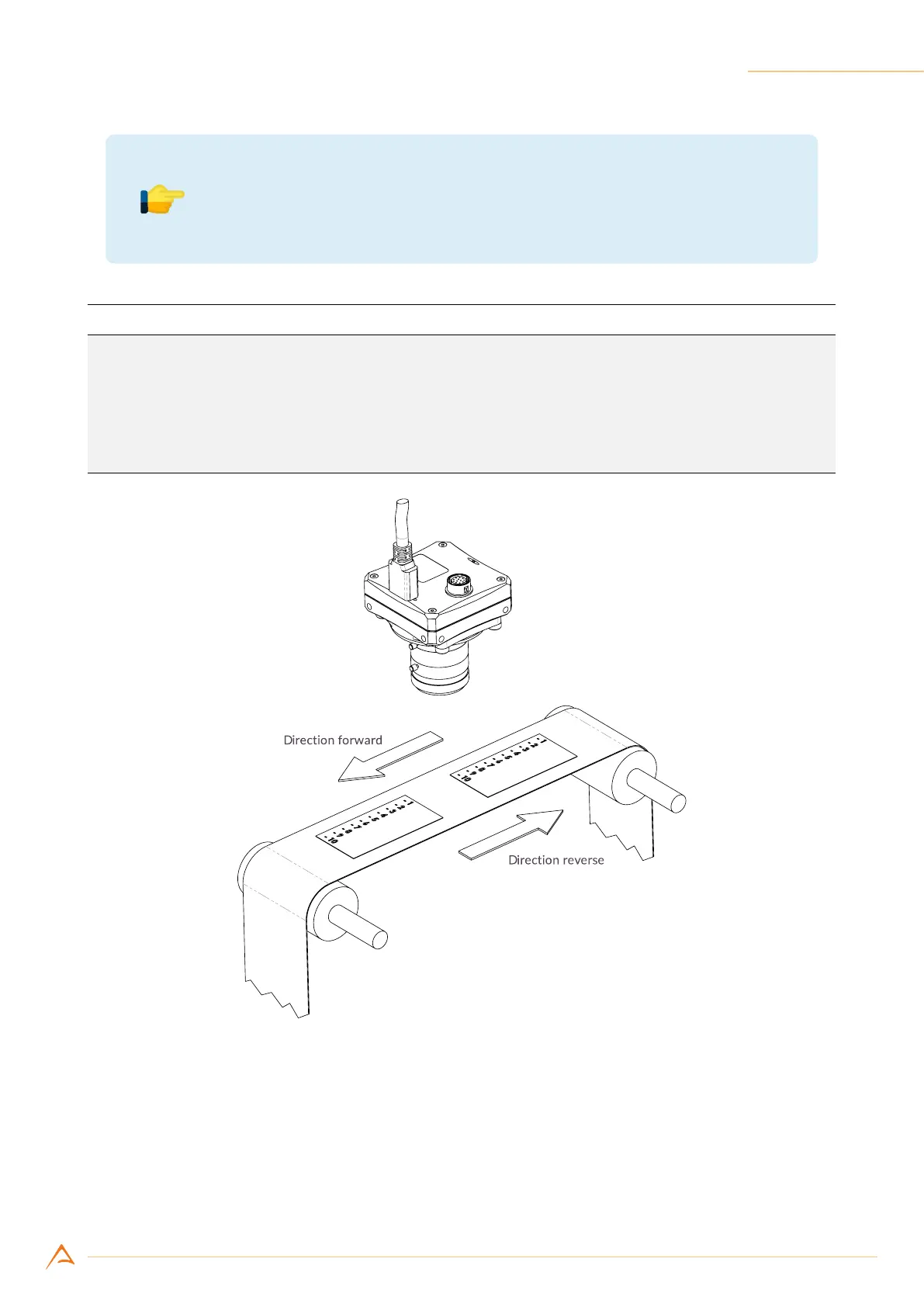
Using the line delay control requires setting the target motion direction (For-
ward or Reverse) according to the acquisition system layout (see Figure 8.10).
Example Code 8.11 |
Setup line delay
// Turn LineDelay mechanism on (default statcamera is disabled)
device.LineDelay.Enabled = true;
// Choose either LineDelayDirection.Forward or LineDelayDirection.Reverse
// according to your setup
device.LineDelay.Direction = LineDelayDirection.Forward;
device.LinePeriod = 70.0;
Figure 8.10: Target Movement vs. Camera positioning (using an inverting lens)
8.8.2 Monochrome cameras
For double-line monochrome cameras, the line delay control works as in color cameras. It may and must
be used only when vertical binning mode is enabled (see Section 8.4) and the target in front of the camera
is moving (see Figure 8.10). In these conditions using the line delay control improves image vertical
sharpness.



 To Next Page