9. Alkeria player 127
9.6.1 Saving and Exporting Conguration
The Cong menu allows to save and load camera conguration to and from the camera internal ash
memory. Conguration can be exported and imported to and from xml les as well. See Section 8.11 for
further information.
9.6.2 I/O panel
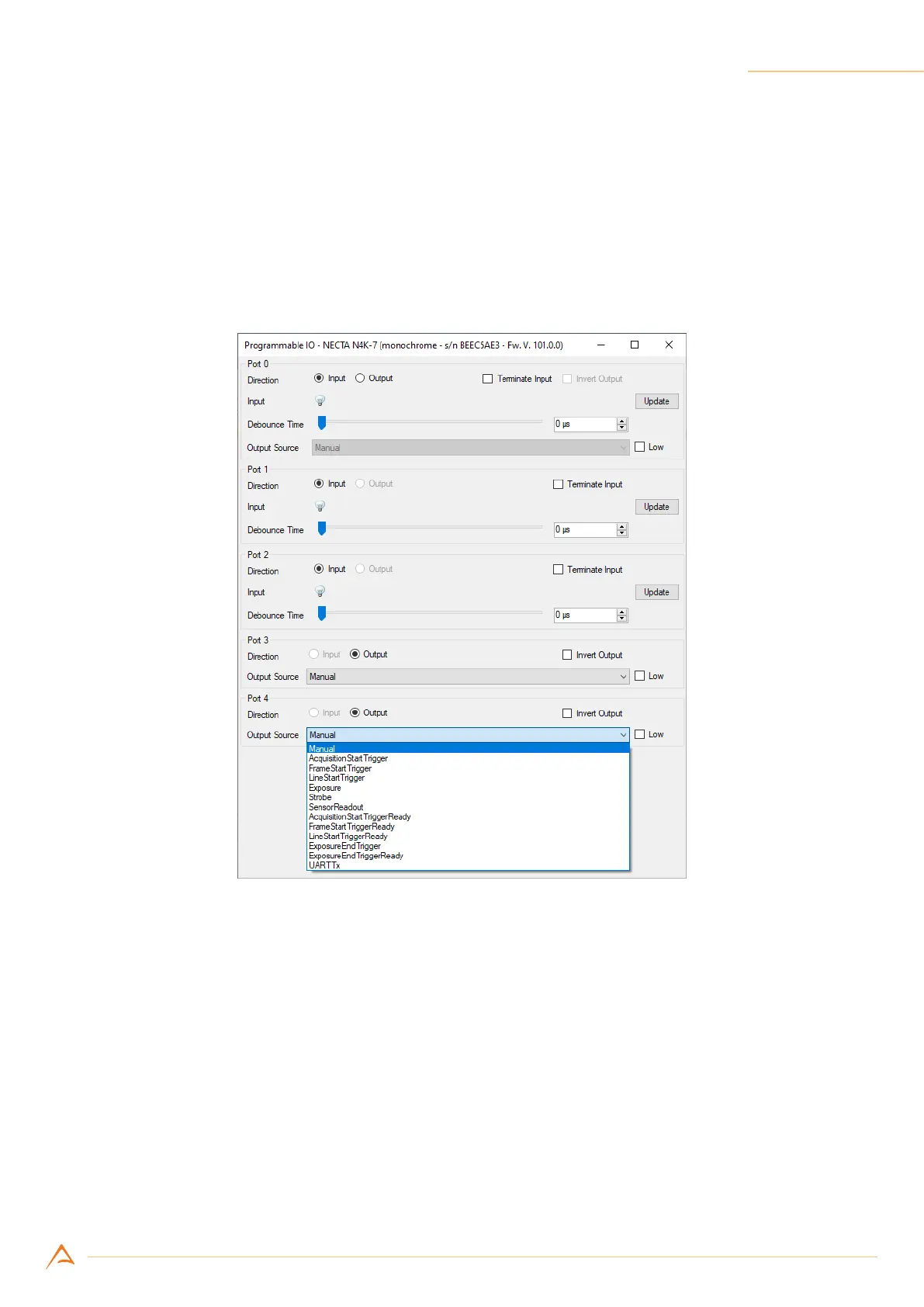
The I/O panel (Figure 9.9) allows to control the I/O ports (see Chapter 4 for details).
Figure 9.9: I/O control panel
Direction for the bidirectional port (Port 0) can be chosen by using the radio button on the top of the
panel (Input / Output). Input ports allow enabling input termination (see Section 4.3.1), reading input
status through the “Update” button and selecting input debounce time. The “Output Source” drop-down
list allows to select how to route internal logical signals to the output pins.
9.6.3 Calibration
NECTA is able to automatically correct non-uniformities introduced by image sensor, lens and lighting
system; these non-uniformities are called FPN. The set of techniques used to improve the quality of
the acquired images is generally called Shading correction or FFC, and is a combination of offset and
gain compensations. The calibration procedure combines three corrections (black level offset, DSNU
and PRNU), involved in different phases of the frame acquisition process. The calibration aim will be de-



 To Next Page