6. Trigger 74
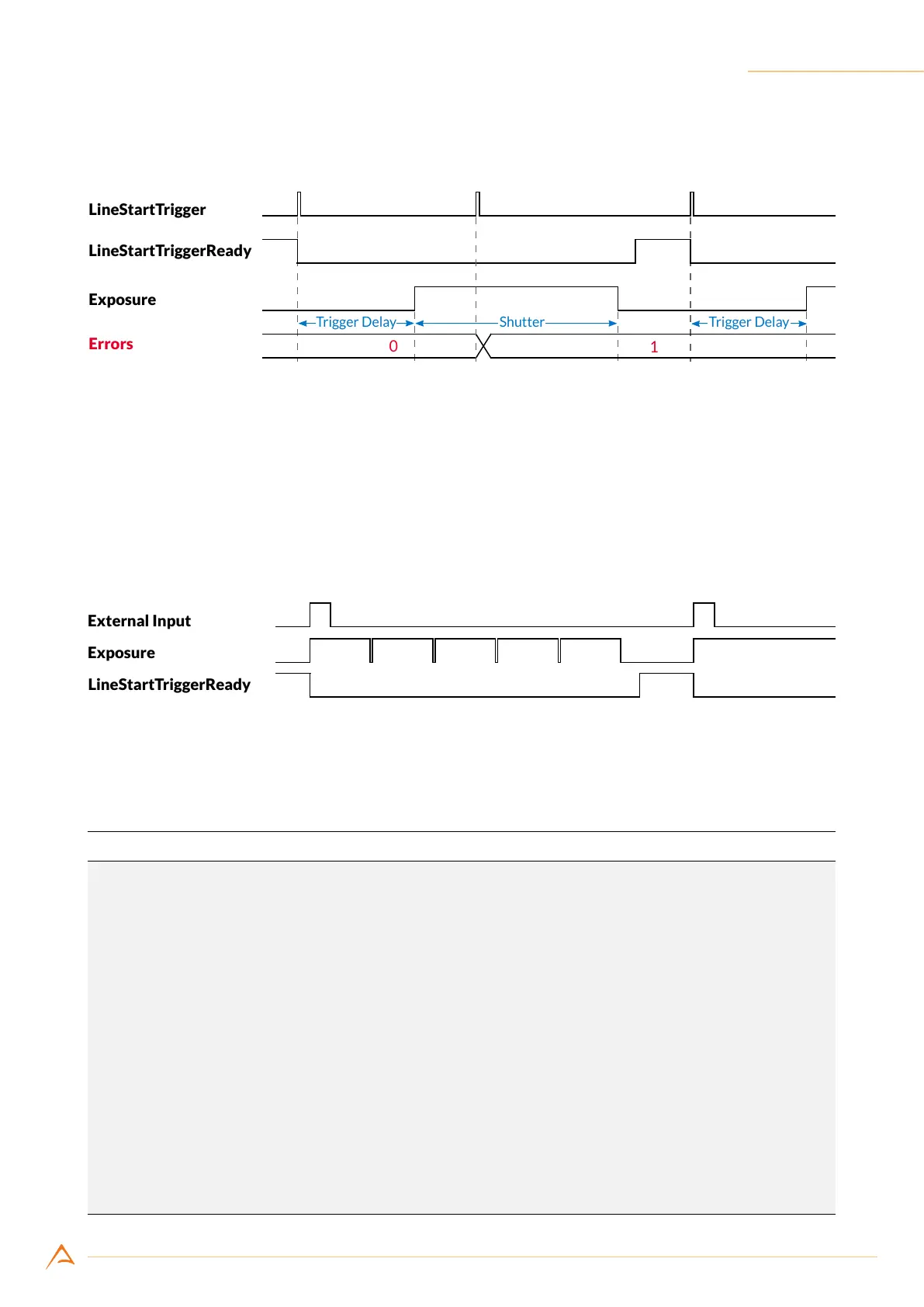
The third trigger signal is properly received and accepted as the previous exposure is already complete.
Figure 6.2: Exposure timings
6.7 TRIGGER CONFIGURATION EXAMPLE
6.7.1 External trigger frame acquisition
The following example assumes that you want to acquire a frame composed by 5 lines every time a rising
edge on input port 1 is detected. Frame start trigger ready signal is routed to output port 3.
Figure 6.3: External trigger frame acquisition timings
As shown in Figure 6.3, the frame-start-trigger-ready signal has to go high before the rising edge of the
signal on port 1. If this constraint is not respected, the trigger will not be accepted.
Example Code 6.3 | External trigger line acquisition
// Set 5 lines per frame
device.ImageSizeY = 5;
// Set shutter time to 1 ms
device.Shutter = (uint)(1e-3/device.GetFeatureUnitInfo(Feature.Shutter).Factor);
// Set debounce time to 1 us
UnitInfo units = device.PIOPorts[1].DebounceUnitInfo;
device.PIOPorts[1].DebounceTime = (ushort)(1e-6 / units.Factor);
device.FrameStartTrigger.Source = TriggerSource.External;
// Select input port 1
device.FrameStartTrigger.ExternalInput = 1;
// Rising edge
device.FrameStartTrigger.DetectExternalInputEdge = true;
device.FrameStartTrigger.InvertExternalInput = false;
// Enable frame trigger
device.FrameStartTrigger.Enabled = true;
// Export Trigger ready signal on port 3
device.PIOPorts[3].Source = OutputSource.FrameStartTriggerReady;



 To Next Page