After completing Setup menu selections, it is recommended that all selections and entries
be recorded on the Setup Worksheet. This Worksheet is included in the Appendix. It can be
removed, copied, and completed to serve as a hard-copy record of each setup program.
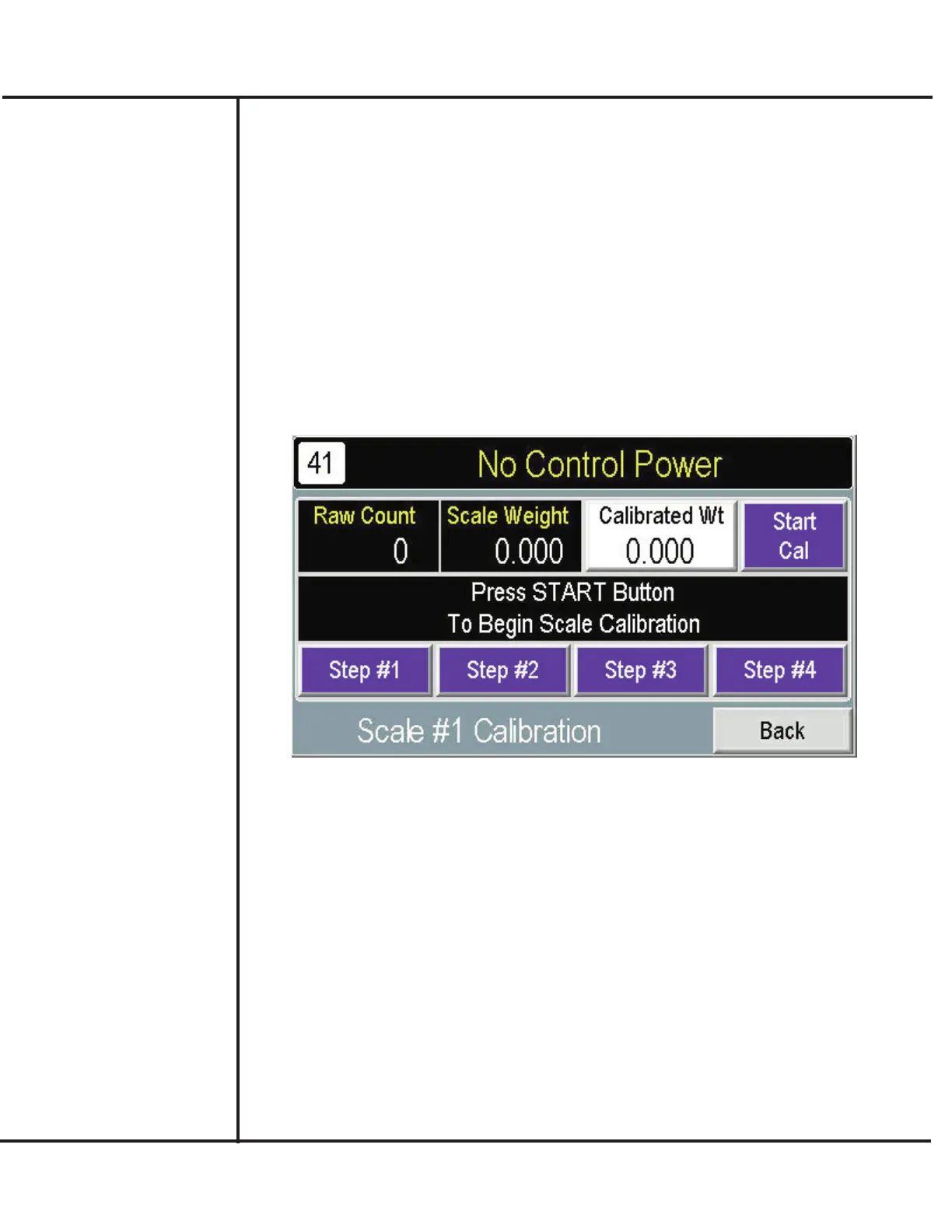
To ensure consistent accuracy, the scale of the Weigh Bucket should be calibrated before
starting production. Calibration involves examining the weighing characteristics at the scale
and completing a 4-step calibration sequence. Instructions to perform calibration are pre-
sented in the following.
A verified, known weight (i.e., “Standard Mass”) should be available to perform Calibration.
1. Access the MAIN screen and press SCALE.
Model VF110-E Touch Screen Control Panel Users Manual
15
AFI Publication 1910817 ● Issue: 1 ● August 2017
Completing Setup
and Testing
Scale Calibration
2. Verify the RAW COUNTS display. This value is input from the loadcell to verify that the
loadcell is responding. If a weight is present on the scale and Raw Counts doesn’t regis-
ter, failure of the loadcell may be suspected.
3. Press CALIBRATED WEIGHT for entry of a standard mass value used during the
calibration process.
4. Press START CAL. to initiate the calibration process.
5. Use STEP #1-#4 to complete the calibration sequence for each scale. Instructions
appear on the screen to complete each step.



 To Next Page