IS-200A
4. How to Operate Screens
4-20
SQD
SQZ
COOL1
WELD1
WELD2
COOL2
WELD3
HOLD
HEAT1
HEAT2 HEAT3
200ms
2ND STAGE
5%
higher
than
HEAT1
5%
higher
than
HEAT1
5%
higher
than
HEAT2
DELAY-START SET time
Valve output
Welding current
2nd supply of
welding current
halted (fixed at 200 ms)
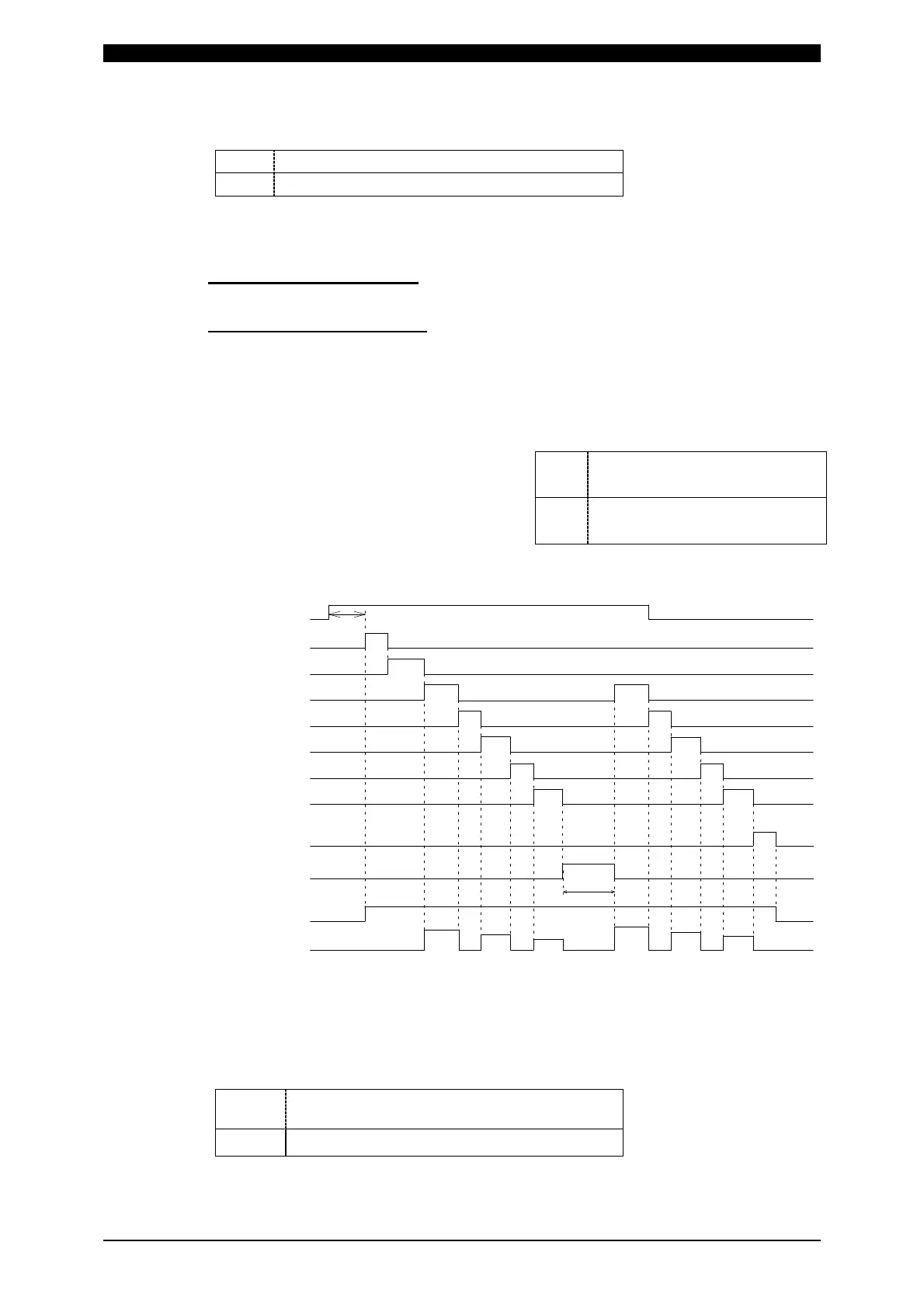
RE-WELD Timing Chart
(f) STEPPER MODE
Select whether or not to perform step-up (step-down) operation.
ON
Step-up (step-down) will be performed.
OFF
Step-up (step-down) will not be performed.
(g) WELD COUNT
Select whether or not to check the weld count. (Set external input pin 14.)
When WELD COUNT = ON
The weld count will be checked. (Refer to (a) of (8) MONITOR MODE Screen.)
When WELD COUNT = OFF
The weld count will not be checked. (The terminal functions as the WE2 STOP
terminal.) The sequence will proceed to COOL2 if external input pin 14 is closed
during the WELD2 sequence operation. (Refer to Note 2, (7)(e).) When the WE2
STOP signal is input before the start signal is input, the welding stop error occurs.
(h) RE-WELD
Select whether or not to supply welding
current again at the same location if the
monitored current is lower than the
lower limit. The second welding current
will be 5% greater than the setting value.
(i) WELD TIME
Use this setting to change the units for TIME, UP SLOPE, and DOWN
SLOPE—the settings available on the (3) SCHEDULE screen.
CYC
50
Hz: 1
CYC = 20
ms
60
Hz: 1
CYC = 16.6
ms
ms
—
ON
Welding current will be
supplied again.
OFF
Welding current will not be
supplied again.



 To Next Page