L0118G
3-1
3.0 VENDOR SYSTEMS AND COMPONENTS
3.1 SENSIT 3 OPERATION
1. The Sensit 3 system is comprised of the
primary sensor, the secondary sensor, and
the control logic. The primary and secondary
sensors are attached to opposite ends of the
hopper, and infrared light is passed between
them.
2. When a selection is made, the vend motor
will begin to run. After several seconds, if no
product falls in the hopper (or motor returns
to home position), the motor will be stopped,
the credit will be maintained and the
customer will be directed to “PLEASE MAKE
ANOTHER SELECTION.”
3. When the controller measures a variation in
the light intensity during the vend cycle, it
recognizes that a product has fallen through
the light into the hopper. The controller stops
the vend motor (or returns to home position)
and removes the credit.
4. When the vendor is serviced with the door
open, the protective lens on the sensors can
become fogged up, particularly in hot or
humid locations. In these cases, the vendor
will display “SENSIT BLOCKED – UNABLE
TO VEND” until the fogging has cleared,
usually within a minute after closing the door.
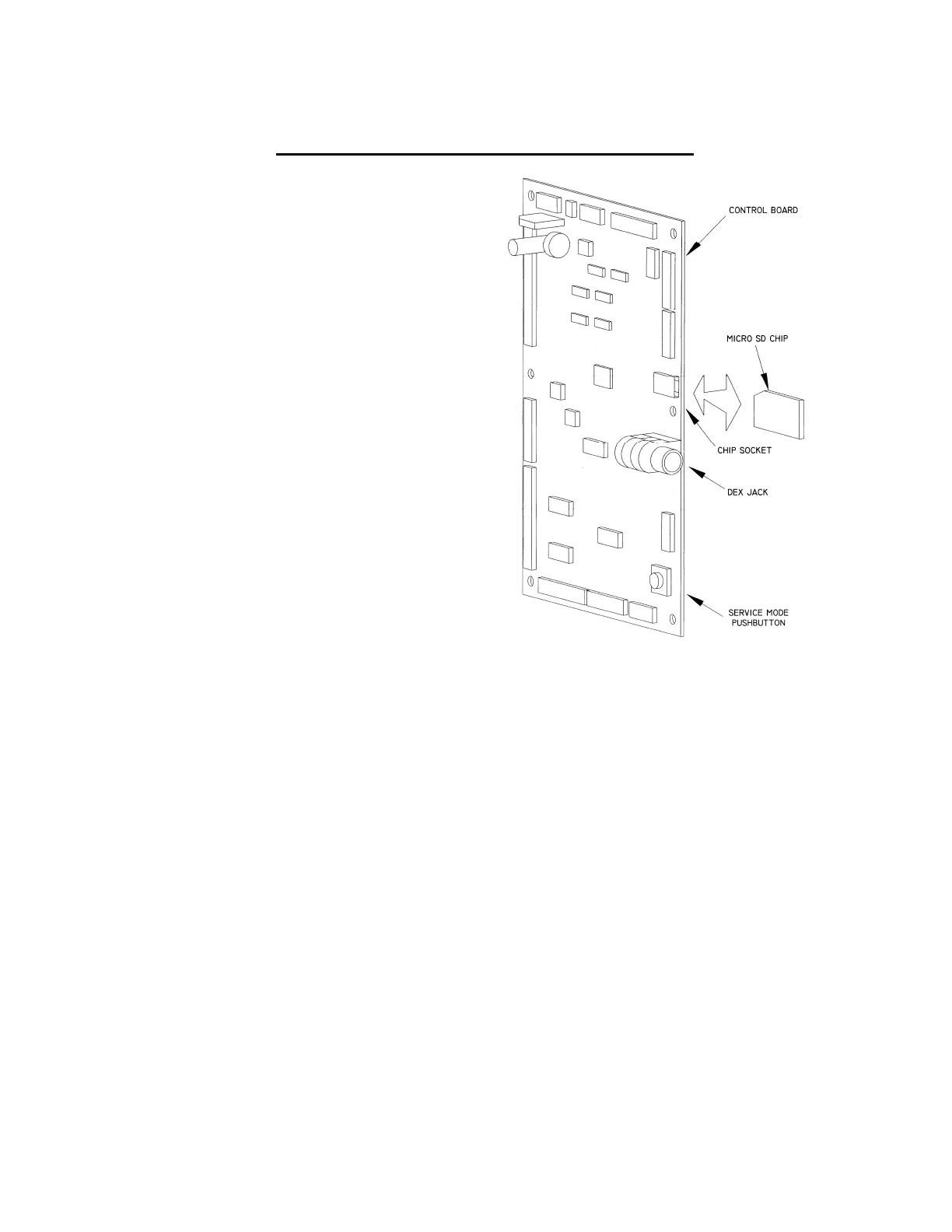
3.2 CONTROL BOARD
The control board controls and monitors the vendor,
DEX, and MDB systems. The control board is located
in the upper left hand corner of the open vendor door,
behind an access door.
Upgrading Firmware
The firmware can be upgraded by using a micro SD
card. The card and card readers are available at
Office supply chains or on the internet. Minimum
capacity of 512Mb is adequate. See Section 8.1.
Mode Switch
Pressing the mode button (Refer to Figure 3.1) allows
the user to get in to the controller’s service mode to
change settings, access vend data, and check error
codes for troubleshooting. Data is displayed on the
front display panel, and entered at the front selection
panel. Pressing the switch again, closing the door, or
waiting approximately 3 minutes will automatically
switch the computer back to vend mode.
Figure 3.1 Control Board Components
DEX Jack
The DEX jack (Refer to Figure 3.1) is provided for use
with external features, such as Speech (Refer to
Section 6.10). Data collection with third party devices
can also be made here. Some telemetry-based
devices (which may include cashless devices) have a
permanent connection here.
3.3 VEND SENSOR
Primary Sensor
The primary sensor is located on the left of the hopper
when viewing the back of the door. The sensor, inside
a protective housing, sends light to and receives light
from the secondary sensor (both sensors operate the
same way in this regard). It contains circuitry to send
a signal to the control board. When a product drops
through the beam, it causes a change which is
interpreted by the control as a successful vend. The
primary sensor board also contains circuitry to
connect to the secondary sensor, and to connect the
machine’s temperature sensor to the control board.
When servicing the primary board, be mindful of the
emitters and detectors as they can be damaged by
rough handling.



 To Next Page