L0118G
8-6
6. After testing, remount the temperature sensor
on the two spring clips, and carefully re-wrap the
sensor wire in the two bracket slots ensuring the
wire is not caught or pulled, and is not pinched
when the door is closed.
7. Close vendor door. The vendor will return to
normal operation (including a cool-down time if
needed).
8.12 SENSIT 3 UTILITY
A PC-based software Utility Program is available for
Sensit 3 control boards. Currently it allows an
operator to save/load vendor configurations, and
upgrade firmware. Please contact your distributor or
AMS for more information.
8.13 REPLACING THE POWER CORD and
GFCI TEST
TOOLS REQUIRED:
Use this procedure to replace a power cord that is cut,
split open or is otherwise damaged or is a hazard. A
¼” nut driver, gloves and protective eyewear are
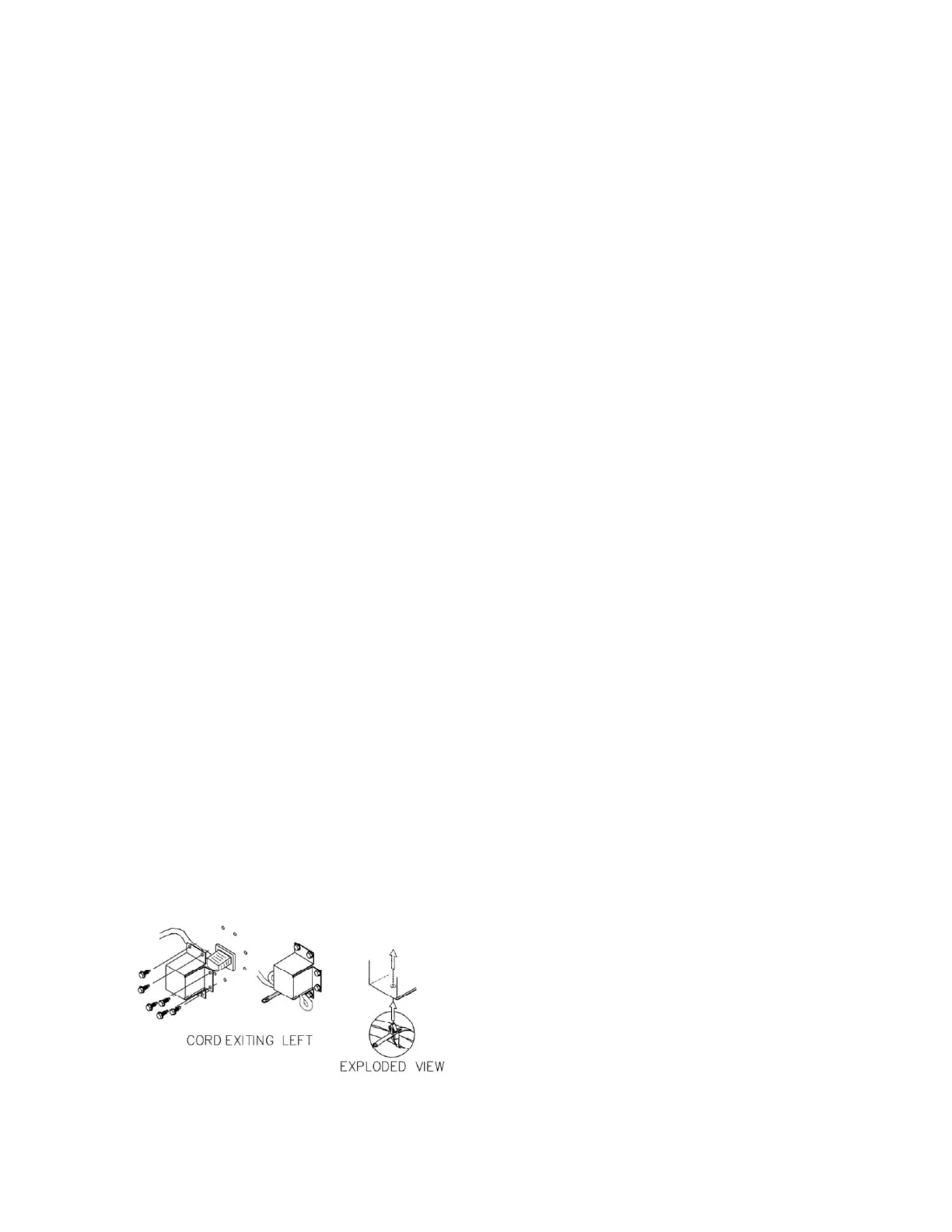
required. Refer to Figure 8.5
REMOVAL
1. Move the vendor away from the wall and unplug
the power cord from the wall outlet.
2. Remove and save the 6 screws attaching the
cover. Save the cover.
3. Unplug the power cord from the vendor as the
protective cover is removed.
4. Operate the small lever on the wire tie to open
the wire tie loop and free the power cord.
5. Remove and dispose of the damaged power
cord.
INSTALLATION
1. Plug the new power cord into the vendors IEC
receptacle but do not plug the power cord into a
power outlet at this time.
2. Place the cover over the IEC receptacle, with
the open side to the left as shown. The cover
will help prevent the power cord from being
removed.
Figure 8.5 Power Cord and Protective Cover
3. Align the holes in the cover with the holes on the
back of the machine. Reinstall 6 screws through
the holes in the cover. Do not over-tighten the
screws.
4. Loop the cord under the cover and back to the
left. Install the wire tie around the fold and
tighten it.
5. Install the wire tie and attached power cord by
inserting the locking tab into the hole in the
cover.
6. Plug the power cord into the power outlet. The
power should come on in the vendor.
7. If the power is on in the vendor, test the GFCI
as follows: press the TEST pushbutton on the
GFCI for 1 second to trip the GFCI and shut it
off. The vendor power should turn off. Then
press the RESET pushbutton for 1 second to
return the GFCI to normal operation. The vendor
should turn on.
8. If the power is not on in the vendor check the
GFCI as follows: press the TEST pushbutton on
the GFCI for 1 second to trip the GFCI and shut
it off. Then press the RESET pushbutton for 1
second to return the GFCI to normal operation.
The vendor should turn on.
9. If there is no power, check the power outlet at
the wall. If there is power at the outlet check for
power at the plug end of the power cord.
10. If everything is operational return the vendor to
its position next to the wall.
8-14. STORING THE VENDOR
If the vendor is to be stored without power for several
days or longer, use the following instructions. These
instructions are similar to those used to store any
refrigerator.
1. Unplug the vendor from the power outlet.
2. Remove any products from the vendor.
3. Clean the inside of the vendor using the general
directions given in Section 8-7.
4. Leave the vendor door open for a day to allow
the interior to thoroughly dry.
5. Close the vendor door and lock it to protect the
interior.
6. Roll up the power cord and place it in the hopper.
If the vendor is being moved follow the handling
and setup procedures given in Section 4.



 To Next Page