Apogee Symphony Desktop User’s Guide
Page 2
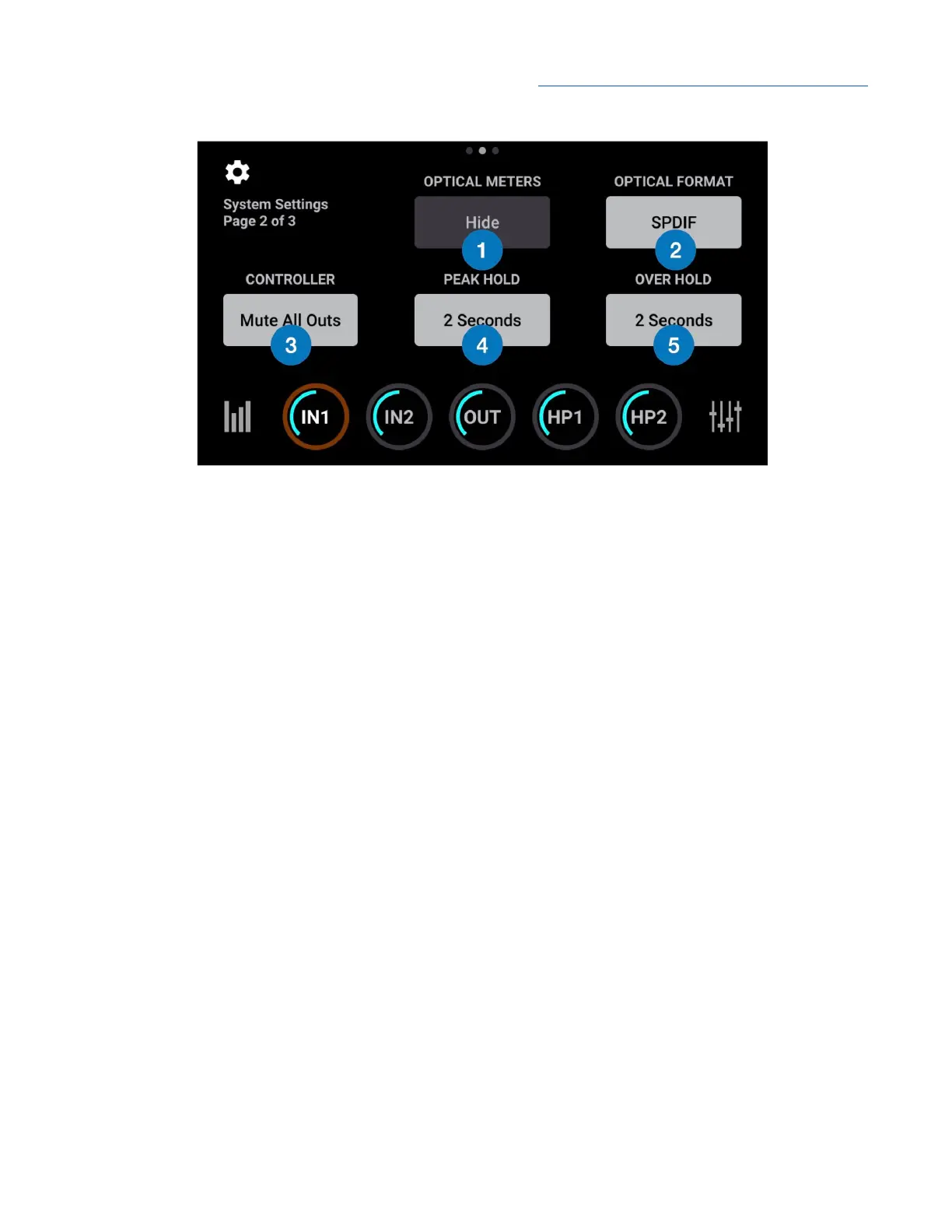
1. Optical Meters - tap to show or hide Optical I/O level meters on the I/O View.
2. Optical Format - tap to set the Optical I/O digital format:
● S/PDIF - 2 channel format at sample rates of 44.1-96kHz.
● ADAT - 8 channel format at sample rates of 44.1-48 kHz.
● SMUX - 4 channel format at sample rates of 88.2-96kHz.
3. Controller - set the behavior of the top panel Control knob when tapped:
● None - nothing happens when tapping the Control knob.
● Mute All Outs - mutes the Main, HP1 and HP2 outputs.
● Mute Main Outs - mutes the Main outputs only.
● Mute HP1 - mutes the front headphone output only.
● Mute HP2 - mutes the rear headphone output only.
● Toggle Mute HP/Speaker - toggle between Main outs muted/headphones unmuted and Main
outs unmuted and headphone muted. Great when you’re tracking in the control room and want
to listen to playback over speakers.
● Toggle I/O Selections - Toggle the Control knob assignment through the two inputs and three
outputs.
4. Peak Hold - tap to set the time* that peak indicators are held on the level meters.
5. Over Hold - tap to set the time* that over indicators are held on the level meters.
* Infinite hold time not guaranteed.
31



 To Next Page