Apogee Symphony Desktop User’s Guide
Monitor/Output Section
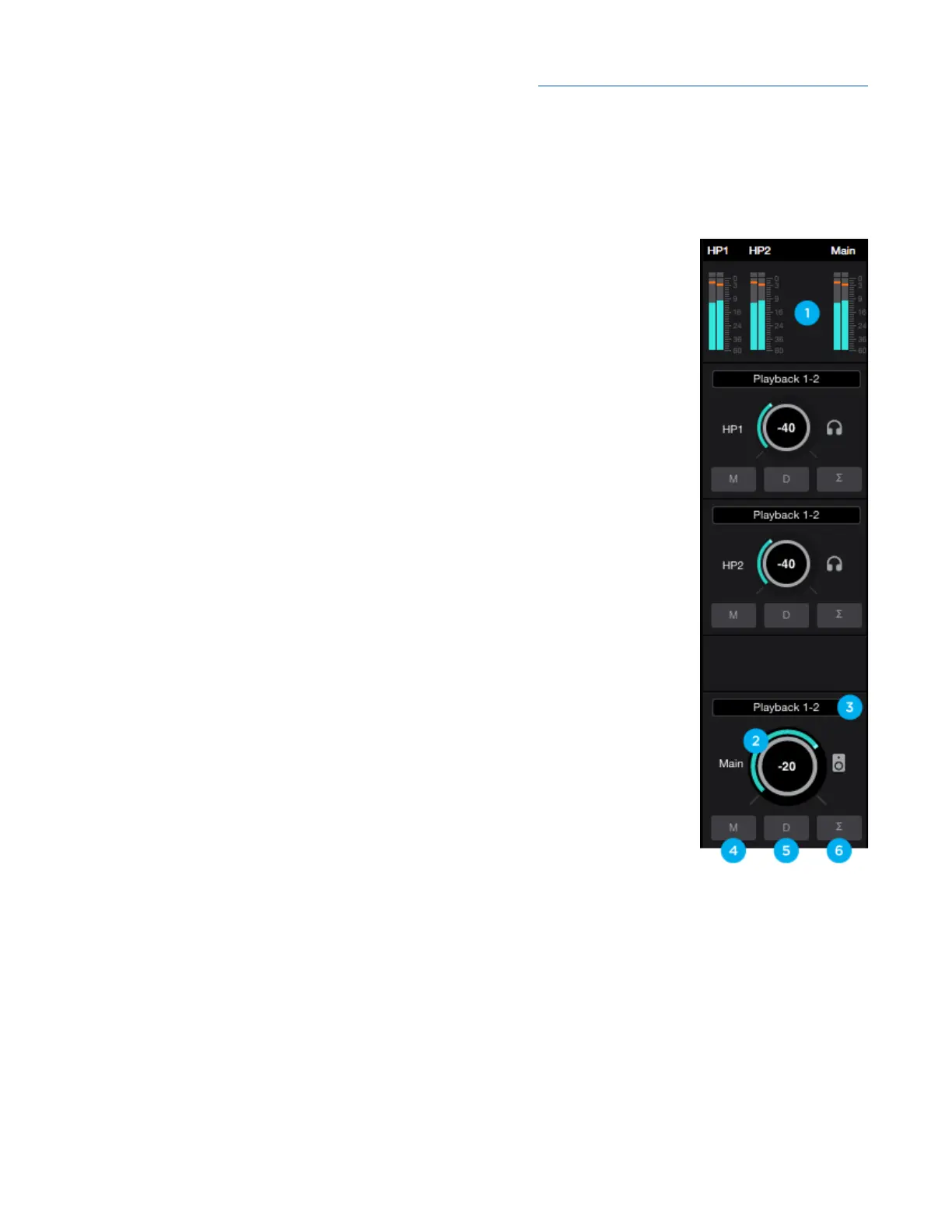
In the Monitor/Output Section, select the signals to be routed to the Main and Headphone outputs,
then control their volume. Output Level Meters display the presence of signal at the outputs, useful as
a diagnostic tool.
1. Output Level Meters - Displays the level of the HP1, HP2 or Main outputs’
digital source.
The following settings are available for the Main, HP1 and HP2 outputs:
2. Source - choose the signal source for the output (Main, HP1 or HP2).
● SW Playback - route the selected stereo Playback signal from audio
software to the HP output.
● Direct Mixers - route the stereo signal from the selected mixer to the
HP output.
● HW:Inputs - route the selected mono or stereo signal from the selected
hardware input(s) to the HP output.
3. Mute - mute the output
4. Dim - dim (reduce) the output by 15 dB;
5. Sum to Mono - Collapse left and right signals to mono at the output. This
combined signal is sent through both Left and Right Outputs and is useful
for verifying the mono-compatibility of a stereo mix.
6. Output Level Control - Set the listening level of the output.
40



 To Next Page