Apogee Symphony Desktop User’s Guide
Monitor FX & DualPath Monitoring
With Monitor FX and DualPath monitoring, users experience workflow benefits that have previously
only been available with Avid Pro Tools HD - 1) very low latency, even when the DAW IO Buffer size
is high 2) simple, non-destructive plugin workflow - open a single plugin in your DAW that processes
monitoring and playback 3) control from a single app window - your DAW.
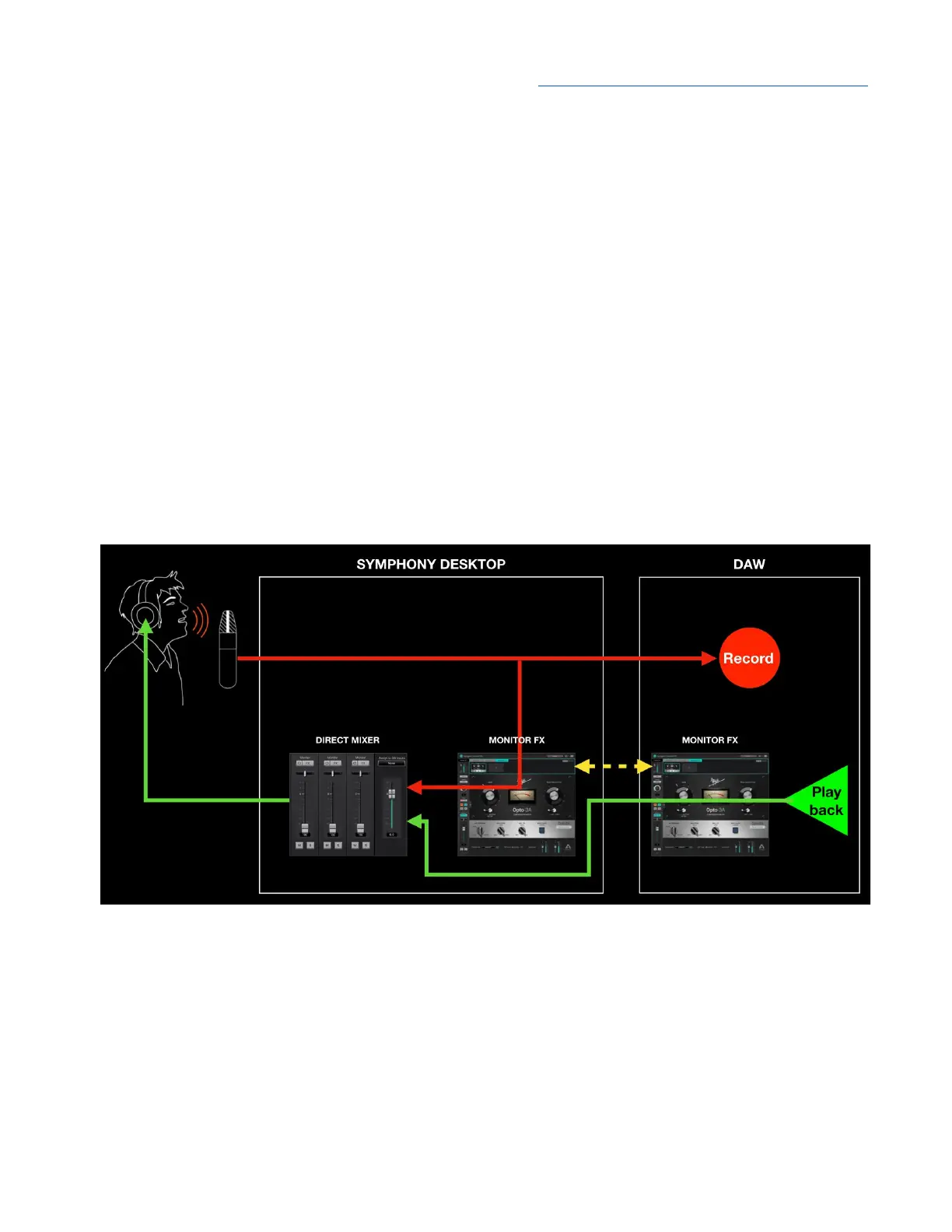
When you open Monitor FX plugins in a DAW Channel FX plugin and set Channel Link, the plugins
are actually inserted in two different
signal paths - 1) in the DAW Playback signal path and 2) before
the direct monitoring mixer but after
the “send” to your DAW, as shown below.
When recording, the performer hears himself through Monitor FX running on hardware DSP;
playback, on the other hand, is heard through Monitor FX running natively in your DAW. Most
importantly, the two plugins are control-linked, so settings made in one Channel FX plugin are
mirrored to the other Channel FX plugin.
All this happens automatically and transparently when you open the Channel FX plugin in your DAW
and link it to a hardware input. We call this revolutionary workflow DualPath Monitoring.
50



 To Next Page