Apogee Symphony Desktop User’s Guide
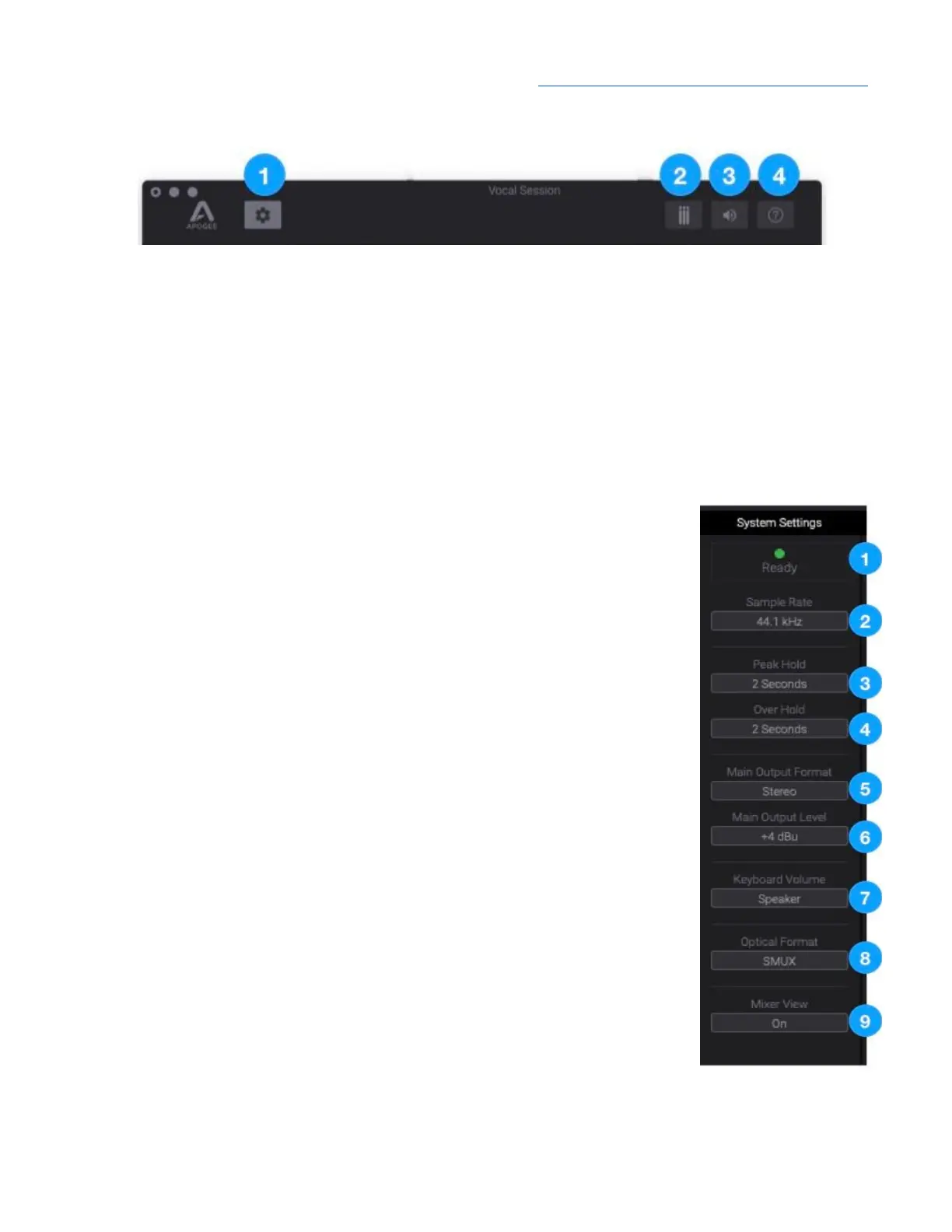
Tool Bar
1. Show/hide System Settings sidebar
2. Clear Meters
3. Mute Outputs
4. Open the Hover Help window
System Settings Sidebar
Provides System-wide settings that apply to your recording system as a whole.
1. System Status Display - Displays the status of the connected hardware.
● Green - System is ready: Hardware is connected and recognized, and
the digital clock is locked to the Clock Source.
● Red - System not ready. Either the hardware is not connected, or the
system is not locked to the Clock Source.
2. Sample Rate - Set Symphony Desktop’s sample rate. In some cases this
setting may be overridden by software running on the computer (e.g. when
a DAW session is open).
3. Peak Hold - Set the time that peak indications are held on the level meters.
4. Over Hold - Set the time that over indicators are held on the level meters.
5. Main Output Format - Select the format of the Main ¼” analog outputs:
● Variable - Choose Variable when connecting directly to powered
monitors or a power amplifier connected to passive speakers. Output
level may be set using the Control knob.
● Fixed - Choose Fixed when connecting to devices that include level
controls, such as mixing consoles.
6. Main Output Level - Select the line-level reference for the Main output
jacks:
● Choose +4dBu when connecting to “pro” gear with inputs at a +4dBu
nominal level.
● Choose -10dBV when connecting to “semi-pro”, hi-fi, or musical
instrument gear with inputs at a -10dBV nominal level.
7. Keyboard Volume - Choose the Symphony Desktop analog outputs to be
controlled by the Mac System Preferences > Sound Output volume slider.
8. Optical Format - Set the digital audio protocol for the optical connectors.
Match the optical format to that of the connecting device:
● SPDIF: Optical I/O is formatted in the SPDIF format, which offers 2 channels at a sample rate
up to 96kHz.
34



 To Next Page