Page 14
1.2.5
SIM-card installation
Aranet PRO+ P/N TDSBOB03, TDSBOBU3, TDSBOBC3 is equipped with GSM LTE 4G modem
accepting Mini size SIM-card.
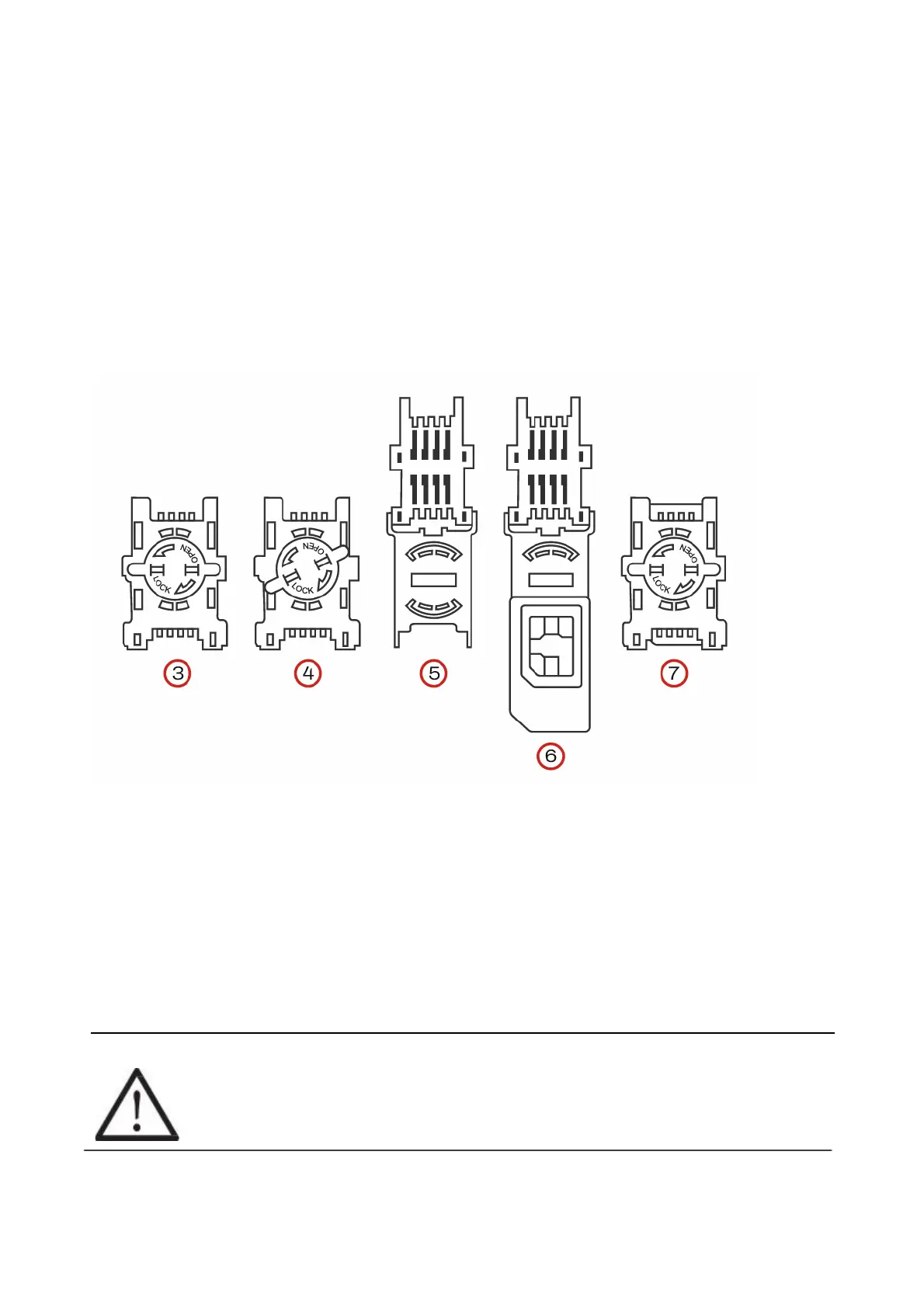
To install SIM-card into modem:
(1) Disconnect Aranet PRO+ from power source and wait for system to shutdown (all LEDs go Off).
(2) Detach Aranet PRO+ transparent lid by loosing 4 screws at the base’s case corners.
(3) Locate SIM-card holder.
(4) Loosen the holder cover by rotating metal locking plate counterclockwise.
(5) Flip the cover off.
(6) Insert SIM-card into the cover observing correct orientation.
(7) Flip cover back and fasten it by rotating metal locking plate clockwise.
(8) Put back Aranet PRO+ lid and fasten 4 screws.
1.2.6
Aranet PRO+ power options
Aranet PRO+ is powered by 802.3af PoE directly from the PoE enabled Ethernet switch or using optional
PoE insert.
1.2.7
Emergency switching off
Aranet PRO+ can shut down and switch off safely in case of main power failure. System notification will be
sent as email and/or SMS to the destination configured by users belonging to the Administrator group.
!WARNING! ARANET PRO+ BASE STATIONS CONTAIN CR2032 TYPE BATTERY. RISK
OF DAMAGE IF BATTERY IS REPLACED BY AN INCORRECT TYPE. THE USER IS
RESPONSIBLE FOR DISPOSAL OF BATTERIES ACCORDING TO THE STATE
LEGISLATION.



 To Next Page