Page 23
2.2
Pair sensors to Aranet PRO /PRO+
Aranet PRO/PRO+ supports several types of sensors. To connect them to the system the same steps apply
for all types of sensors. Sensors can be paired by-one or in batch.
When pairing the sensor, it should be physically located within around 20 meters of Aranet PRO/PRO+.
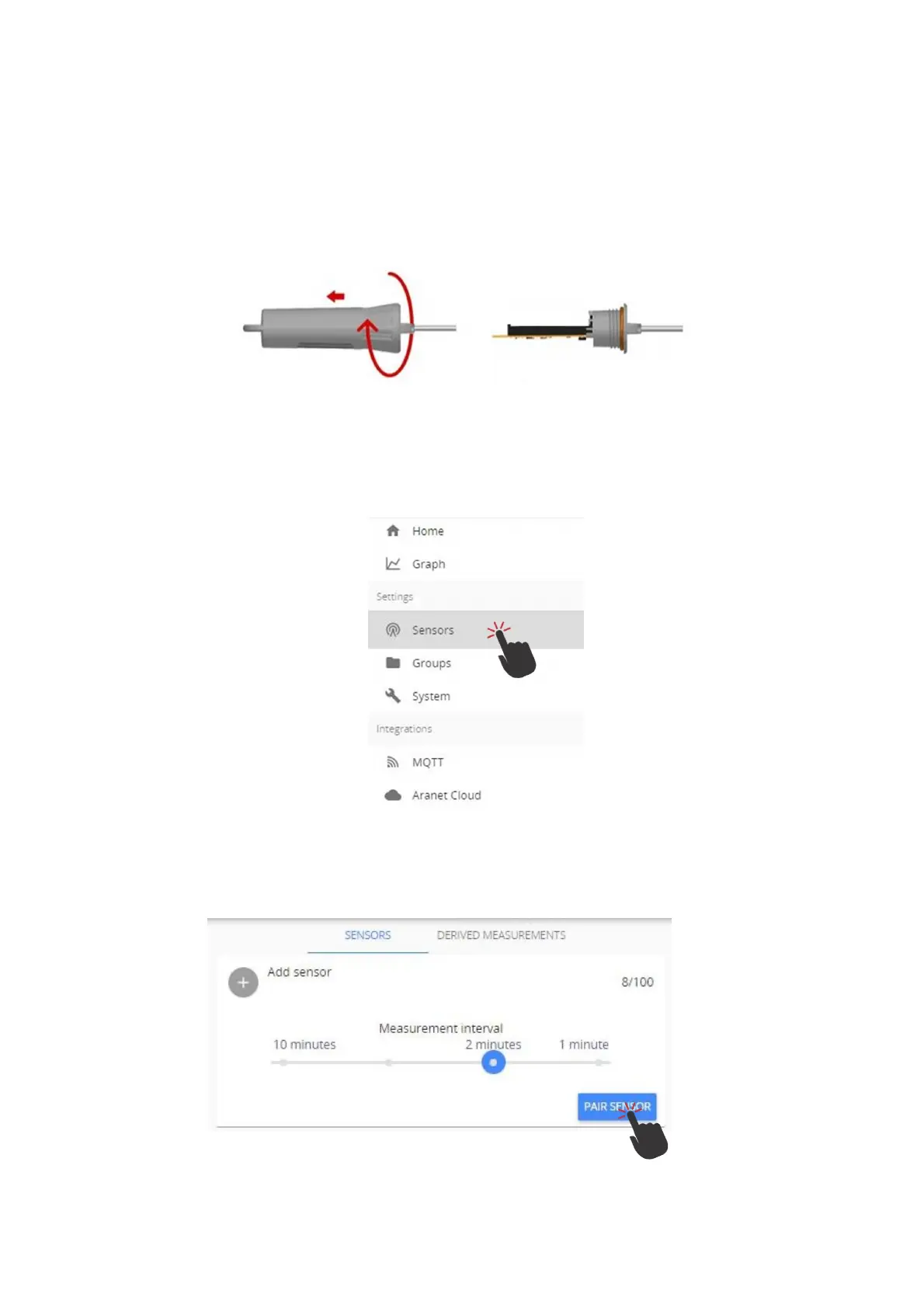
(1) Open the battery compartment of sensor, see example image below. While holding with one arm
the plastic cup, turn clockwise the main plastic body of the sensor (do not remove or twist the
cable).
Most other sensors have visible battery compartment or screws on the body. Loosen the screws to
take out the lid and expose battery compartment. Take out battery(ies) from the sensor(s) you want
to pair. If there are two batteries in the battery compartment, it is enough to take out one.
(2) Log in to Aranet PRO/PRO+ web-interface using an account with Administrator rights
(3) Navigate to Aranet PRO/PRO+ Main menu
(4) Choose “Sensors” menu
(5) Set the Measurement interval (10, 5, 2 or 1 minute).
(6) Click “PAIR SENSOR” button to initiate pairing for a sensor.



 To Next Page