Page 24
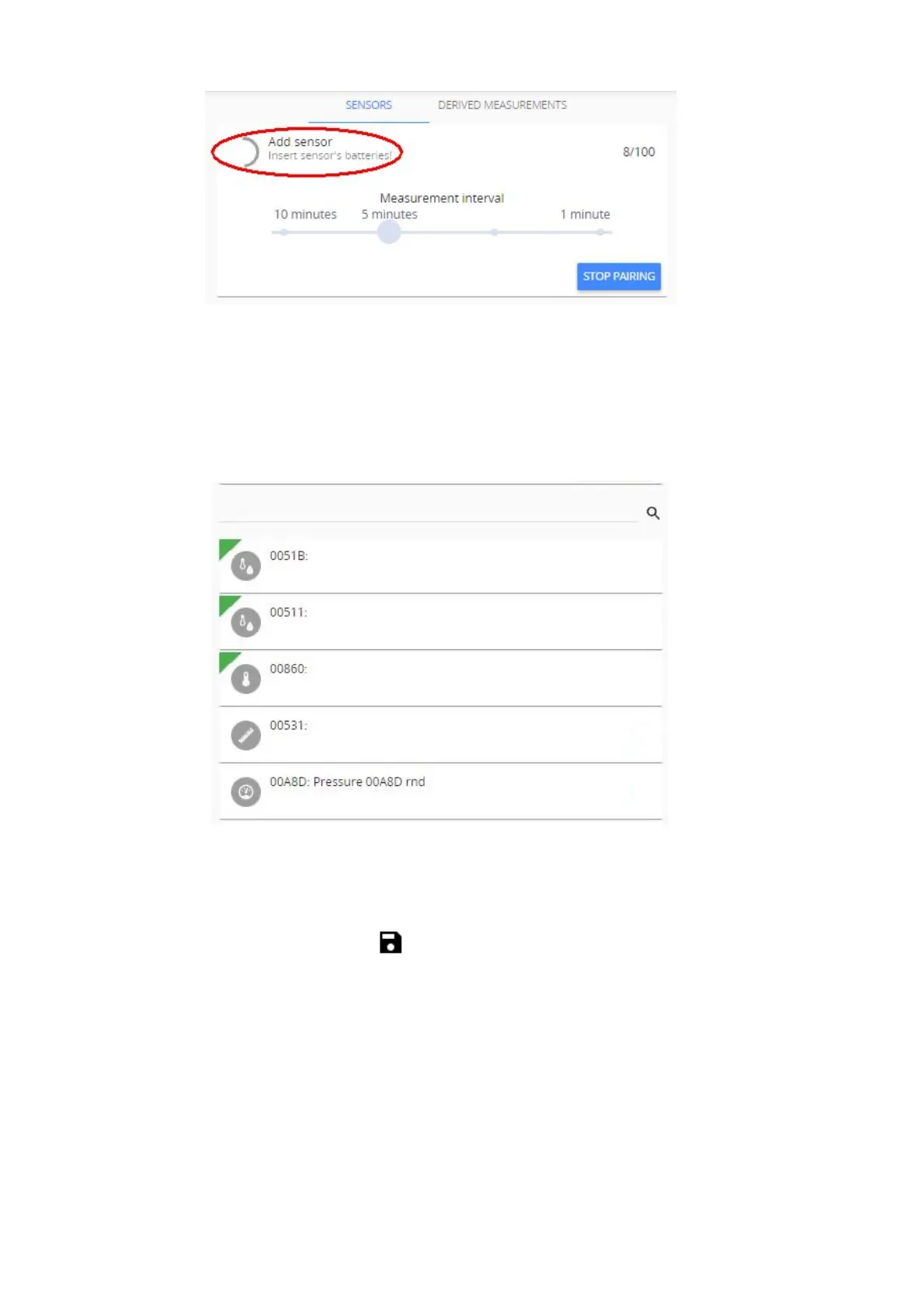
2-minute timer indicated by closing ring is started:
(7) Insert sensor’s battery(ies) by observing the correct polarity. Refer to datasheet of respective
sensor for information on supported battery types.
(8) Red LED light will flash on the sensor. Three short flashes followed by a long flash will signal a
connection failure, the pause between flashes will be the same. In case of successful pairing the
long flash will follow immediately after a short flash. Observing the LED light indications can save
time while pairing sensors, however, Aranet PRO/PRO+ software will also display successfully
paired sensor in the sensors list: new sensors are indicated by green triangle. Sensor pairing
process usually lasts 10-15 seconds but can be prolonged up to 30 seconds.
Each time new sensor is successfully paired, 2-minutes timer is restarted. If sensor pairing was not
successful within 30-seconds period, take out battery from the sensor, wait 10 seconds and place
battery back to repeat pairing process. When you finish pairing all sensors, press “STOP PAIRING”
button or wait for the timer to close pairing process automatically.
(9) After successful pairing, close the battery compartment of sensor(s).
(10) Now you can rename the sensor(s), set thresholds for alarms, add it(them) to favorites, etc. After
completing your tasks click Save button for every modified sensor.



 To Next Page