LS-200 User Manual
10www.arec.com
1.1.1 Video inputs
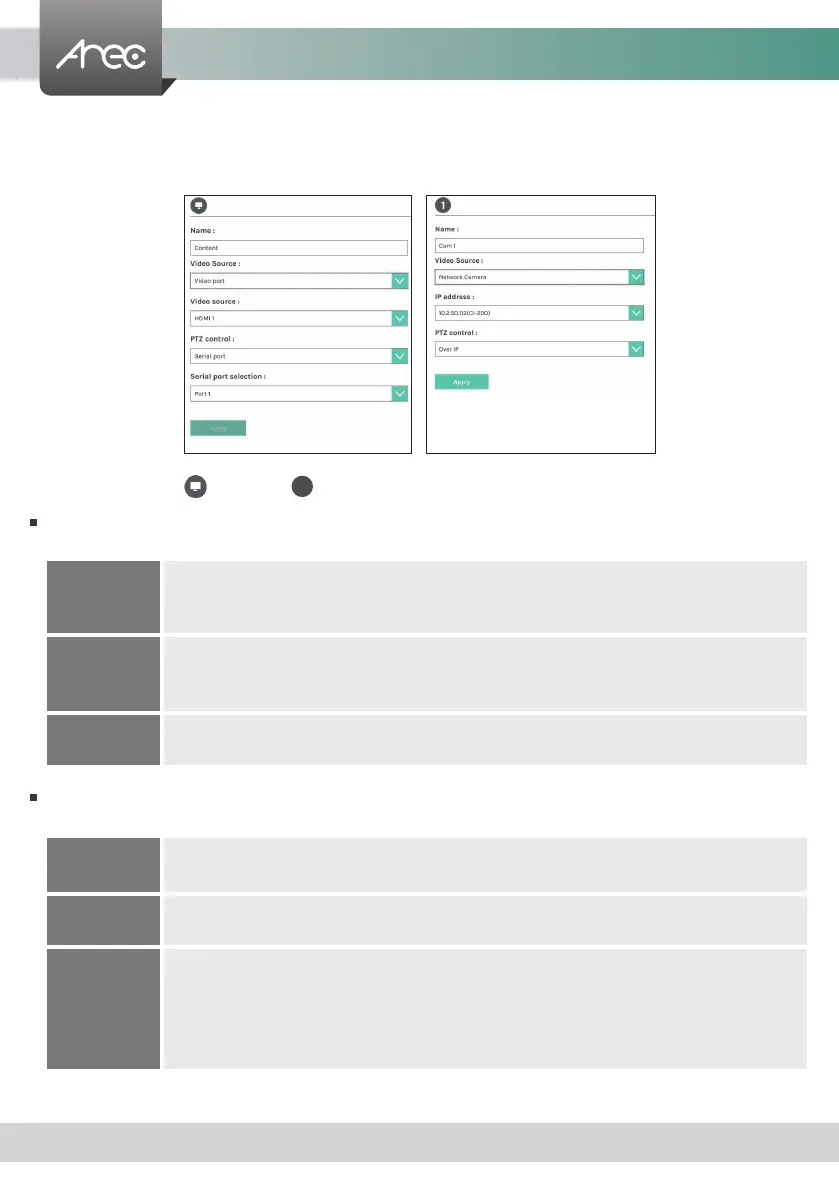
The LS-200 is capable of process up to two video inputs. The name of these inputs are user congurable; by default are
Content and Cam 1.
1.1.1.1 Content / Cam 1
Video Source can be choose from Network Camera, Encoder or Video port. The last option is available only for the rst
two video inputs.
PTZ control : The LS-200 is highly integrated with PTZ cameras and provides two control methods, Over IP or via Serial
port.
Video port
Select Video source: The LS-200 provides VGA and HDMI input options for video port. If only one of
those is connected, the system would detect and automatically switch to source of signal. If both
options are connected, select one in between.
Network Camera
Select IP address: Select from the camera ip address drop list of those available.
Note: A login authentication with the camera might be required. See Media I/O\ Camera manager for
more details.
Encoder
Select Protocol: The available options are RTP, RTSP, or RTMP. Enter the primary and secondary url/
port number.
Serial port
Select this option when the appointed camera uses RS-232 PTZ control protocol. Then complete the
Serial port selection from drop list Port 1~4. See Media I/O\ PTZ control port for more details.
Over IP
The option is available when the specied signal type is a network camera. Select this option if that
camera supports networking PTZ control.
Auto-Tracking
Mount
Select IP address: Select from the TP-100 ip address drop list of those available.
Select Tracking mode: off / Auto-Tracking / Auto-Tracking (pan only), the default is the Auto-
Tracking.
Note: A login authentication with the TP-100 might be required. See Media I/O\ Network device
manager for more details.
1



 To Next Page