LS-200 User Manual
38www.arec.com
2.2 Online Director
The LS-200 embedded Online Director web pages allow user to control recording and have a live stream view of the output
video. This director control panel makes it easy to apply layout, select background, and control the audio recorded during the
recording process.
Entering the Online Director webpage via [Administrator] by clicking the
button or login Online Director from the initial
login page with default username director and password director. Both ways lead to the Online Director control panel for
web-based users.
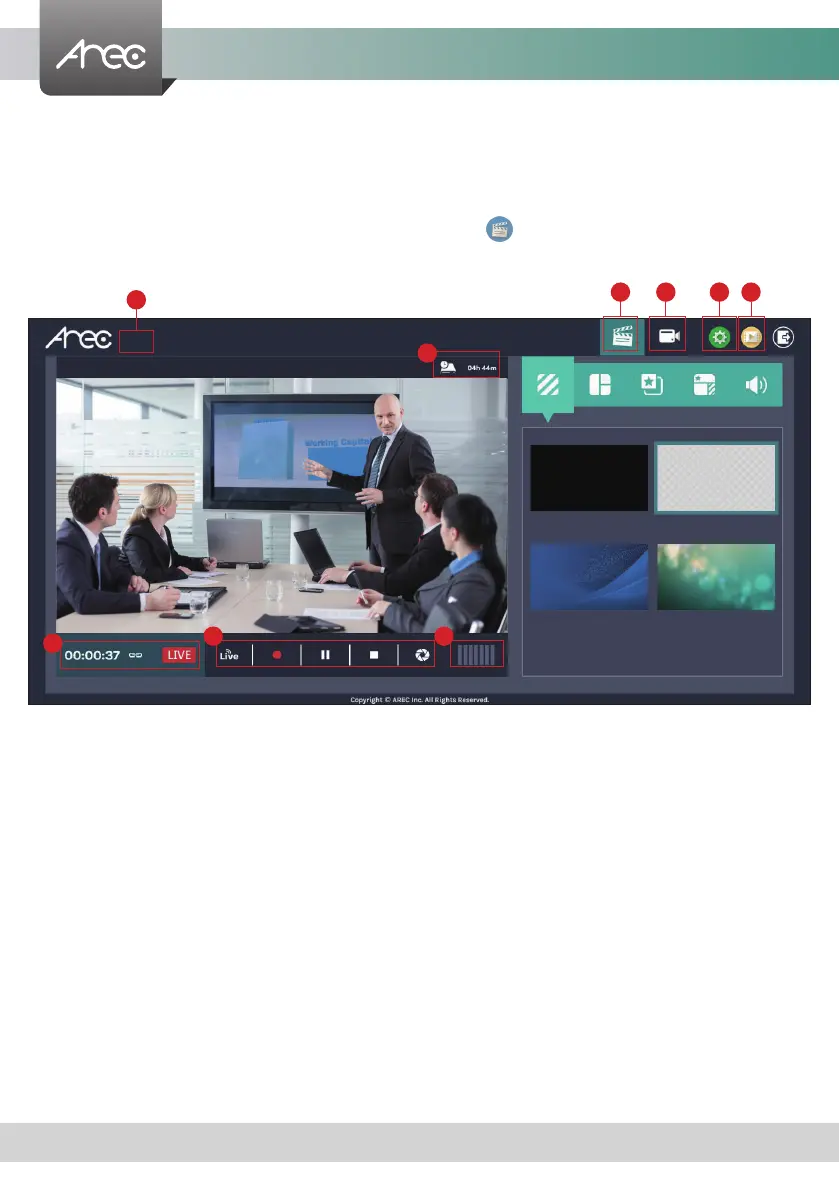
These Web pages provide the following features and information about:
1.
A live view window and a control panel of the LS-200 recording and streaming.
2.
A visual sources monitoring exclusive panel which allow user to control and monitor the cameras providing the video
source.
3.
A simplied setting page to congure the content that is going to be recorded and streamed.
4.
A Video Manager hyperlink to manage the content stored in the LS-200.
5.
Device description, which is congurable for system Administrator, indicates the device location…etc.
6.
Storage capacity which is converted into remaining time for recording.
7.
Recording/ Streaming status and timer.
8. Recording/ Streaming control and Snapshot buttons.
9.
Audio volume meter indicates the audio volume of the content being recorded and streamed.
5
6
98
7
1 2 3 4
LS-200



 To Next Page