LS-200 User Manual
46www.arec.com
3.1.5 Edit the recording information
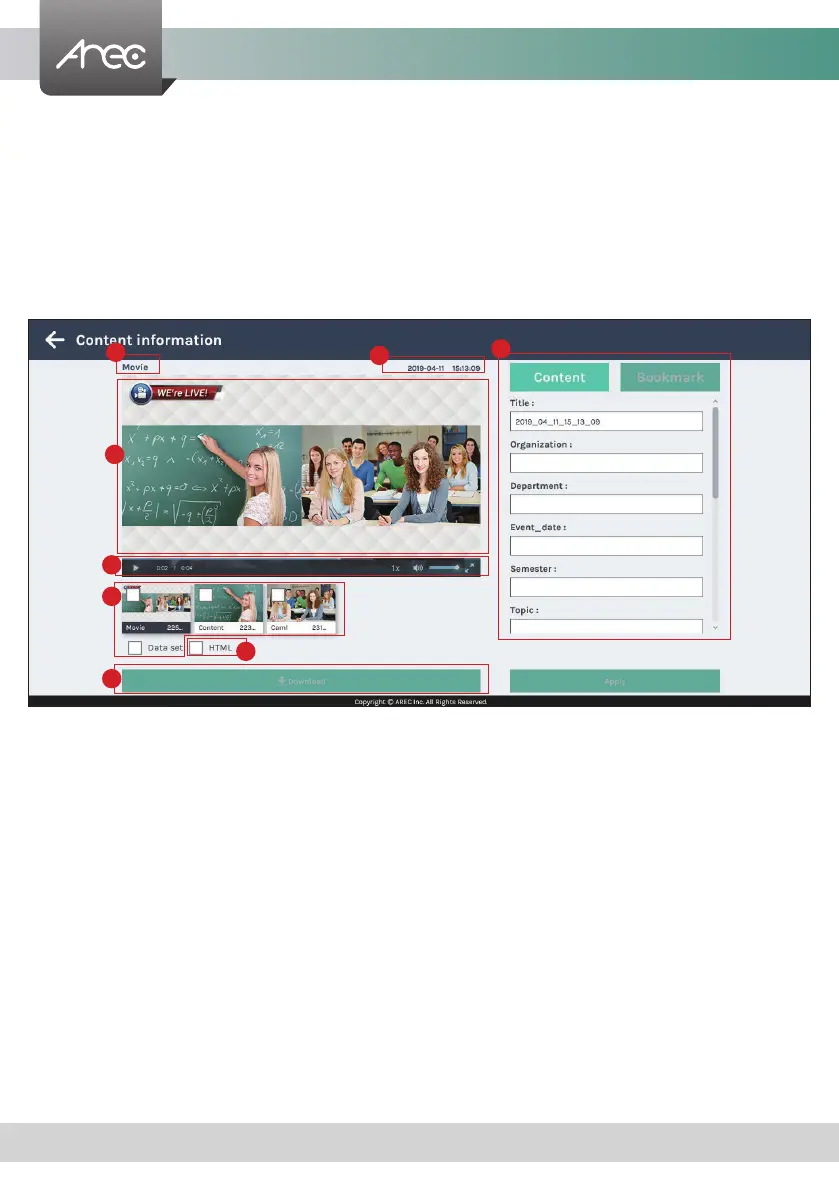
If you require to edit the information of a recording, click on the desired recording and you will be directed to the content
information page. Replace the existing text or enter new information in the content elds. Click APPLY to save the changes.
3.1.4 Playback the recording
Click on the desired recording and you will be directed to the content information page. Use the player controls at the bottom
of the window to watch the video.
There might be more than one les listed under the window if the content is recorded in MP4 Mixed video/ Original source
recording mode. Select the video for playback by clicking on the image of the desired one.
The le size being download is shown within the button.
The title used for Mixed video is “Movie”, and those for Original source(s) are the name of the corresponding video input(s);
by default are Content and Cam 1. To separately download MP4 Mixed video/ Original source les, select the desired le and
click Download.
1. Title of the video le being played
2. Recording date and time
3. Edit the content elds
4. Playback window
5. Playback controls
6. Video les and data set (les containing metadata, thumbnail images,
and bookmarks.)
7. HTML le and thumbnail images
8. Download button
1
6
4
5
8
7
2
3



 To Next Page