LS-200 User Manual
45www.arec.com
3.1.2 Download the recording
3.1.3 Delete the recording
Select the desired recording and click . Select Save if offered the choice to Open or to Save the package. The recording
packages are downloaded to your computer included mp4 file and dataset file. These are typically saved to the default
download location used by your browser.
The recording package may contain more than one .mp4 files if that is recorded in MP4 Mixed video/ Original source
recording mode.
To separately download the les in the recording packages, click on the recording thumbnail and access those in the Content
information page.
Recording packages can be deleted manually to make room for new recordings.
Select the recording and click . A confirmation dialog box opens asking you to confirm the deletion. Click Confirm
to permanently remove the recording packages. The list may not update immediately. Refresh the list by reloading this
webpage.
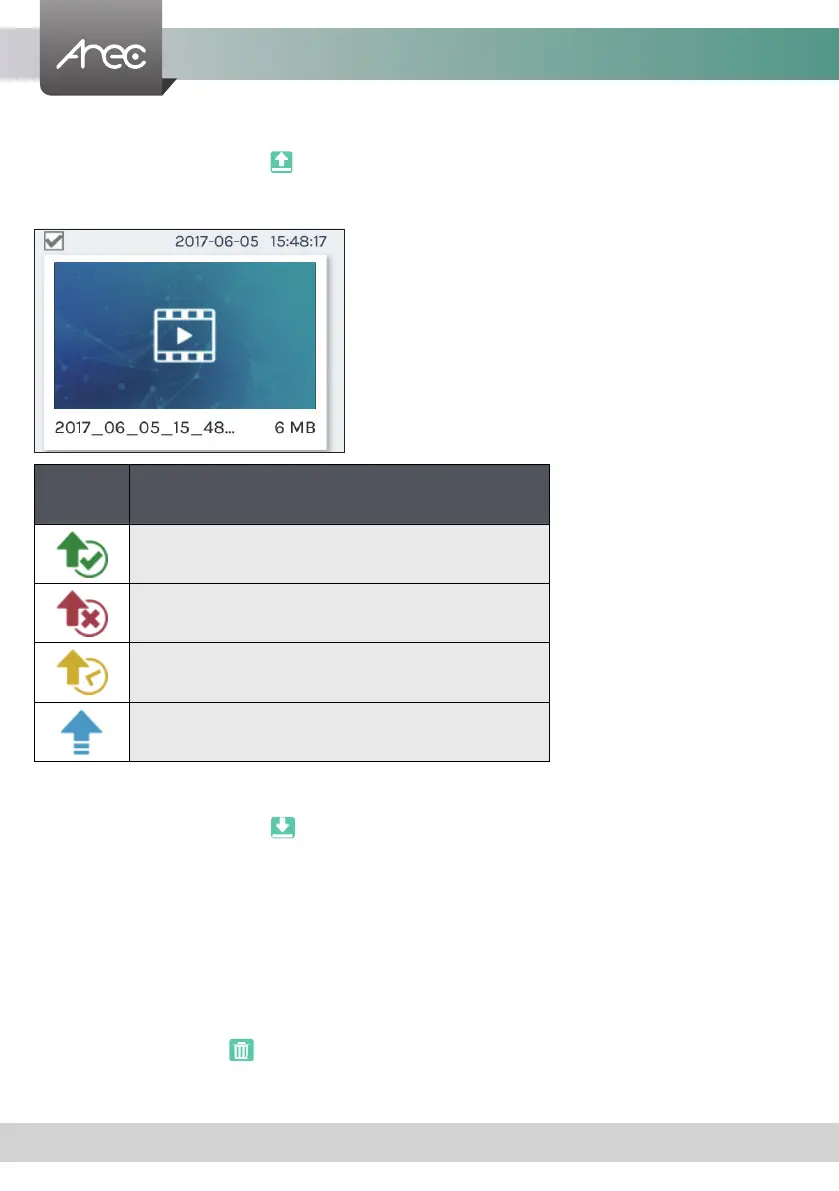
3.1.1 Upload the recording
Select the desired recording and click to add it in the upload queue. The upload destination is pre-congured by system
administrator. See Administrator\ Upload for more details. The LS-200 arranges the upload sequence automatically and
indicates the upload status/result on the corresponding recordings. The following indicators are used:
Icon Upload Status
The recording package are uploaded successfully.
The recording upload is failed.
The recording is in the upload queue.
The recording is uploading at this moment.



 To Next Page