LS-200 User Manual
5www.arec.com
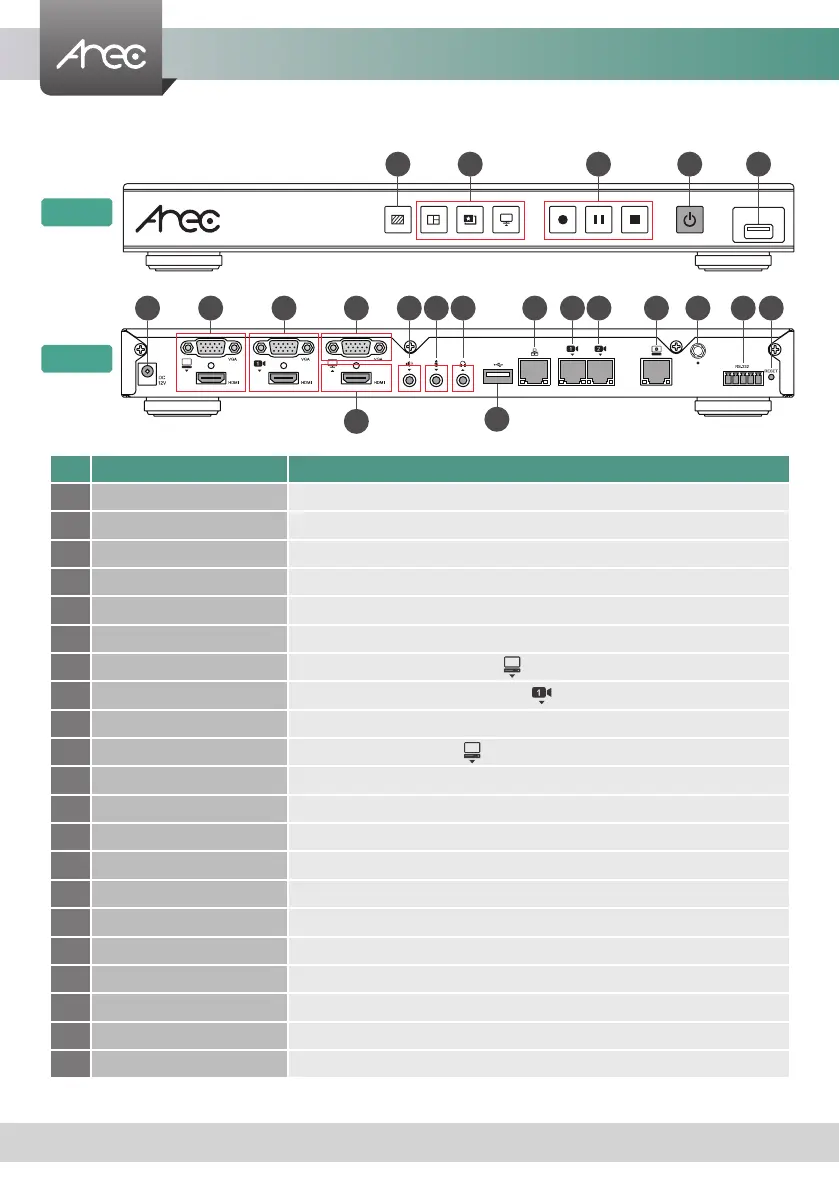
No. Name Brief introduction
1 Background function key Control the Background function
2 Layout function keys Control the Layout function
3 Record function keys Control the Record, Pause, Stop function
4 Power Power on/off the device
5 Front USB port For external USB storage device* Firmware update through USB disk
6 Power port 12V / 2A
7 Video input VGA / HDMI input source for PC [ ]
8 Video input VGA / HDMI input source for camera [ ]
9 Video output HDMI preview output
10 Video output VGA loop thru from input [ ]
11 Audio input Line audio input
12 Audio input Mic audio input
13 Audio output Line audio output
14 Back USB port USB interface for camera control over RS-232
15 Network port RJ-45 Ethernet connector for network connection
16 Network camera input 1 RJ-45 Ethernet connector for network camera input source
17 Network camera input 2 RJ-45 Ethernet connector for network camera input source
18 Setting port RJ-45 Ethernet connector for device conguration and control
19 Antenna port for Microphone Connected to antenna for wireless microphone
20 RS-232 Captive screw connector for control over RS-232
21 Reset button Restoring devices to its factory default state
Product Appearance
NOTE: The LS-200 can detect and record to USB storage devices using FAT32, NTFS le systems.
1
5
2 3
4
Front
Back
6 11 15 2012 13
14
7 10
9
8 1816 17 19 21



 To Next Page