LS-200 User Manual
15www.arec.com
1.2.1 Recording
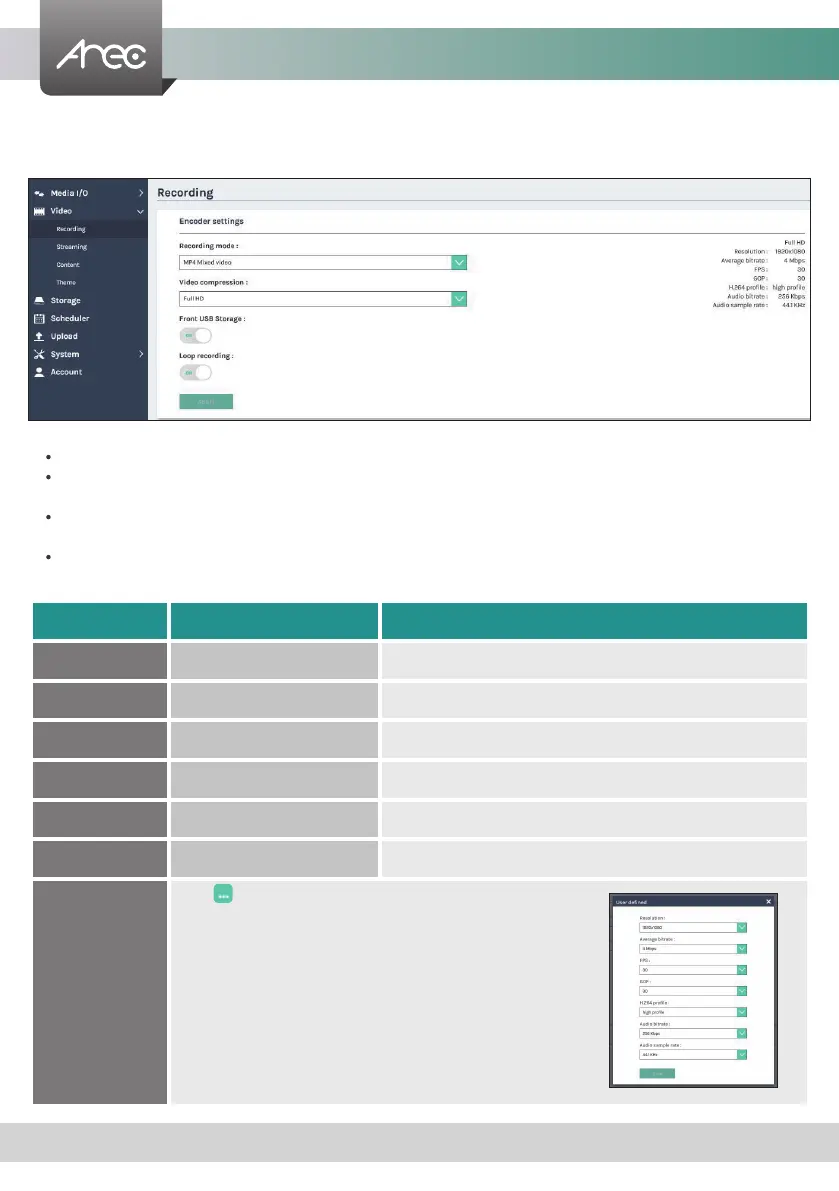
Set up the Encoder settings and Bookmark settings for recording.
Encoder settings
Recording mode: Available options are MP4 Mixed video and MP4 Mixed video/ Original source.
Video compression : There are 7 preset recording video compression proles for different resolution and bitrate. Select
one to see the option details on the right side. You may customize your own user dened option.
Front USB recording : Set ON/OFF to enable/disable LS-200 front USB recording function. Make sure the front USB drive
connected can be normally read and written and have enough space for the recorded les.
Loop recording : Set ON/OFF to enable/disable LS-200 local storage recording rule.
Click Apply button at the bottom corner when nished to apply the settings.
Profile name Video Resolution/ Bitrate Application description
Full HD 1080p/ 4Mbps Dynamic scene and large local hard disk recording.
Internet Full HD 1080p/ 3Mbps General scene and medium local hard disk recording.
HD 720p/ 2Mbps Static scene and small local hard disk recording.
Internet HD 720p/ 1.5Mbps Live broadcasting through the Internet.
SD 480p/ 800kbps Static scene for live broadcasting through the Internet.
Mobile SD 480p/ 500kbps Live broadcasting for portable mobile devices watching.
User dened
Click button to open customization window as
shown below, and click Save button to make the option
changed.



 To Next Page