LS-200 User Manual
25www.arec.com
1.5 Upload
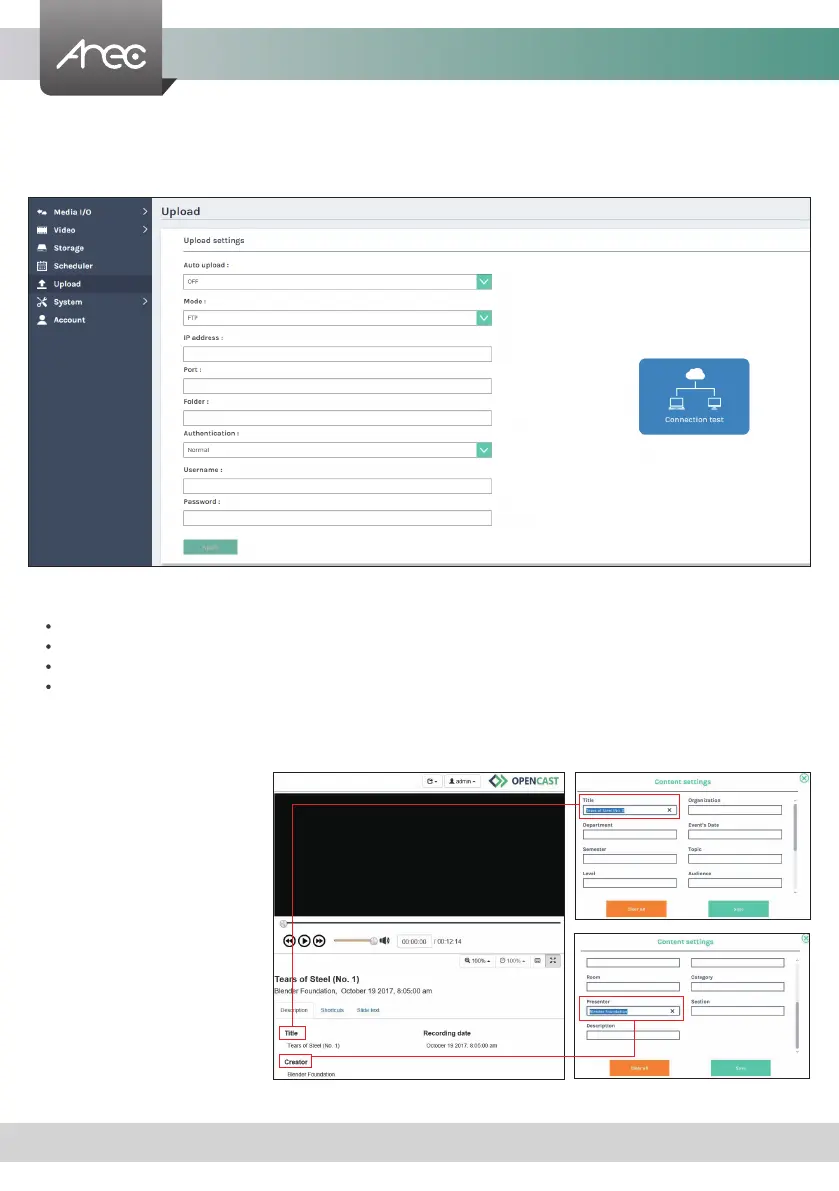
The LS-200 is able to automatically upload recordings from its internal drive to a network server. In this page, user can
congure the upload destination and tests the connection.
Auto upload- Select from the drop-down list. Start uploading "after recording is completed”, or turn “OFF” the function.
Followings to be congured according to the upload destination.
Mode: Select network server type (FTP, SFTP, Kaltura, Panopto, Opencast HTTP, Opencast HTTPS).
IP address, port, or User ID: Congure these elds according to the upload destination.
Folder: Enter the folder name of the
upload destination.
Authentication: Congure this section according to the upload destination authentication method.
Connection test- Click the Connection test button to validate upload settings.
Click Apply after setup is completed. New setting is effective from next recording being created.
The upload status/result of the corresponding recordings is denoted in the Video Manager web pages.
Note
: If the web server is Opencast, the
video title and the creator description
are automatically filled with the title and
presenter of the Director's content settings.



 To Next Page