LS-200 User Manual
13www.arec.com
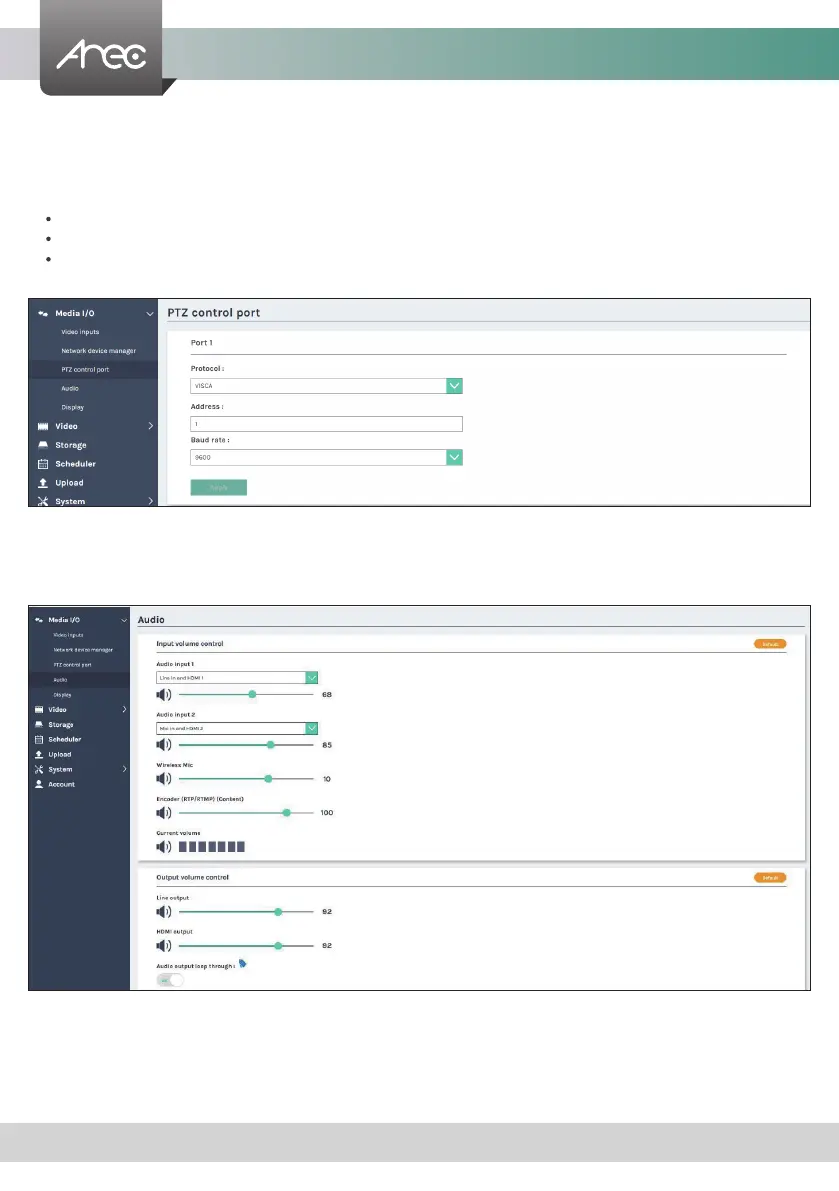
1.1.3 PTZ control port
1.1.4 Audio
The LS-200 facilitate the web-based users control PTZ cameras using RS-232 protocol. Connect an USB-to-RS-232 adapter
to the LS-200 back USB port in advance. Before making any changes to this page, please get to know about the RS-232
settings of the desired PTZ camera. The following congurations must be identical to the external device settings.
Protocol : Available options are VISCA, PELCO-D, and PELCO-P;
Address : Set according to the camera address for RS-232 communication. VISCA: 1-7, PELCO D/P: 1-255;
Baud rate : 2400, 4800, 9600, and 115200
Note: Support USB to RS-232 serial port adapter with chip PL2303 or FT4232H.
Input volume control - Users can select the sound source from the drop-down menu of Audio input 1 or Audio input 2. Tune
the recorded volume from each audio input. Congurable range of sound input is 0-125,of AREC
wireless microphone 0~15. The nearby volume meter indicates the encoded audio current volume.
Output volume control - Adjust the Line output or HDMI output volume.
Set Audio output loop through on/ off.
Adjust volume and select the audio input source.



 To Next Page