Subject to change · V 2.02.20 · EN
Page 13
www.argo-hytos.com
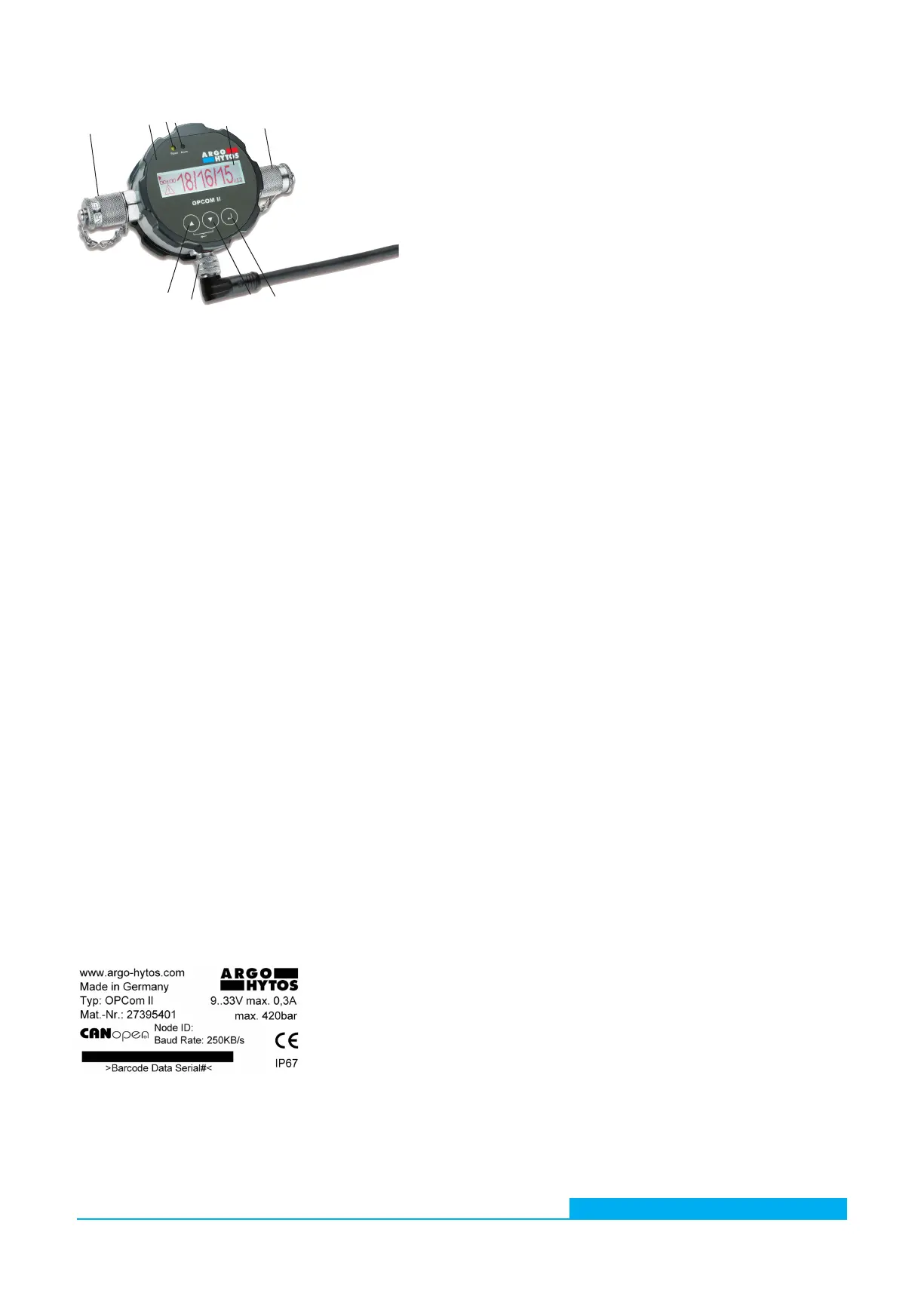
1 + 6 Hydraulic connection uid
The device is equipped with two Minimess©-Connectors M16x2. Usually two Minimess© hoses are added to connect the particle
monitor to the fluid system. The measurement is independent of the flow direction.
2 + 5 Front panel and display
The latest measured cleanliness classes and the time to the next measurement or the remaining measurement time is displayed.
3 Indicator light „Power“
If an operating voltage is applied, this indicator light glows green.
4 Indicator light „Alarm“
If there is an internal alarm, this indicator light glows red. Several alarms can be set in the device. Please read the manual for further
information.
7 Selection button [ ]
The selection button leads to the next menu level or to the next position if values are to be set.
8 Button DOWN []
10 Button UP []
These buttons navigate through the menu and browse through entries.
9 Connection M12x1 sensor cable
The device is equipped with an 8 pole M12x1 connector for connection of a sensor cable. The pin assignment of the sensor cable
and its connection are included in this manual.
Further functions of the buttons:
› Back:
Simultaneous pressing of the buttons UP [] and DOWN [].
› Changing of values:
With the button UP [] or the button DOWN [] the required parameter can be marked in the menu structure. To choose this
parameter press the selection button, then the value can be changed with the UP [] or DOWN [] button. Changes are confir-
med by pressing the selection button after the last position of input ability. In case of a jump to the higher level before pressing
the selection button, the changes will not be saved.
5.3 Identification of the product
Fig. 5: Nameplate
1
2
3
4
5
6
7
8
9
10
1 Hydraulic connection uid
2 Front panel and display
3 Indicator light „Power“
4 Indicator light „Alarm“
5 Display
6 Hydraulic connection uid
7 Selection button [ ]
8 Button DOWN []
9 Connection M12x1 sensor cable 1
10 Button UP []
Fig. 4: Component overview
5.2 Component overview


 To Next Page