Subject to change · V 2.02.20 · EN
Page 61
www.argo-hytos.com
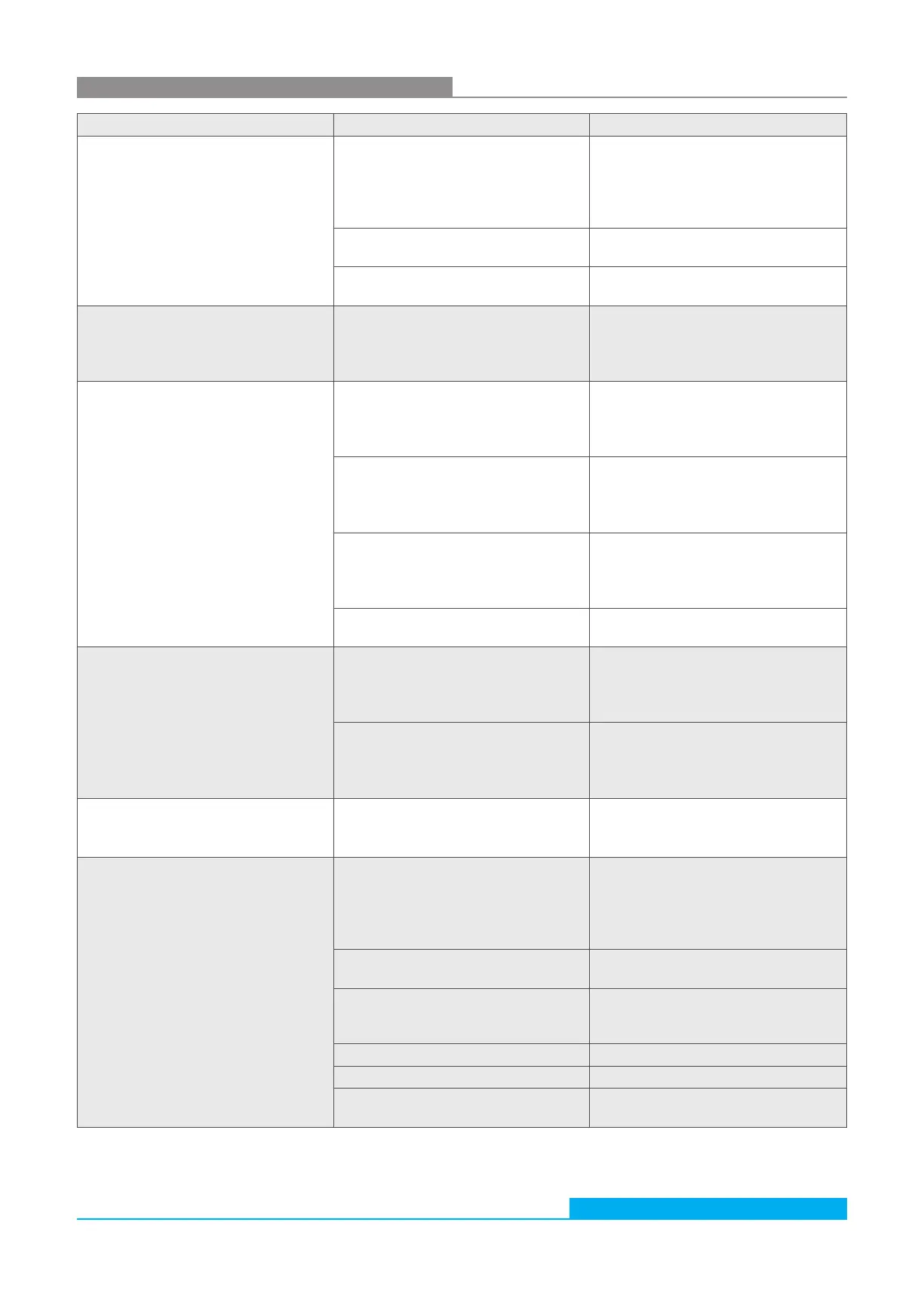
21. Troubleshooting
Error Possible cause Recommended measures
› No communication via RS232 or
CAN-bus possible.
› Current output < 4 mA
Cable not properly connected
First check the electrical
connection of the sensor, the data
cable and power cable.
Ensure that the connection is
configured as prescribed.
Operating voltage is outside of the
prescribed range
Always operate the sensor in the
range between 9 V and 33 VDC.
Wrong configured communication bus
Check configuration in the menu
“Communication"
› On all size channels, identical values
are displayed.
Air in the oil
Increase operating pressure within
the specified range.
Increase distance to the next pump /
gear / cylinder.
› All size channels show the value 0/0/0/0 No volume flow
Check inlet and outlet for correct
installation.
Increase operating pressure in the
specified range.
No valid measurement result available
Check configuration and measuring
mode
Make sure that a measurement starts
and is completed
Measuring cell contaminated
(symbol [] flashes in display)
Clean OPCom Particle Monitor using
clean oil or a solvent (e.g. isopropanol)
Rinse with clean oil in the opposite
direction.
Measuring cell defective
(symbol []flashes in display)
Please contact ARGO-HYTOS service.
› Laser current high
› Photo voltage low
Air in the oil
Increase operating pressure in the
specified range.
Increase distance to the next pump /
gear / cylinder.
Measuring cell contaminated
Clean OPCom Particle Monitor using
clean oil or a solvent (e.g. isopropanol)
Rinse with clean oil in the opposite
direction.
› The device permanently displays
"no valid application".
› The device repeatedly restarts.
The basic system has a disorder.
(All communication lines are automatically
deactivated)
Please contact ARGO-HYTOS service.
› No serial communication Interface configuration is incorrect
Check and correct settings of the
interface parameter if needed (9600,
8,1, N, N).
Test communication using a terminal
program.
Wrong communication port selected
Check and correct the selection of
the communication port (e.g. COM1)
Incorrect spelling of sensor commands
Check the spelling of the sensor
commands. Pay particular attention
to upper case and lower case.
NumLock key is disabled
Activate the NumLock key
Caps lock key is activated (upper case)
Deactivate the Caps Lock
Incorrect connection of cable or cable is
defective
If possible, use the ARGO-HYTOS
data cable
Table 42: Troubleshooting


 To Next Page