Subject to change · V 2.02.20 · EN
Page 30
www.argo-hytos.com
11.10.3 Operating hours
› Sensor:
Counter of operating hours of the device. The counter is active as soon as the device is powered.
› Laser:
Counter of operating hours of the laser. This counter is only active during a measurement.
› Hour scale:
Display of the remaining hours until the next calibration of the device. At a value of 0 (ZERO), the time has expired or the function
is not activated. When the time has elapsed, this is indicated by a message on the start screen.
11.10.4 Error info
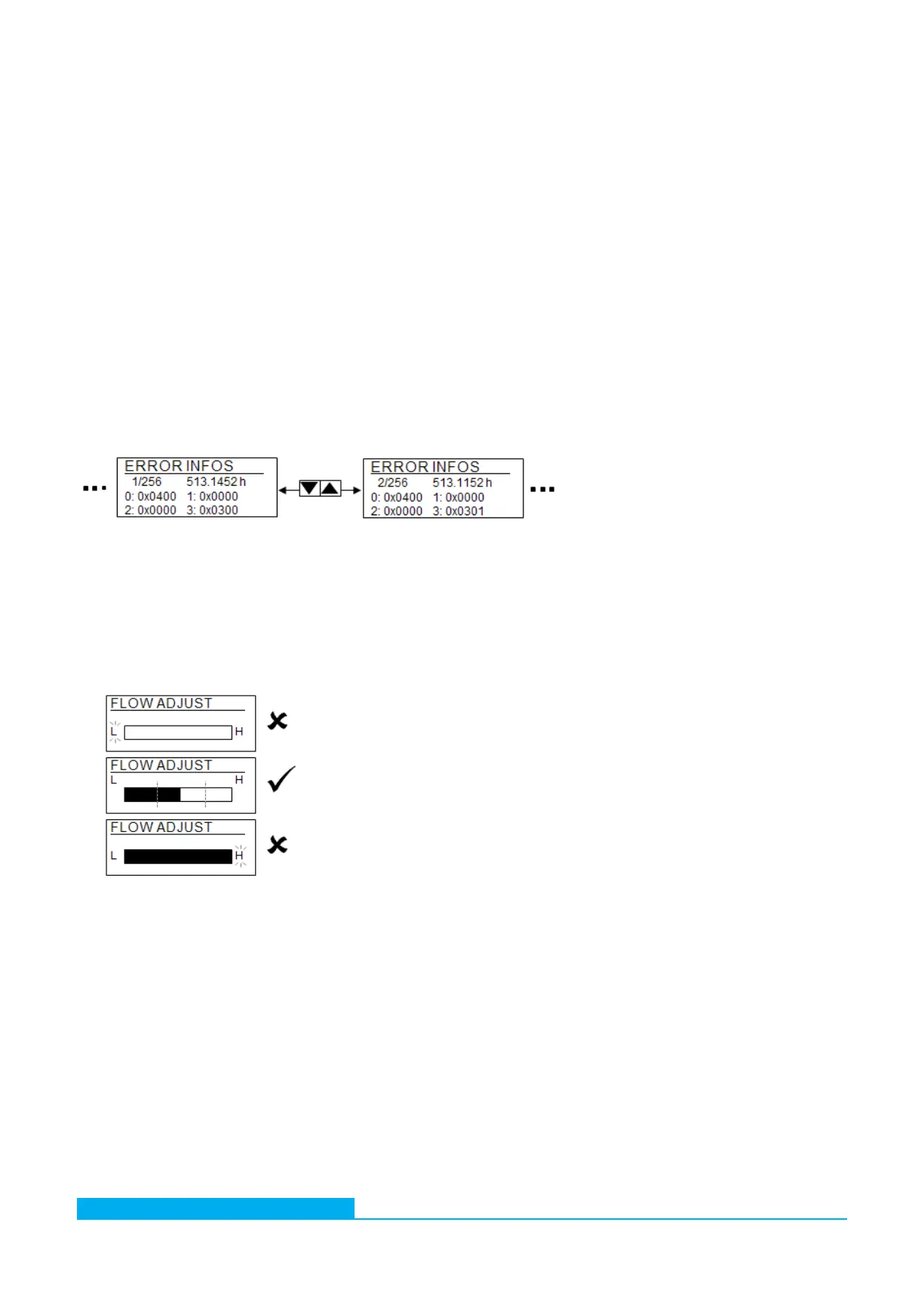
The OPCom Particle Monitor collects various errors, information and operating status and summarizes them into four 16 bit values,
the ERC (Error Code). These are always shown in hexadecimal notation. For further information on the decoding see Chapter 25.2
"Coding of error bits".
The ERCs are created and stored after each measurement. In the display the last 256 ERCs are shown. To go through them use the
UP [] and DOWN [] buttons.
To match the ERCs with the specific measurement, the referring operating hour is displayed it the upper right corner.
› 1/256 = ERC of the latest valid measurement
› 256/256 = ERC of the oldest valid measurement
Fig. 17: Bar display of flow
11.10.5 Flow settings
If the flow is automatically determined, this is shown via a bar graph. The bar is scaled from 50 to 400 ml/min. The representation is
used for checking the correct flow during commissioning. The display is updated every 10 seconds.
The flashing letters L (Low) or H (High) signalize a fall below or a rise above the threshold and must be avoided.
If the flow is fixed to a static value, this is also displayed. Then the bar does not change.
Fig. 16: Display of error codes (ERC)
11.11 Language
The menu can be displayed in different languages. The following languages are available:
› English › Czech › Polish
› German › Spanish › Turkish
› French › Italian
› Dutch › Portuguese


 To Next Page