Subject to change · V 2.02.20 · EN
Page 43
www.argo-hytos.com
16.1.1 „CANopen Object Dictionary“ in general
The CANopen Object Dictionary (OD) is an object directory in which each object can be addressed with a 16 bit index. Each object
can consist of several data elements that can be addressed by means of an 8-bit sub index.
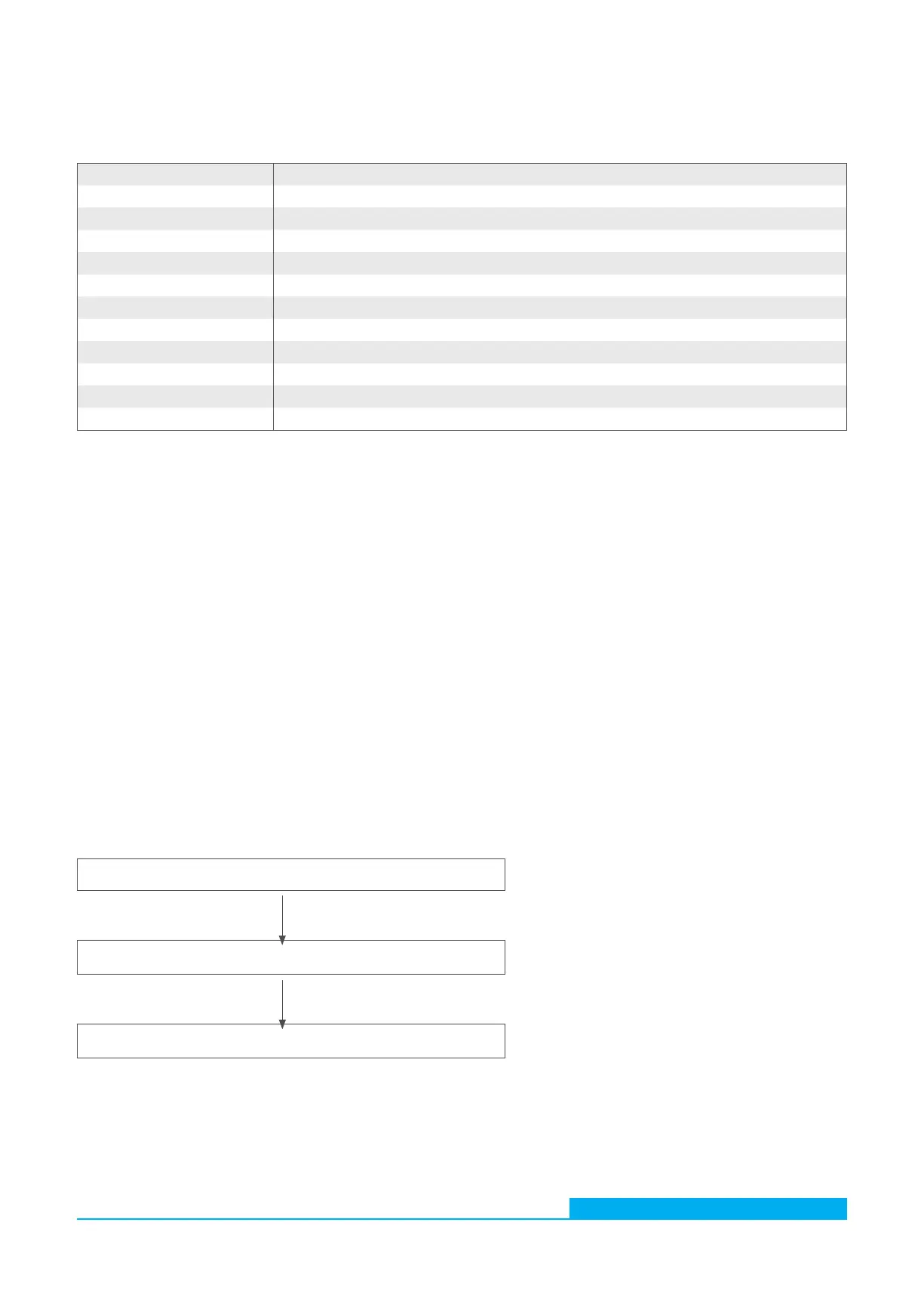
The basic layout of a CANopen object dictionary is shown in the following table.
Index (hex) Object
0000 -
0001 - 001F Static data types (Boolean, integer)
0020 - 003F Complex data types (consisting of standard data types)
0040 - 005F Complex data types, manufacturer-specific
0060 - 007F Static data types (device profile-specific)
0080 - 009F Complex data types (device profile-specific)
00A0 - 0FFF Reserved
1000 - 1FFF Communication Profile Area (e.g. device type, error register, supported PDOs etc.)
2000 - 5FFF Communication Profile Area (manufacturer-specific)
6000 - 9FFF Device profile-specific Device Profile Area (e.g. “DSP-401 Device Profile for I/O Modules”)
A000 - FFFF Reserved
16.1.2 CANopen Communication Objects
Communication objects transferred with CANopen are described by services and protocols and are classified as follows:
› Network Management (NMT) provides services and is used for bus initialization, error handling and node control
› Process Data Objects (PDOs) are used to transfer process data in real-time
› Service Data Objects (SDOs) enable read and write access to the object dictionary of a node
› Special Function Object protocol allows application-specific network synchronization, timestamp transfer and emergency
messages
An example of network initialization using a CANopen Master and a sensor is described below.
(A) After connection to the current supply, the sensor sends a Boot Up message within approx. five seconds once the pre-
operational status has been reached. In this state, the sensor only sends heartbeat messages if configured accordingly (see point
A Fig. 26).
(B) Then the sensor can be configured via SDOs; in most cases this is not necessary, since the once set communication parameters
are automatically saved by the sensor (see point B Fig. 26).
(C) In order to set the sensor into the operational state, you can either send an appropriate message to all CANopen participants or
specifically to the sensor. In operational state, the sensor sends the supported PDOs according to its configuration either at
periodic intervals or as triggered synch messages (see Paragraph C in Fig. 26).
Wait for boot-up or heartbeat from the sensor
Configuration of sensors and communication parameters via SDO
NMT to all nodes / to sensor in order to enter operational mode
Table 26: General CANopen Object Dictionary structure
Fig. 26: CANopen Bus initialization process
(A)
(B)
(C)


 To Next Page