Citadel Bed Frame System
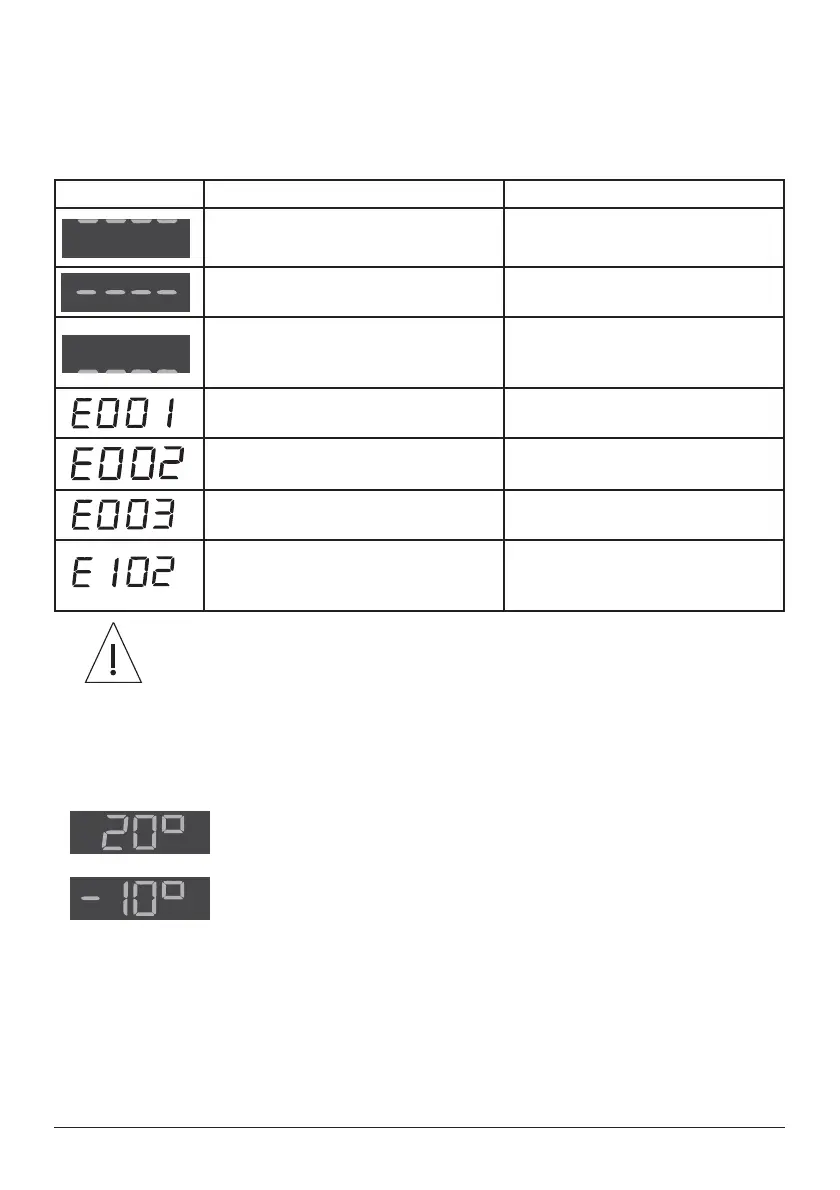
Weighing System Error Codes
Error codes are shown on the display. They are used to indicate a problem with the
weighing system; this may be due to an operator error or a possible fault condition.
The table below shows common error code displays with their causes and solutions.
Display Cause Solution
More than safe working load applied to
frame
Remove excess weight from frame
More than 50 kg (110 lb) applied during
scale zeroing.
Remove excess weight prior to re-
initalizing scale zeroing
Components i.e. footboard and / or
deck sections removed from the frame
prior to zeroing.
Install missing components and re-
initialize the weighing system
Zero on battery power Connect bed to mains supply and
re-initialize the weighing system
Auto Compensation weight decrease
more than 100 kg (220 lb)
Replace weight removed from bed
Auto Compensation weight increase
more than 100 kg (220 lb)
Remove added weight from bed
A stable weight reading was not
obtained within 10 seconds
Refer to the points listed in the
section Weighing Accuracy on page
39
If the display shows an error code other than those given above, refer
to the product service manual or contact an approved Arjo service
DJHQW
Angle Indication
When operating the controls for backrest or tilt, the weighing system display shows the
approximate angle in degrees of the selected function.
$QJOHVDUHVKRZQUHODWLYHWRWKHÀRRUVRWKHGLVSOD\HGYDOXHVRI
backrest angle and thigh angle change when the deck is tilted.
The tilt angle is shown as a positive value for head down tilt and a
negative value for foot down tilt.



 To Next Page