44
Citadel Bed Frame System
VariZone Operation
Before activating patient movement detection, make sure that:
• The patient’s weight has been measured and recorded.
• All additional items (example: accessories) have been accounted for using the
Auto Compensation function.
• The weighing system display is blank.
Before using patient movement detection, verify that the alarm can be
HDVLO\KHDUGE\FDUHJLYHUV([DPSOHDWWKHQXUVH¶VVWDWLRQ
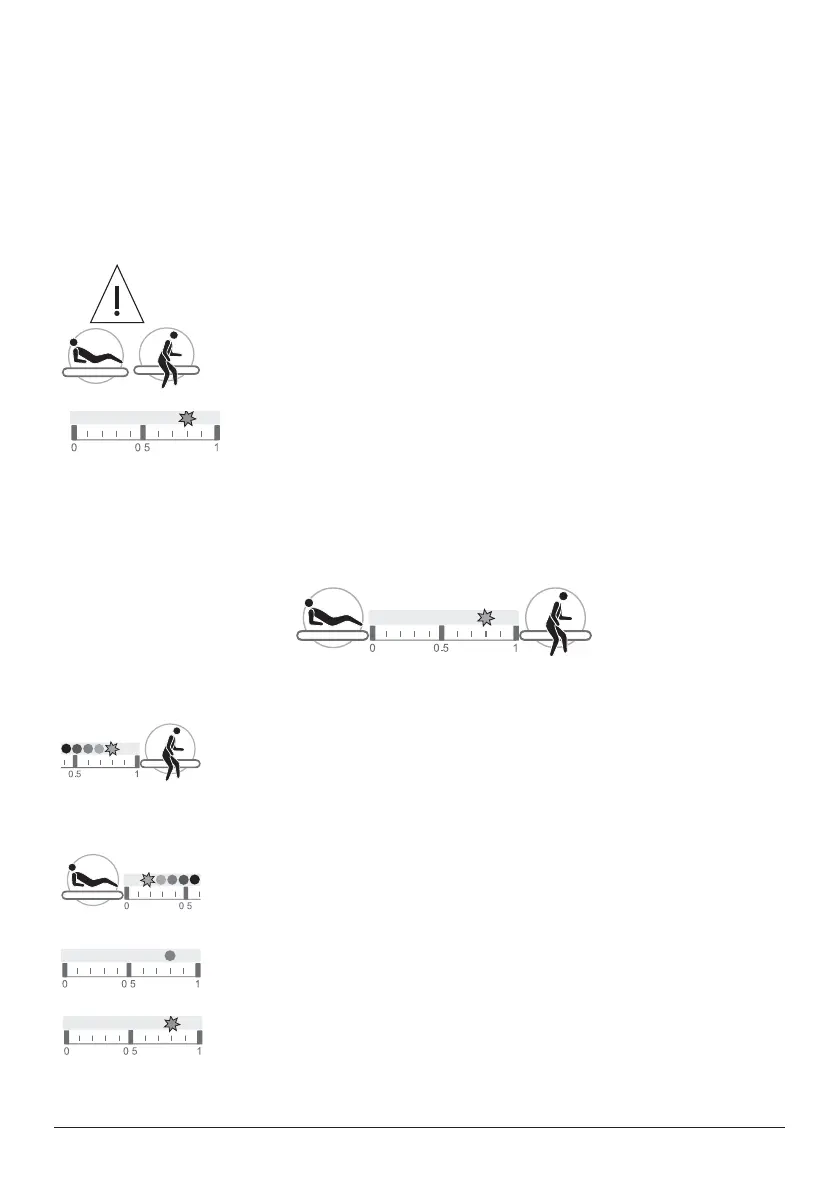
To activate patient movement detection, press and hold either the
In Bed button or Egress button for two seconds.
7KHWKUHVKROGGLVSOD\LQGLFDWRU/('ZLOOÀDVKWRVKRZWKHDODUP
threshold level.
7KHIXUWKHUWRWKHOHIWWKHÀDVKLQJLQGLFDWRU/('LVWKHORZHUWKH
alarm threshold, and small movements of the patient in bed will
be detected.
7KHIXUWKHUWRWKHULJKWWKHÀDVKLQJLQGLFDWRU/('LVWKHKLJKHU
the alarm threshold, and only large movements, such as the
patient exiting the bed, will be detected.
To increase the patient movement detection threshold:
3UHVVDQGKROGWKH(JUHVVEXWWRQWKHÀDVKLQJLQGLFDWRU/('ZLOO
move towards the right. When the required threshold is reached,
release the button.
To reduce the patient movement detection threshold:
3UHVVDQGKROGWKH,Q%HGEXWWRQWKHÀDVKLQJLQGLFDWRU/('ZLOO
move towards the left. When the required threshold is reached,
release the button.
$IWHUDIHZVHFRQGVWKHLQGLFDWRU/('ZLOOVWRSÀDVKLQJDQGUHPDLQ
illuminated to show that patient movement detection is active.
If movement of the patient above the set threshold is detected, an
DXGLEOHWRQHZLOOVRXQGDQGWKHWKUHVKROGLQGLFDWRU/('ZLOOÀDVK
.
.
.
.
.
.



 To Next Page