C H A P T E R 4
INSTALLING NC4000 NODES
This chapter describes how to install preconfigured NC4000 nodes in the network, including
physical mounting (pedestal or strand mounting) and cable connections. Forward and return path
segmentation is described, and functional tests (forward and return path RF level
measurements) are included. Nodes should be preconfigured (or the configuration verified) per
Chapter 3, Configuring NC4000 Nodes before installing them in the network.
Preconfiguration includes installation of power supplies and all applicable plug -ins.
4.1
Mounting
DANGER
Laser Radiation
– Use of controls or adjustments, or performance of procedures
other than those specified herein may result in hazardous radiation exposure.
While the NC4000 nodes are ruggedized units designed to operate outdoors in cable
networks, they are not indestructible. Do not drop nodes
―
keep nodes in their
shipping boxes until you are ready to install them. Nodes should remain boxed while
being trucked to the installation site. Only qualified technicians should install and
activate nodes. After any installation checks or adjustments, close the node, being
careful not to pinch the cables connecting the lid and base housings (see 4.9 Closing
the NC4000 Housing on page 4-22).
The NC4000 can be suspended from a horizontal cable (strand mount) or mounted in an
enclosure or equipment room (pedestal or surface mount).
4.1.1
Strand Mounting
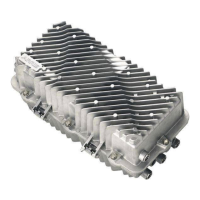
Two strand clamps are attached to the top of the base housing. You can use these clamps to mount
the NC4000 horizontally below the suspension strand (Figure 4.1).
To mount the NC4000 from a suspension strand:
1.
Use a ½-inch wrench to loosen the bolts holding the two clamps to the housing. Loosen the
bolts enough to allow the clamps to fit over the suspension strand.
2.
Hang the NC4000 from the strand by the clamps and tighten the two bolts enough to
hold the housing securely to the strand. Don’t tighten the bolts all the way yet, as you may
need to move the NC4000 on the strand to accommodate fiber and RF cables.
3.
After all fiber and RF cables are connected to the NC4000, torque the clamp bolts to 10
foot-pounds (13.5 newton-meters) to hold the unit the final mounting position.
4.
Ground the housing, using a split-bolt grounding stud, as described in
4.1.4 Grounding
on
page 4-4 and shown in Figure 4.4 on page 4-5.


 To Next Page