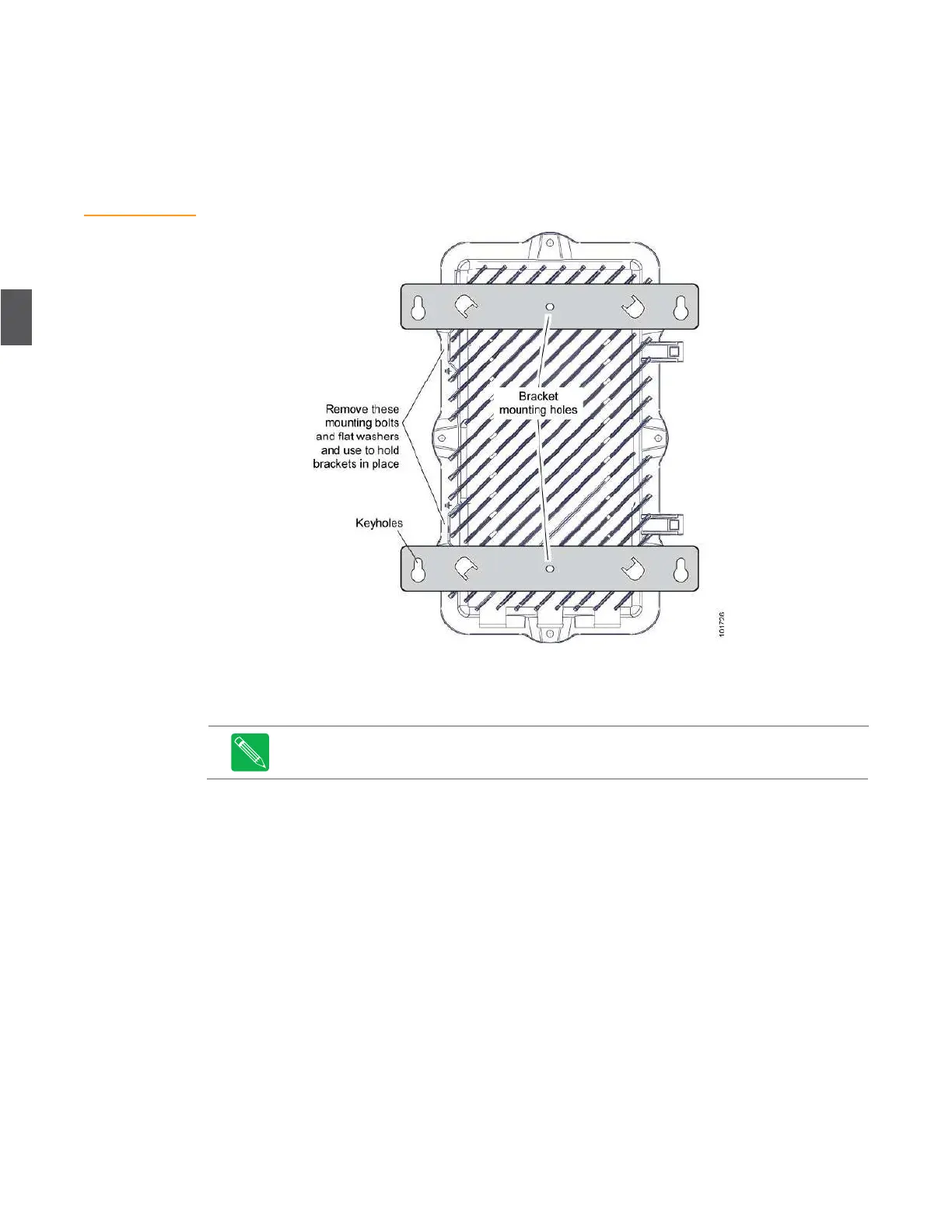
Figure 4.3
Wall Mounting
6.
Align both brackets so they are horizontal with respect to the node base. Torque the two
mounting bracket bolts to 10 foot-pounds (13.5 newton-meters).
7.
Mount the NC4000 (with mounting brackets installed) on the wall or pedestal.
8.
Ground the housing, using a split-bolt grounding stud, as described in
4.1.4 Grounding
and
shown in Figure 4.4 on page 4-5.
4.1.4
Grounding
Use a split-bolt grounding stud to ground the NC4000 housing to earth grou nd.
The grounding stud is not provided—use ARRIS model number GL4000 (part
number 79-10133).
1.
Using a 1/2-inch wrench, install the split-bolt grounding stud on the housing base
(Figure 4.4 on page 4-5).
–
For a strand-mounted NC4000, install the grounding stud in one of the two
threaded holes on the rear face if the base.
–
For a pedestal or surface mounted NC4000, remove one of the two strand mount
brackets, and install the grounding stud in the threaded hole.
2.
Using an 11/16-inch wrench, loosen the top nut and insert the grounding cable. (You may
need to remove the nut to insert the cable.)
3.
With the grounding cable installed, tighten the top nut to secure the cable.
4.
Using a multimeter, measure the resistance from the NC4000 base to earth ground.
Resistance (through the grounding cable) must be less than one ohm.


 To Next Page