4.12.3. Editing the Arpeggiator
Please read the previous chapters about the two distinct Arpeggiator states – Arpeggiator
Play and Arpeggiator Edit first. Once you've learned that part, we can start editing the way
the Arpeggiator plays patterns.
So, long-press the Arpeggiator button to get into the Arpeggiator Edit page. Then, hit the
Arpeggiator button to activate the Arpeggiator.
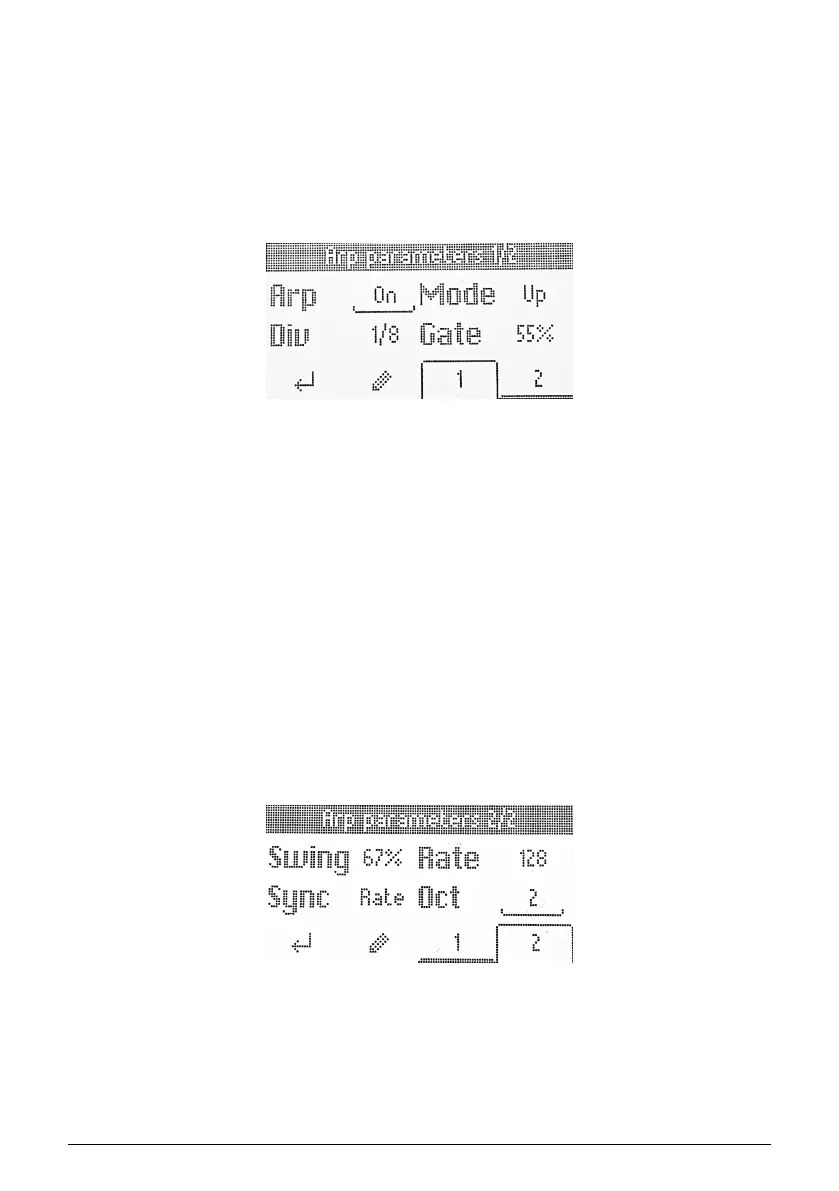
The display will now look like this:
The Arpeggio Edit functions occupy two pages. You can change pages by hitting the 1 or 2
buttons below the screen. An alternative method is to simply turn the Encoder knob.
The Arpeggiator parameters are:
• On/Off: Engages or disengages the Arpeggiator.
• Mode: Chooses the order in which the Arpeggiator plays notes.
• Division: Adjusts the rhythmic subdivision relative to master tempo.
• Gate: Adjusts the gate time of notes, i.e. the length of each arpeggiated note.
• Swing: Adds a swing factor for a “behind the beat” feel.
• Rate: Sets the Arpeggiator rate in beats per minute when Sync is set to Internal.
• Sync: Selects KeyLab Essential’s internal clock (Rate) or an external source such
as connected software or hardware (Ext) as the source of master tempo.
• Octaves: Chooses the octave range of played notes, from zero to three octaves.
To select a parameter for editing, click the Encoder. Then turn the Encoder to edit. When
done, click the Encoder again.
When browsing the parameters, the values are underscored.
When a parameter is ready for editing, its value is surrounded by a square.
26 Arturia - User Manual KeyLab Essential mk3 - KeyLab Essential operations



 To Next Page