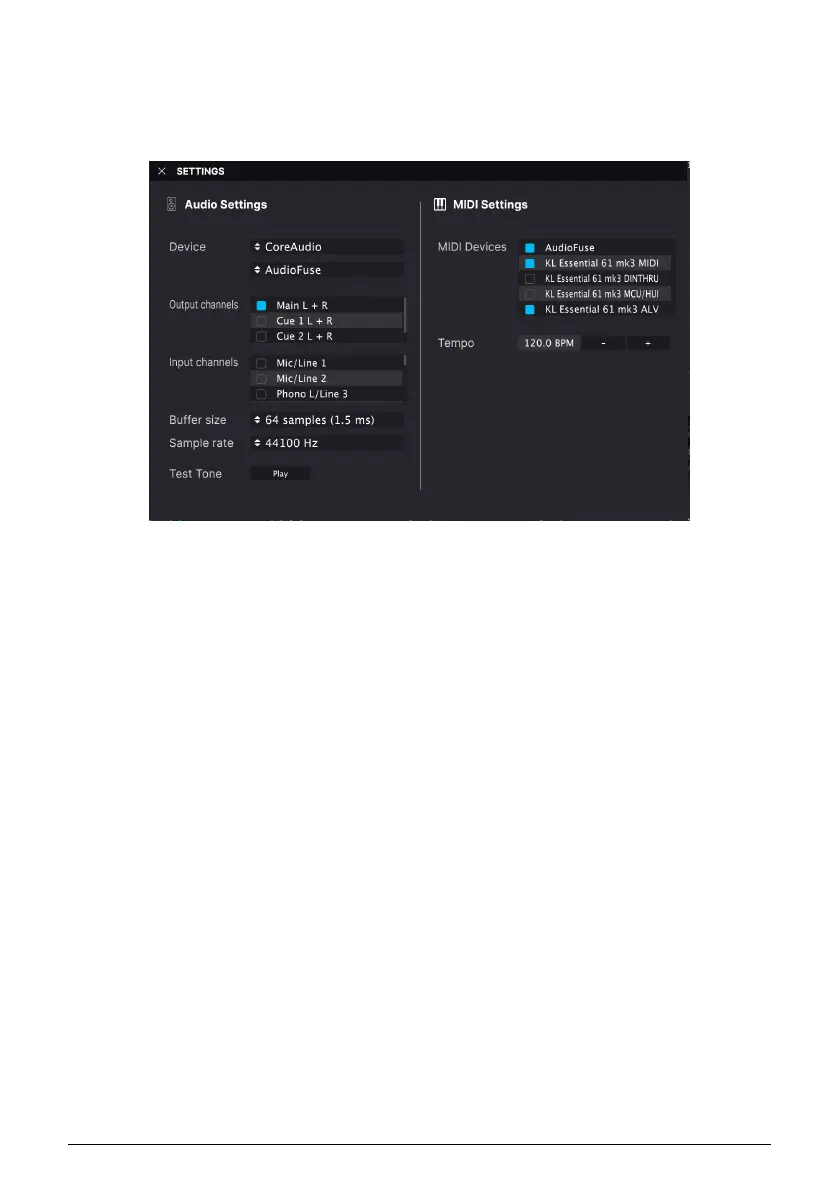
5.2. Audio and MIDI Setup
The first thing to do after launching Analog Lab V
in stand-alone mode
, is to make sure
the software is set to output audio correctly and that it will receive MIDI from the KeyLab
Essential keyboard.
If running Analog Lab V in stand-alone mode, open its Audio MIDI Settings from the main
menu (the 3 horizontal lines in the upper left corner). If using Analog Lab V as a plug-in
inside your DAW, open the MIDI preferences in your DAW and select KeyLab Essential (49/
61) mk3 MIDI in the input list, then create an Analog Lab V track and arm it: You will now be
able to play and control Analog Lab V inside your favorite DAW.
The above screen shows the settings in Analog Lab V stand-alone. Configure your audio
device as desired. The important thing here are the three MIDI ports/devices that KeyLab
Essential shows to Analog Lab V or any DAW:
• KL Essential (49/61) mk3 MIDI: Enables MIDI communication via the USB-C port
on KeyLab Essential.
• KL Essential (49/61) mk3 DINTHRU: Passes outgoing MIDI information from the
host software through KeyLab Essential’s 5-pin MIDI out connector. This can be
useful when you want to sequence and control hardware synths with your DAW
using KeyLab Essential as a MIDI interface.
• KL Essential (49/61) mk3 MCU/HUI: Enables KeyLab Essential as a Mackie
Control Universal surface via a dedicated port, to not interfere with other MIDI
messages as notes or control changes.
• KL Essential (49/61) mk3 ALV Transmits screen messages from Analog Lab V to
KeyLab Essential.
You will almost always want KL Essential (49/61) mk3 MIDI turned on. If using KeyLab
Essential to control any of the custom supported DAWs [p.43] described in the next chapter,
ensure KL Essential (49/61) mk3 MCU/HUI is
not
activated.
5.2.1. Analog Lab V MIDI Settings
Click the gear icon at the upper right corner of Analog Lab V to open the Settings section.
Click on the MIDI tab and select
KL Essential
from the MIDI Controller drop-down menu, if
it has not already beed automatically detected.
Arturia - User Manual KeyLab Essential mk3 - KeyLab Essential and Analog Lab V 35



 To Next Page