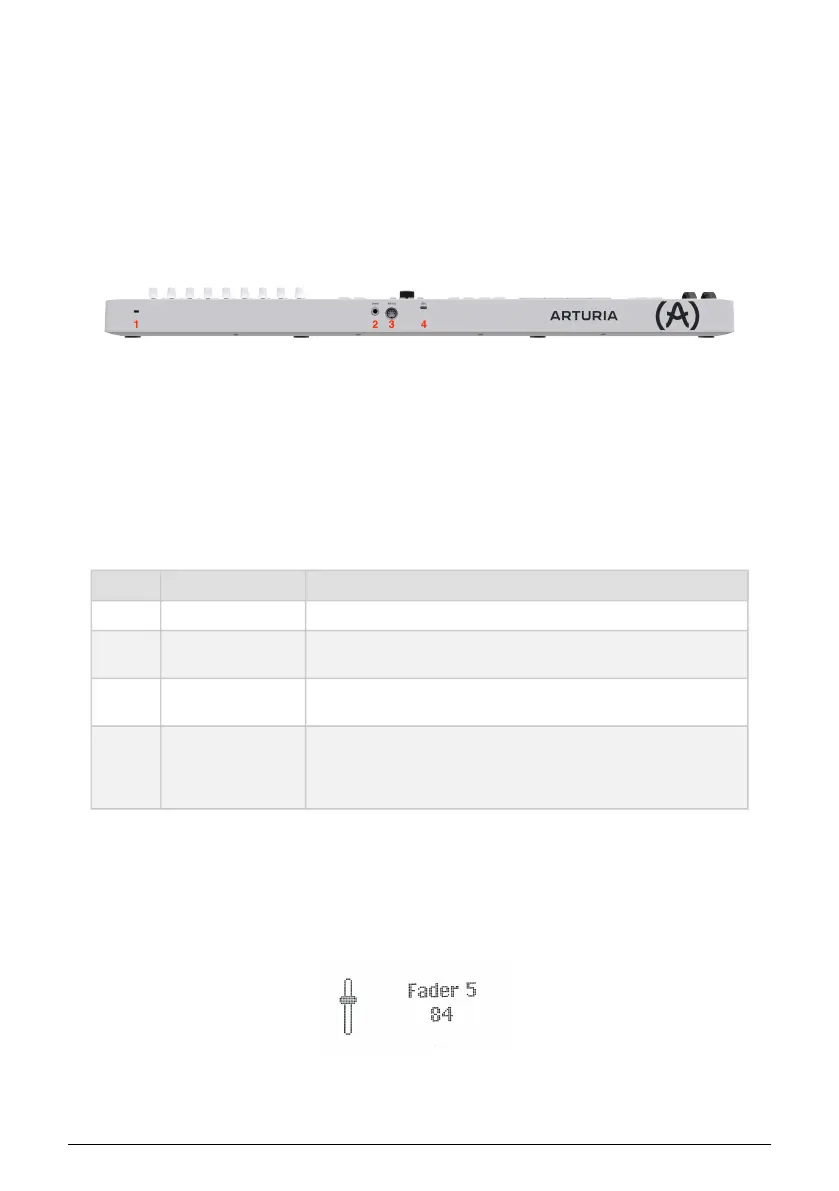
3.3. Rear Panel
Number Name Description
1. Kensington Lock Port This socket accepts a standard Kensington laptop lock for anti-theft.
2. Control Pedal Input
1/4" TRS; accepts sustain pedal, footswitch, or a continuous controller
(expression pedal).
3. MIDI Out
5-pin DIN MIDI output for controlling hardware synth modules. Can also
be used as MIDI Thru.
4. USB-C port
Use this socket to connect KeyLab Essential to your device. This USB-
C port provides both power, MIDI data, and control information.
Alternatively, a Power Supply Unit can connect to this port to power
KeyLab Essential, when the MIDI connector is used.
3.4. Display
By default, the main Display momentarily shows a graphic of whatever control you touch,
along with the value sent by that control as you move it. For example, this is what is
displayed when you move a knob:
When you strike a pad, the display first shows your initial velocity. If you then apply after-
pressure, it will display that value.
8 Arturia - User Manual KeyLab Essential mk3 - Hardware Overview



 To Next Page