5 Operation
MM/DDIYY
Operator Login
HH:MM'SS
Legend
MM:
month
Operator:
I I
DO:
day
YV:
year
Pa$$word: I
I
HH:
hour
MM:
minute
55:
second
$ A &
4 5 6 7 8
a
w E R T Y
U
I
0
P
BACKSP
:
I : I
~
I
~
I% I I I .
~
I
~
I : I : I
-
A S 0 F G
H
J K
L
:
< >
CAP
LOCK
z
X
C
V B N M
ENTER
..
{
} ?
I
BACKSP
ALT
ALT
(
1
\ I
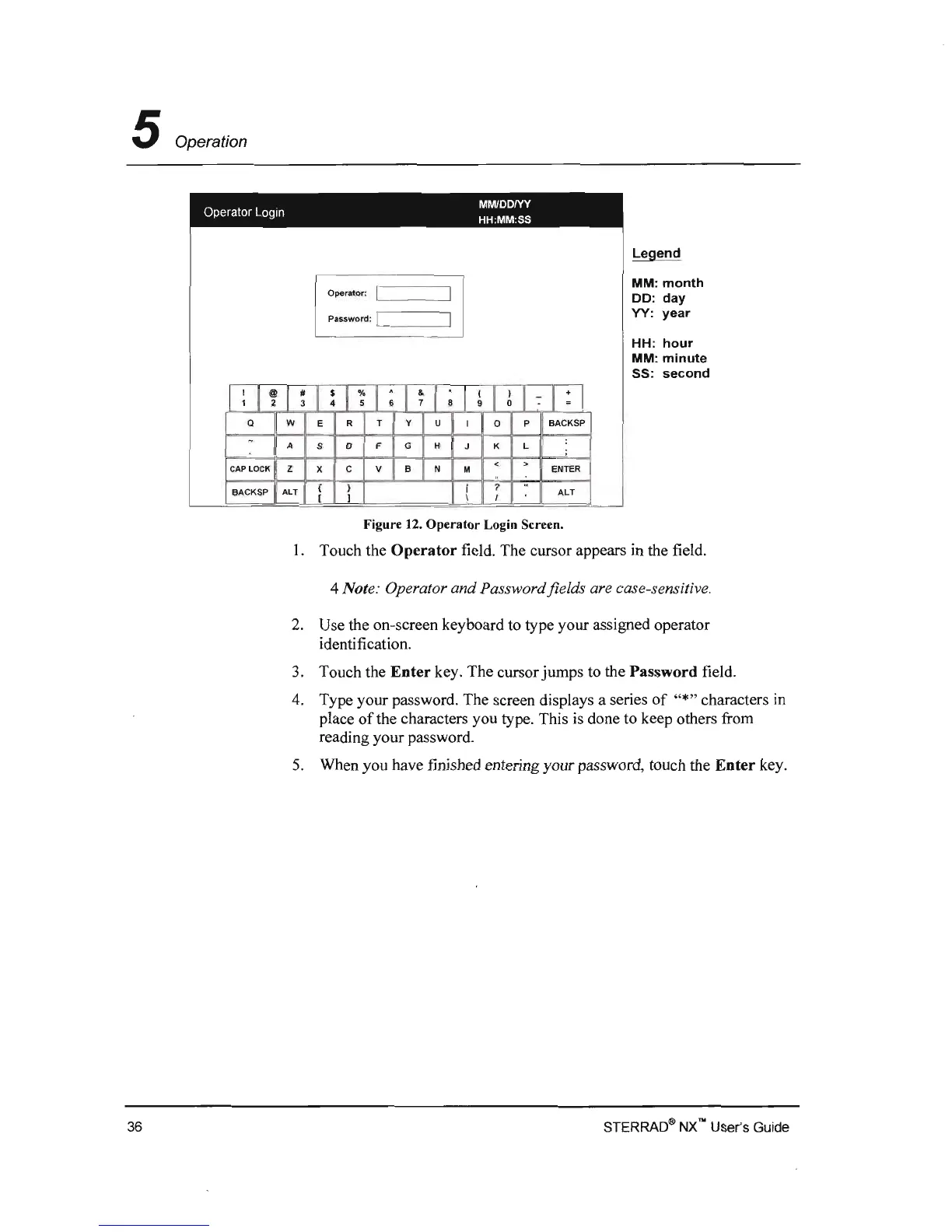
Figure 12.
Operator
Login Screen.
I. Touch the
Operator
field. The cursor appears in the field.
4 Note: Operator and Password fields are case-sensitive,
2.
Use the on-screen keyboard
to
type your assigned operator
identification.
3.
Touch the
Enter
key. The cursor jumps to the Password field.
4.
Type your password. The screen displays a series
of
"*,, characters in
place
of
the characters you type. This is done to keep others from
reading your password.
S.
When you have finished entering your password, touch the
Enter
key.
STERRAO<!i>
NXno User's Guide 36


 To Next Page