Operation 5
Entering Load
Information
4 Note:
If
your
sterilizer has been configured
not
to require
load
item data, this screen will
not
appear. Skip to
the subsection titled Cycle Notes.
Enter Load Item Data
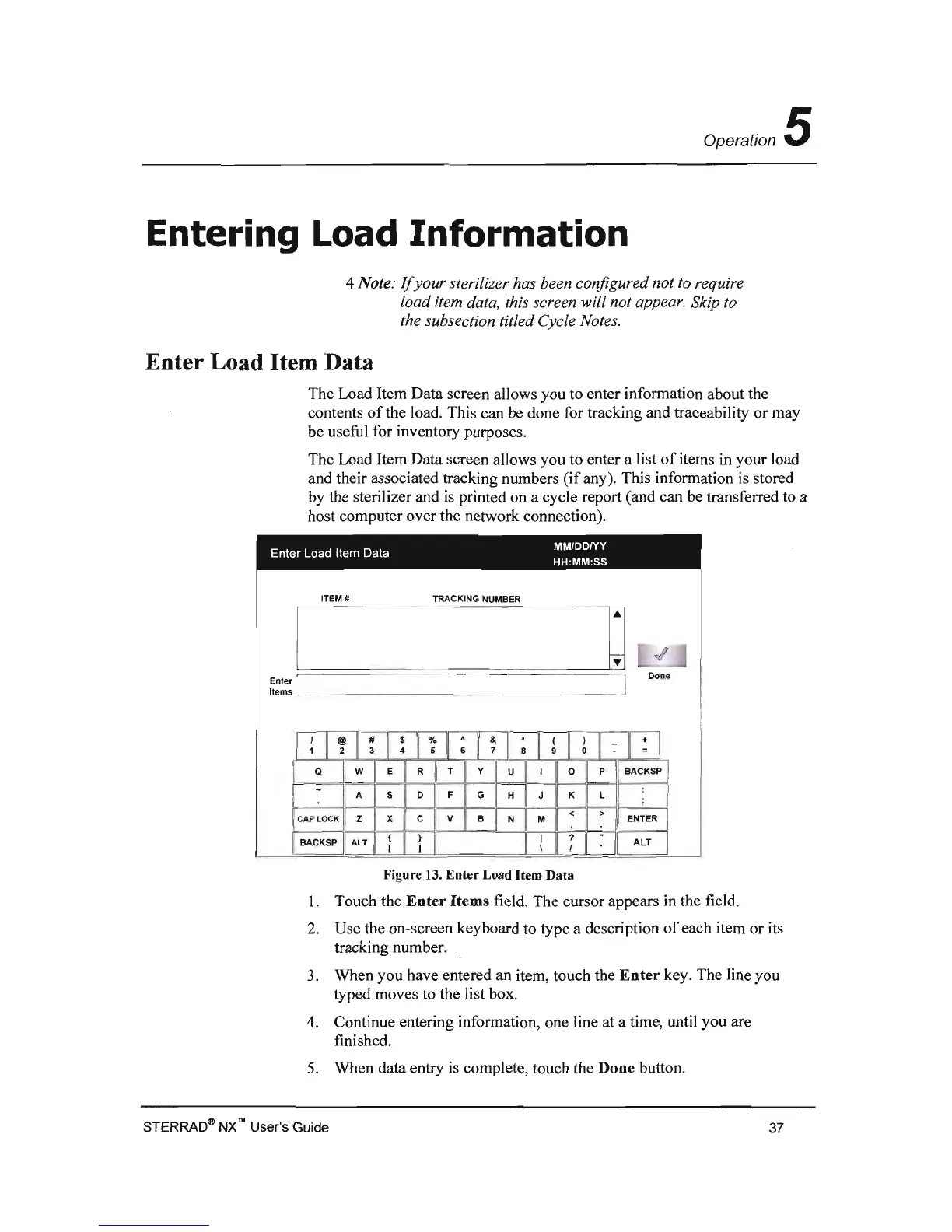
The Load Item Data screen allows you to enter information about the
contents
of
the load. This can be done for tracking and traceability or may
be useful for inventory purposes.
The Load Item Data screen allows you to enter a list
of
items in your load
and their associated tracking numbers
(if
any). This information
is
stored
by
the sterilizer and
is
printed on a cycle report (and can be transferred to a
host computer over the network connection).
Enter Load Item Data
MMlOOIYY
HH:MM:SS
ITEM #
TRACKING NUMBER
I
O
[
~
l
Enter
~
==========
==
~'
Done
J
Items _
__
______
_ _ _
___
__
_
--'
I~
I
~
I
~
I
!
I
·~
I
;
I
~
I
~
I
~
I
~
I
:
I
:I
a w E
R
T
y
U
o P BACKSP !
A
S o
F
G H J
K
L
< >
CAP LOCK Z
x C v B N
M
ENTER
?
BACKSP ALT
ALT
I
Figure
13.
Enter
Load Item Data
1.
Touch the
Enter
Items
field. The cursor appears
in
the field.
2.
Use the on-screen keyboard to type a description
of
each item or its
tracking number.
3.
When you have entered an item, touch the
Enter
key. The line you
typed moves to the list box.
4.
Continue entering information, one line at a time, until you are
finished.
5.
When data entry
is
complete, touch the Done button.
STERRADqj) NXN User's
Guide
37



 To Next Page