3.0 Back up the Telestra server
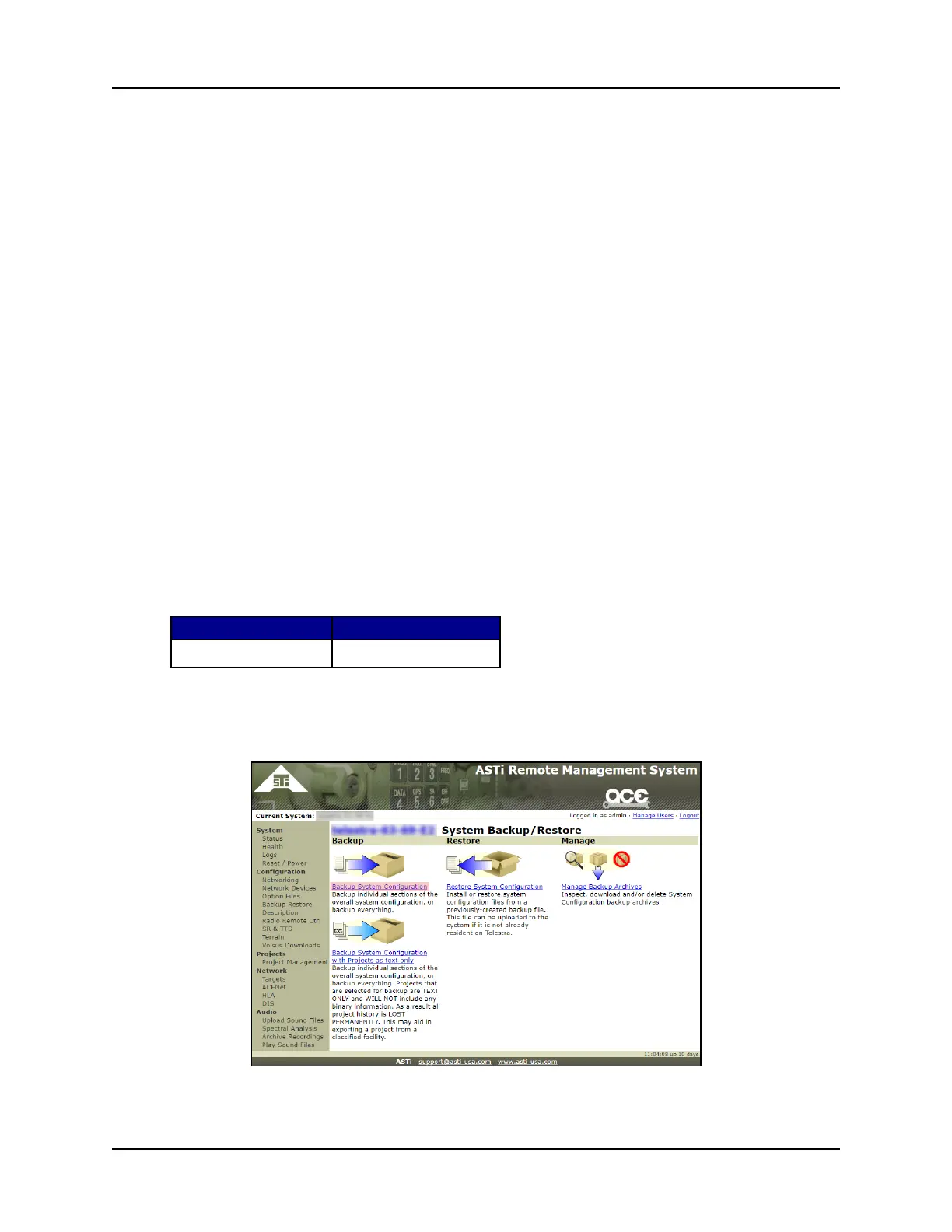
The Backup System Configuration page creates an archive of backup files on the devel-
opment workstation. This page includes the following settings:
l Options: includes all options files loaded on the system.
l ProjectsArchive: includes all projects archived on the system.
l RMSUsersAndConfig: includes user information (e.g., passwords, lockout settings).
l SoundLibrary: the library of sound files on the system, including the project's index and
files in Waveform (.wav) audio file format.
l TelestraConfig: includes configuration settings (e.g., network settings, preferences).
To create a system backup, follow these steps:
1. Open a web browser on the ACEStudio development workstation. Ensure the devel-
opment workstation shares the same network as the Telestra server.
2. To access the RMS, in the address bar, type the Telestra server's IP address.
3. In the top-right corner, click Login.
4. Log into the system using the following default credentials:
Username Password
admin astirules
5. From the left menu, under Configuration, click Backup Restore.
6. On the System Backup/Restore page, click Backup System Configuration.
Figure 2: Backup System Configuration
Copyright © 2018 Advanced Simulation Technology inc. 3
ACE Target and Studio Cold Start Guide (Rev. B, Ver. 0)



 To Next Page