USER manual52 of 216
6.10.2 “SAE” version
To use the cup warmer on this version of the machine, pro-
ceed as follows:
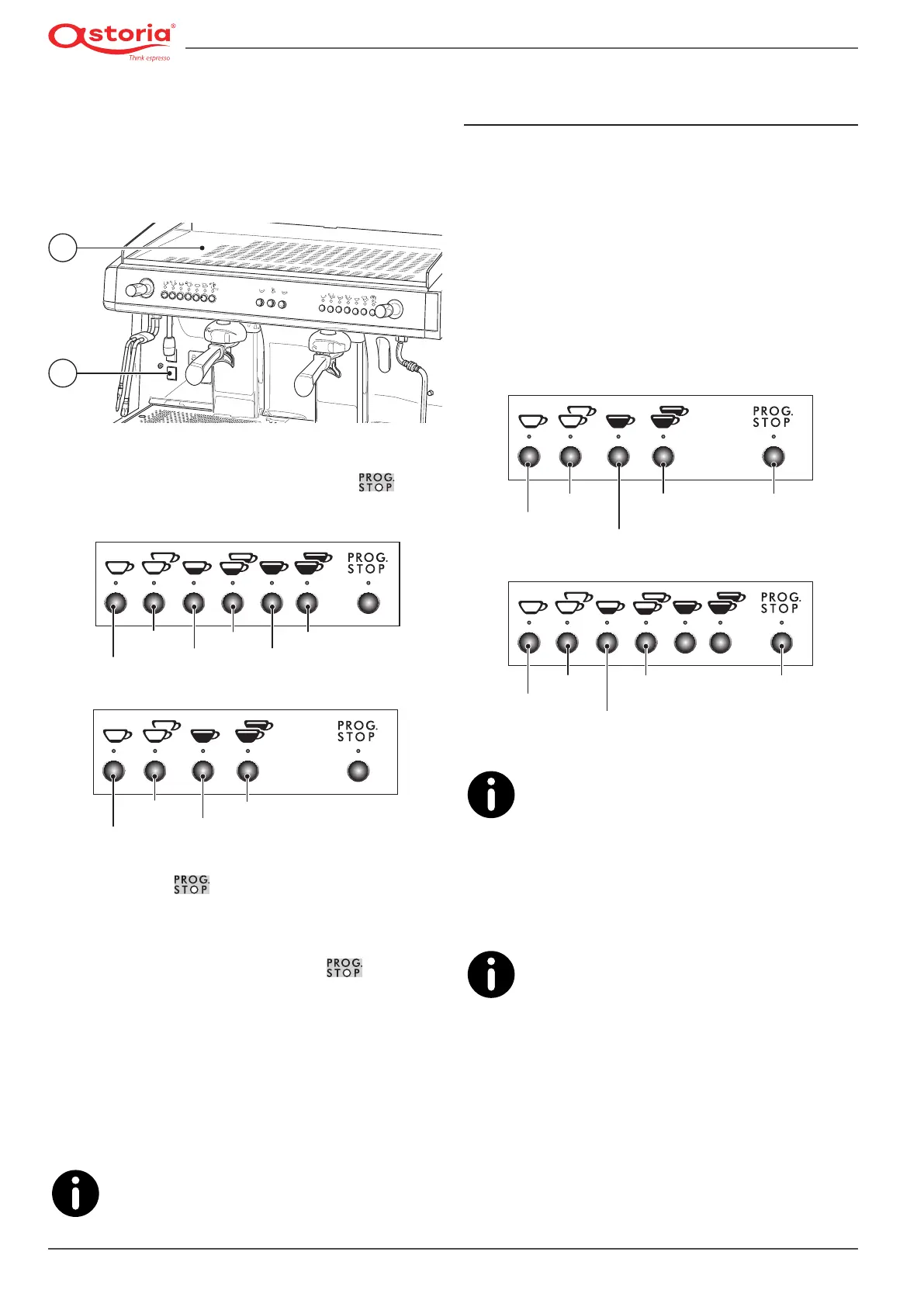
• Place the cups on the cup warmer (1) shelf of the coffee
machine.
• Turn the cup warmer switch (2)totheONposition.
1
2
To adjust the cup warmer temperature, proceed as follows:
• When the machine is switched on, press the button
ontherightpushbuttonpanel:theashingLEDwillindicate
the current cup warmer setting, as indicated in the images.
70 °C
80 °C 100 °C
90 °C 110 °C
Cup warmer
Disabled
70 °C
80 °C
90 °C
Cup warmer
Disabled
• Hold down the
button until the LED on the panel
goesfromaashingtoasteadylight.
• Press the button that corresponds to the desired temper-
ature.
• Toconrmtheselectedvalue,pressthe
button.
6.10.3 “DISPLAY” version
To use the cup warmer on this version of the machine, pro-
ceed as follows:
• Place the cups on the cup warmer (1) shelf of the coffee
machine.
• Turn the cup warmer switch (2)totheONposition.
To adjust the cup warmer temperature, follow the
instructions provided in paragraph "6.11.6 Pro-
gramming the Cup Warmer" on page 54.
6.11 Programming the “DISPLAY” version
machine parameters
6.11.1 Accessing the menu
• To access the programming menu, press and hold the
(MODE) button for at least 3 seconds.
• Use the (MODE) button to scroll the various areas of the
programming menu.
• Use the (ENTER) button to move from one parameter to
another within the same area.
• To change the value of each parameter, use the two ( +)
increase and (-) decrease buttons.
Decrease (-)
Increase (+)
Mode
Enter Stop
Program.
Decrease (-)
Increase (+)
Mode
Enter Stop
Programm.
The system automatically exits the programming
mode 20 seconds after the last operation was car-
ried out.
Always use the right-hand side pushbutton panel for the pro-
gramming modes.
The machine menu is indicated below.
The machine menu can vary. This occurs should a
different version of the software be installed on
the machine; sometimes the software is also up-
dated even during maintenance to improve its performance.











 To Next Page