ASUS RS540-E9-RS36-E
5-35
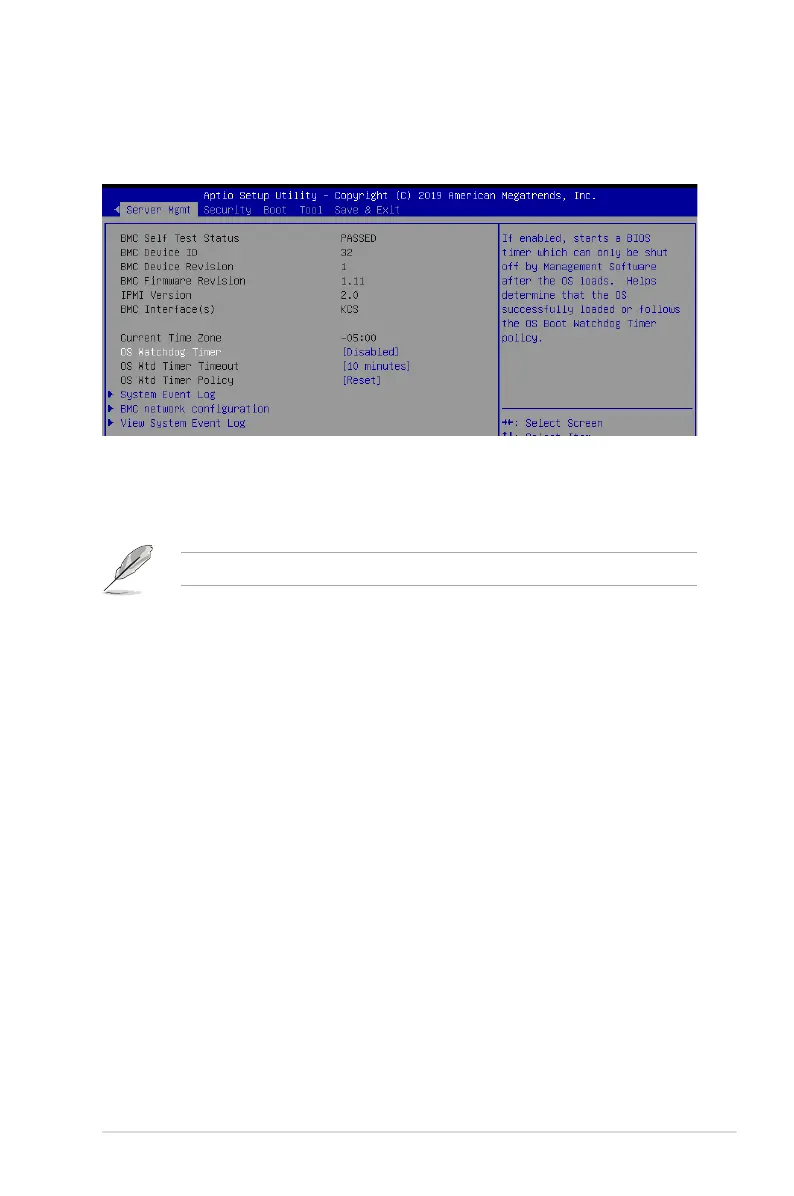
5.9 Server Mgmt menu
The Server Management menu displays the server management status and allows you to
change the settings.
OS Watchdog Timer [Disabled]
This item allows you to start a BIOS timer which can only be shut off by Intel Management
Software after the OS loads.
Congurationoptions:[Disabled][Enabled]
Thefollowingitemsiscongurableonlywhenthe
OS Watchdog Timer
is set to
[Enabled]
.
OS Wtd Timer Timeout [10 minutes]
AllowsyoutocongurethelengthfotheOSBootWatchdogTimer.
Congurationoptions:[5minutes][10minutes][15minutes][20minutes]
OS Wtd Timer Policy [Reset]
ThisitemallowsyoutocongurethehowthesystemshouldrespondiftheOSBoot
WatchTimerexpires.
Congurationoptions:[DoNothing][Reset][PowerDown]
System Event Log
AllowsyoutochangetheSELeventlogconguration.
Erase SEL [No]
Allows you to choose options for erasing SEL.
Congurationoptions:[No][Yes,Onnextreset][Yes,Oneveryreset]
When SEL is Full [Do Nothing]
Allows you to choose options for reactions to a full SEL.
Congurationoptions:[DoNothing][EraseImmediately]
BMC network configuration
Thesub-itemsinthiscongurationallowyoutoconguretheBMCnetworkparameters.
View System Event Log
This item allows you to view the system event log records.













 To Next Page