2-7
ASUS RS540-E9-RS36-E
2.3 System memory
2.3.1 Overview
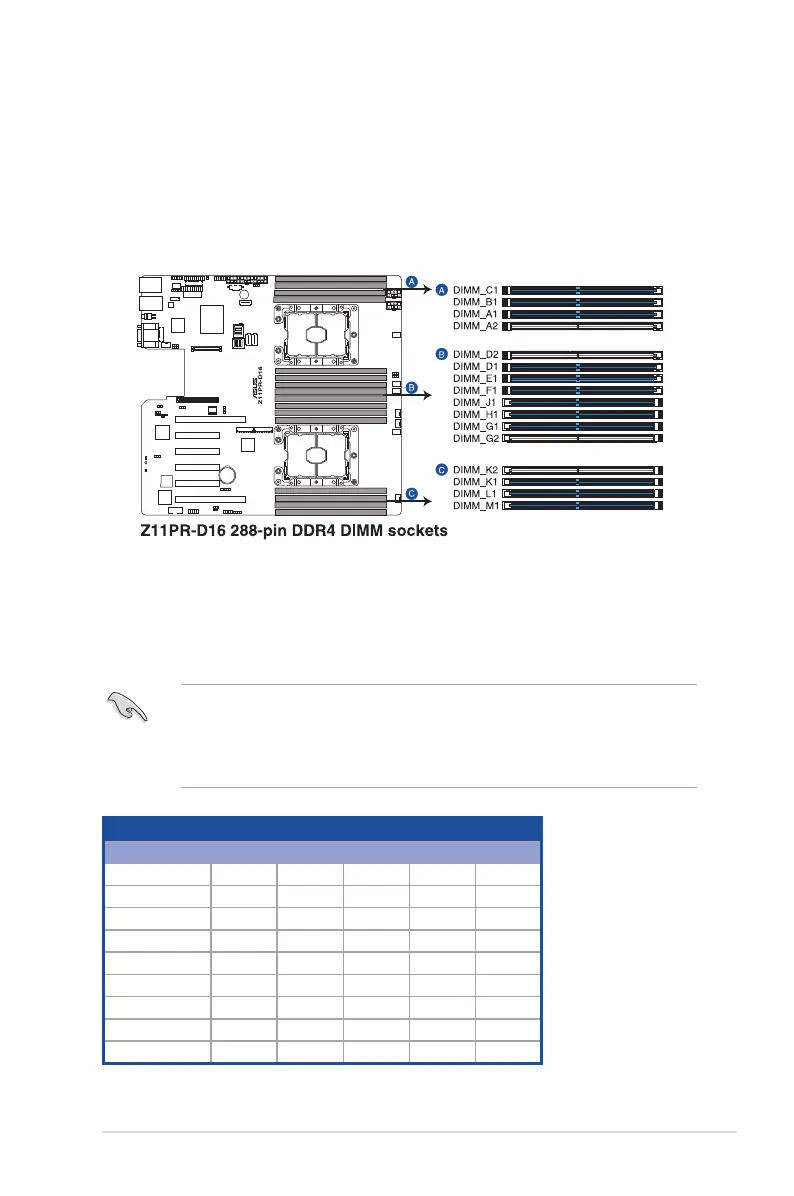
The motherboard comes with sixteen (16) Double Data Rate 4 (DDR4) Dual Inline Memory
Modules (DIMM) sockets.
The gure illustrates the location of the DDR4 DIMM sockets:
2.3.2 Memory Configurations
You may install 8 GB, 16 GB, 32 GB, and 64 GB RDIMMs; 32 GB, and 64 GB LRDIMMs; and
64GB and 128GB LRDIMMs (3DS) into the DIMM sockets using the memory congurations
in this section.
• Refer to ASUS Server AVL for the updated list of compatible DIMMs.
• Always install DIMMs with the same CAS latency. For optimum compatibility, it is
recommended that you obtain memory modules from the same vendor.
• Start installing the DIMMs in slot A1.
Single CPU configuration (must be installed on CPU1)
DIMM
1 2 4 6 8
DIMM_C1
• •
DIMM_B1
• • •
DIMM_A1
• • • • •
DIMM_A2
•
DIMM_D2
•
DIMM_D1
• • • •
DIMM_E1
• • •
DIMM_F1
• •













 To Next Page