Chapter 2: Hardware Information
2-26
2.6 Cable connections
• The bundled system cables are pre-connected before shipment. You do not need
to disconnect these cables unless you need to remove pre-installed components to
install additional devices.
• Refer to Chapter 4 for detailed information on the connectors.
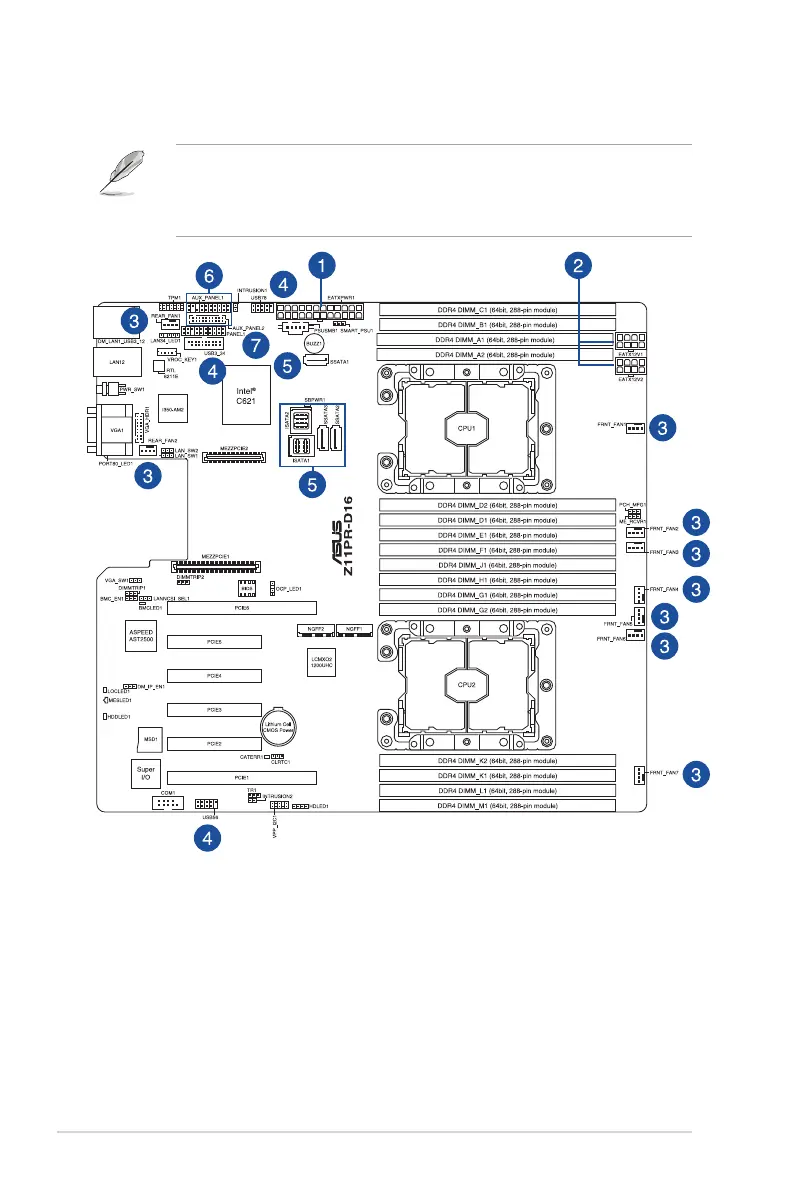
Standard cables connected to the motherboard
1. 24-pin ATX power connector (from power supply to motherboard)
2. 8-pin 12V power connector (from power supply to motherboard)
3. System fan connector (from system fan to motherboard)
4. USB connector (from motherboard to front I/O board)
5. SATA ports connectors (system default; from motherboard to SATA/SAS backplane)
6. System auxiliary panel connector (from motherboard to front I/O board)
7. System panel connector (from motherboard to front I/O board)













 To Next Page