Chapter 1: Product Introduction
1-6
1
3 4
2
RESET
ID
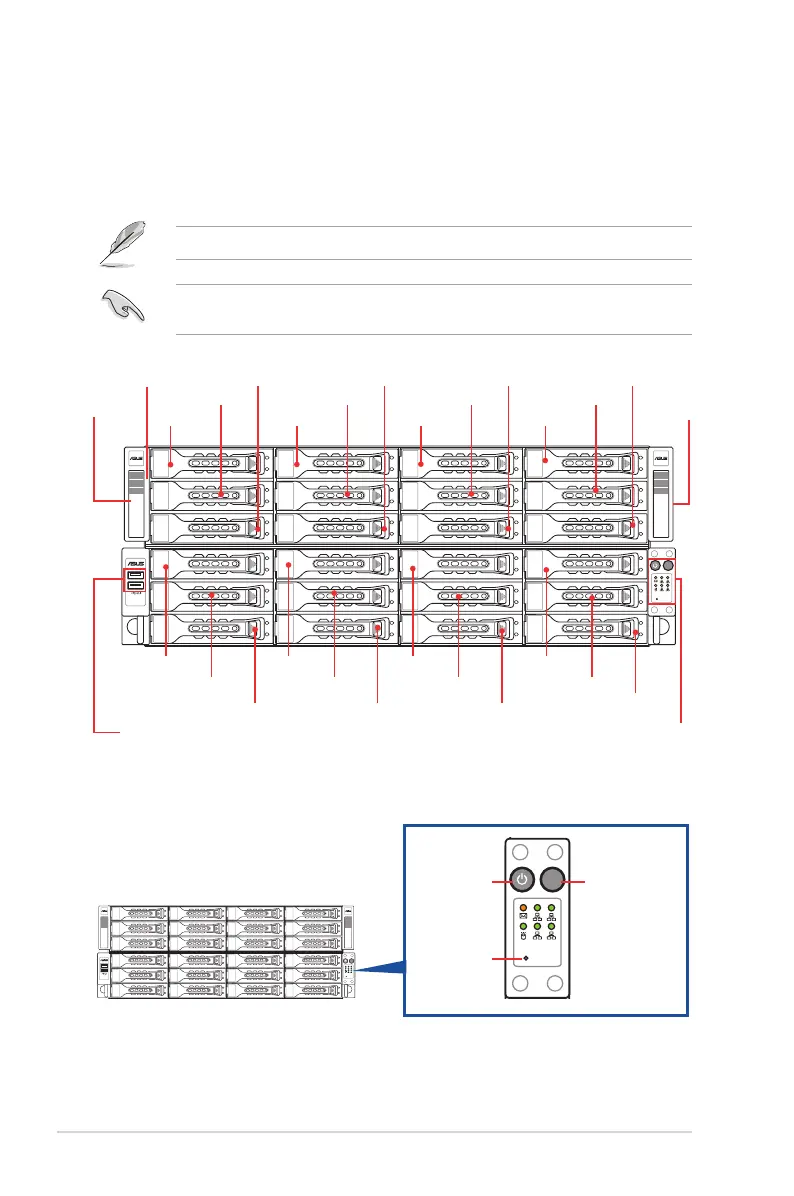
1.4 Front panel features
The barebone server displays a simple yet stylish front panel with easily accessible features.
The power and reset buttons, LED indicators, and USB ports for each Node are located on
the front panel.
Refer to the
1.7.1 Front panel LEDs
section for the LED descriptions.
Turn off the system power and detach the power supply before removing or replacing any
system component.
Bay 1
Bay 13 Bay 14 Bay 15 Bay 16
Bay 17 Bay 18 Bay 19 Bay 20
Bay 21 Bay 22 Bay 23
Bay 24
Bay 2 Bay 3 Bay 4
Bay 5 Bay 6 Bay 7 Bay 8
Bay 9 Bay 10 Bay 11 Bay 12
USB 2.0 ports
Steel pull
handle
Steel pull
handle
Front Panel LEDs
and buttons
Asset tag
(hidden)
1.4.1 Front panel buttons
1
3 4
2
RESET
ID
1
3 4
2
RESET
ID
Reset button
Power button
Location button













 To Next Page