....
N
a:
CX)
....
I.Cl
U"I
N
I.Cl
....
Dialing a telephone number
Applies to: vehicles with telephone
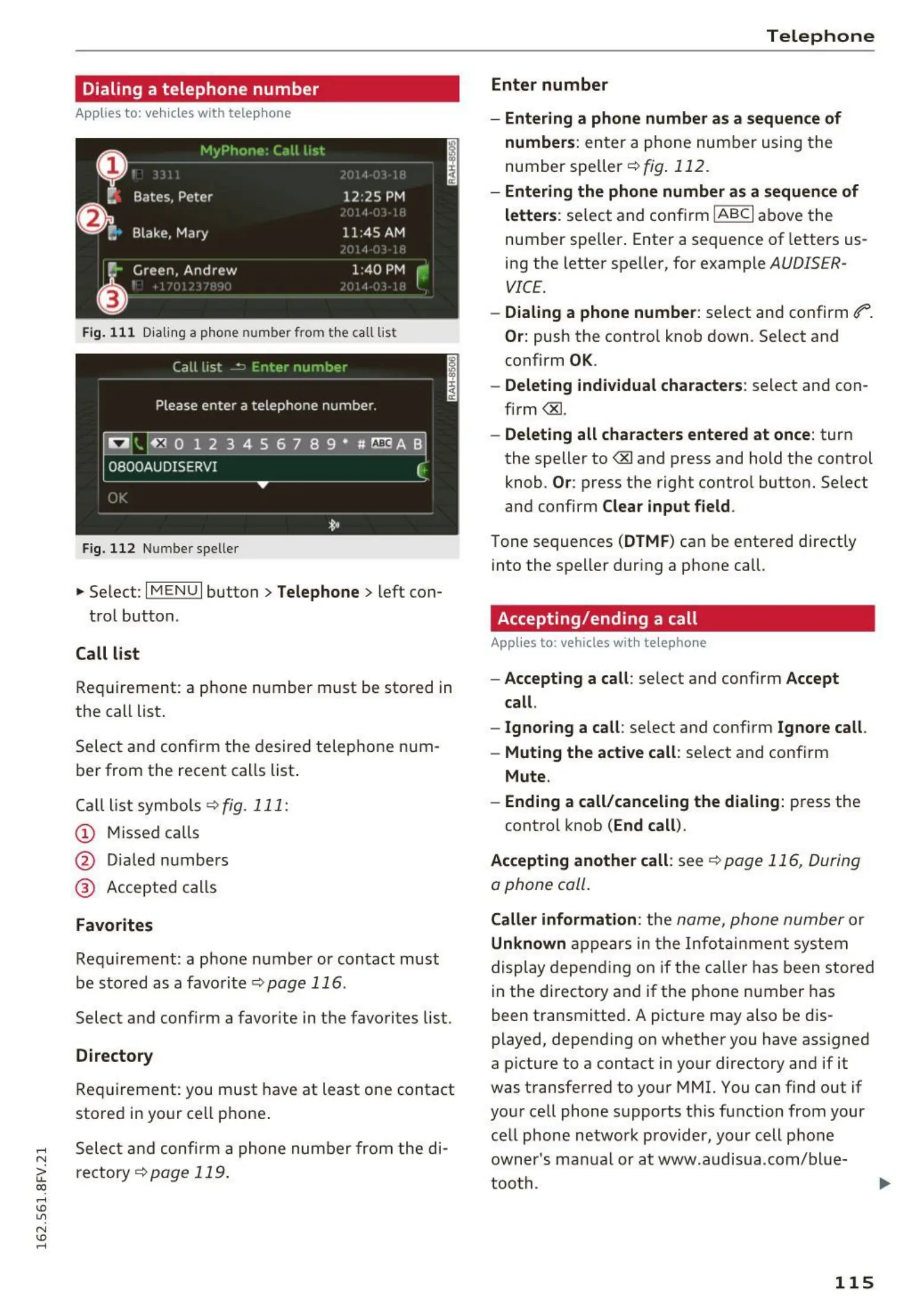
Fig. 111 Dialing a phone number from the call list
Fig. 112 Num be r speller
.,.. Select : I MENU I button> Telephone > left con-
trol button.
Call list
Requirement: a phone number must be stored in
the call list.
Select and confirm the desired telephone num-
ber from the recent calls list.
Call list symbols
~ fig. 111:
CD Missed calls
@ Dia led numbers
@ Accepted calls
Favorites
Requirement: a pho ne number or contact must
be stored as a favorite ~
page 116 .
Select and confirm a favorite in the favorites list .
Directory
Requirement: you must have at least one contact
stored in your cell phone .
Select and confi rm a phone number from the di-
rectory ~
page 119.
Telephone
Enter number
- Entering a phone number as a sequence of
numbers : enter a phone number using th e
numberspeller ~ fig. 112 .
- Entering the phone number as a sequence of
letters : se lect and confirm
IABCI above the
number spe ller . Enter a sequence of letters us-
ing the letter speller, for example
AUDISER-
VICE.
- Dialing a phone number : select and confirm ef"'.
Or: push the control knob down . Se lect and
confirm
OK.
- Deleting individual characters: select and con -
firm
<&l.
- Deleting all characters entered at once : tur n
the speller to
<8J and press and hold the control
knob .
Or: press the right control button. Select
and confirm Clear input field .
Tone sequences (DTMF) can be entered directly
into the speller during a phone call.
Accepting/ending a call
Applies to : vehicles wit h telep ho ne
- Accepting a call : select and confirm Accept
call.
- Ignoring a call : select and conf irm Ignore call .
- Muting the active call : select and confirm
Mute.
- Ending a call/canceling the dialing: press the
control knob (End call).
Accepting another call : see
~ page 116, During
o phone coll.
Caller information : the name, phone number or
Unknown app ears in th e Infotainment system
display depend ing on if the caller has been stored
in the directory and if the phone number has
been transmitted . A picture may also be dis-
played, depending on whether you have assigned
a picture to a contact in your directory and if it
was transferred to your MMI. You can find out if
your cell phone supports t his function from your
cell phone network provider, your cell pho ne
owner's manual or at www .audisua .com/bl ue-
tooth .
115



 To Next Page