....
N
a:
CX)
....
I.Cl
U"I
N
I.Cl
....
Transferring a destination from the
directory
Applies to: vehicles with navigation system
You can navigate directly to destinations in the
directory.
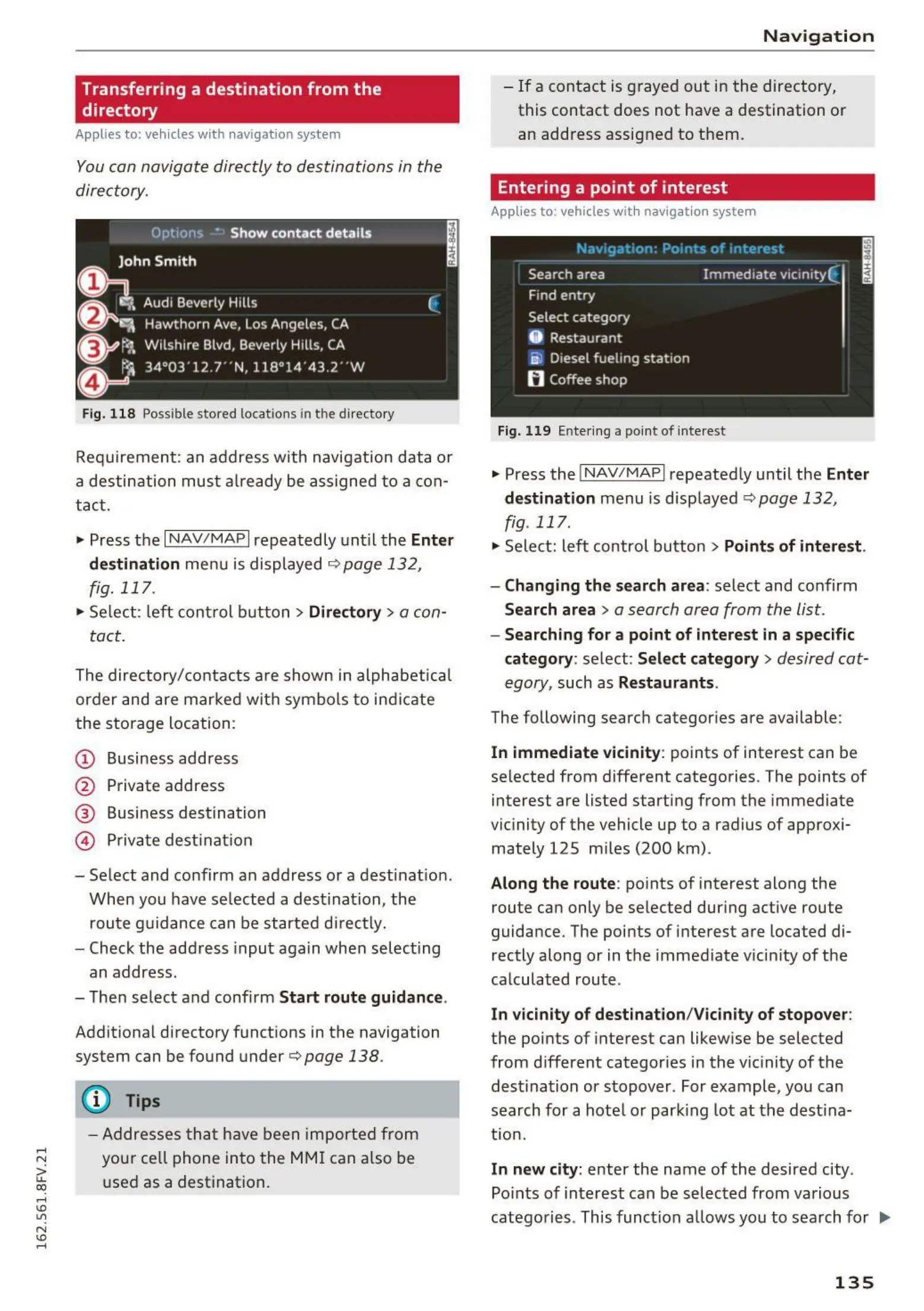
Fig. 1 18 Possible sto red locat ions in th e directory
Requirement : an address with navigation data or
a destination must already be assigned t o a con -
tact.
.,. Press the
I NAV / MAPI repeatedly unt il the Enter
destinati on
menu is displayed ¢ page 132 ,
fig. 117 .
• Select : left control button > Directo ry > a con-
tact.
The directory/contacts a re shown in alphabetical
order and are marked wit h symbo ls to ind icate
the storage locat ion :
(D Business address
@ Private address
® Business destination
@ Privat e dest inat ion
- Select and confirm an address or a destination .
When you have se lected a dest inat ion, the
route guidance can be started directly.
- Check the address input again when selecting
an address.
- The n select and confirm
Start rout e guidance.
Addit ion al directory funct ions in the navigation
system can be found unde r
¢page 138 .
(D Tips
- Addresses t hat have been imported from
your ce ll phone into the MMI can a lso be
used as a destination.
Na v igat ion
- If a contact is grayed out in the directory,
this contact does not have a destination or
an address assigned to them.
Entering a point of interest
Applies to : vehicles with navigat ion system
Fig. 11 9 Ente ring a po int of inte rest
.. Press the I NAV /MAP I repeatedly until the Enter
destinati on
menu is disp layed ¢ page 132,
fig. 117 .
• Select: left control but ton > Points of int erest .
- Changing the search area:
select and confirm
Search area > a search area from the list .
- Searching for a point of interest in a specific
category :
se lect: Select category > desired cat-
egory,
such as Restaurants .
The follow ing searc h categor ies a re availa ble :
In immed iate vicinity: points of int erest can be
selected from different categories . The points of
interes t are listed st art ing from the immed iate
vicinity of the vehicle up t o a radius of approxi-
mately 125 m iles (200 km) .
Along the route : points of interest along the
route can only be selected dur ing active rou t e
guidance. The point s of interest are locat ed di-
rectly along or in the immediate vicinity of the
calculated route .
I n vicinity of dest inat ion/Vici nity of stopover:
the points of interest can likewise be selec ted
from different categor ies in the vicinity of the
destination or stopover. For example, you can
search for a hote l or park ing lot at the dest ina-
tion .
In new city: enter the name of the desired city .
Points of interest can be selected from various
categories . This function a llows you to search for
IJI>
135



 To Next Page