Dr iv er information sy stem
Press the thumbwheel @ to confirm the selec-
tion . The split time appears for approximately
10 seconds in area @ . The tim ing of the cur-
rent lap continues.
If you wou ld like to insert a pause
m immediate-
ly after the split time, first press the thumbwheel
@ to confirm the menu item
Press OK to go
back .
.,. To insert a pause, turn the thumbwheel @ unti l
Pause appears in line @ . Press the thumb -
wheel @ to confirm the select ion. The pause
symbol
m appea rs in a rea @ .
.,. To continue timing, press the t humbwhee l @ .
If t iming is paused, you can continue it later even
if you switch the ign ition off .
Meaning of the indicator in the Infota inment sys-
tem disp lay ¢
fig. 16:
CD
Display of las t recorded t ime
@
Symbols:
-[Ol: start of t ime record ing
- • : s lowest recorded t ime
-II: fastest recorded time
-[~l: spl it t ime
-m: pause
®
Current t ime measurement
©
Menu :
- Start lap 1 by driving off (start)
- Start by driving off (start)
- New lap (start another lap)
- Split time (time within section of the
route)
- Pause (interrupts measurement)
- Cancel lap
- Reset lap times (all values a re deleted)
26
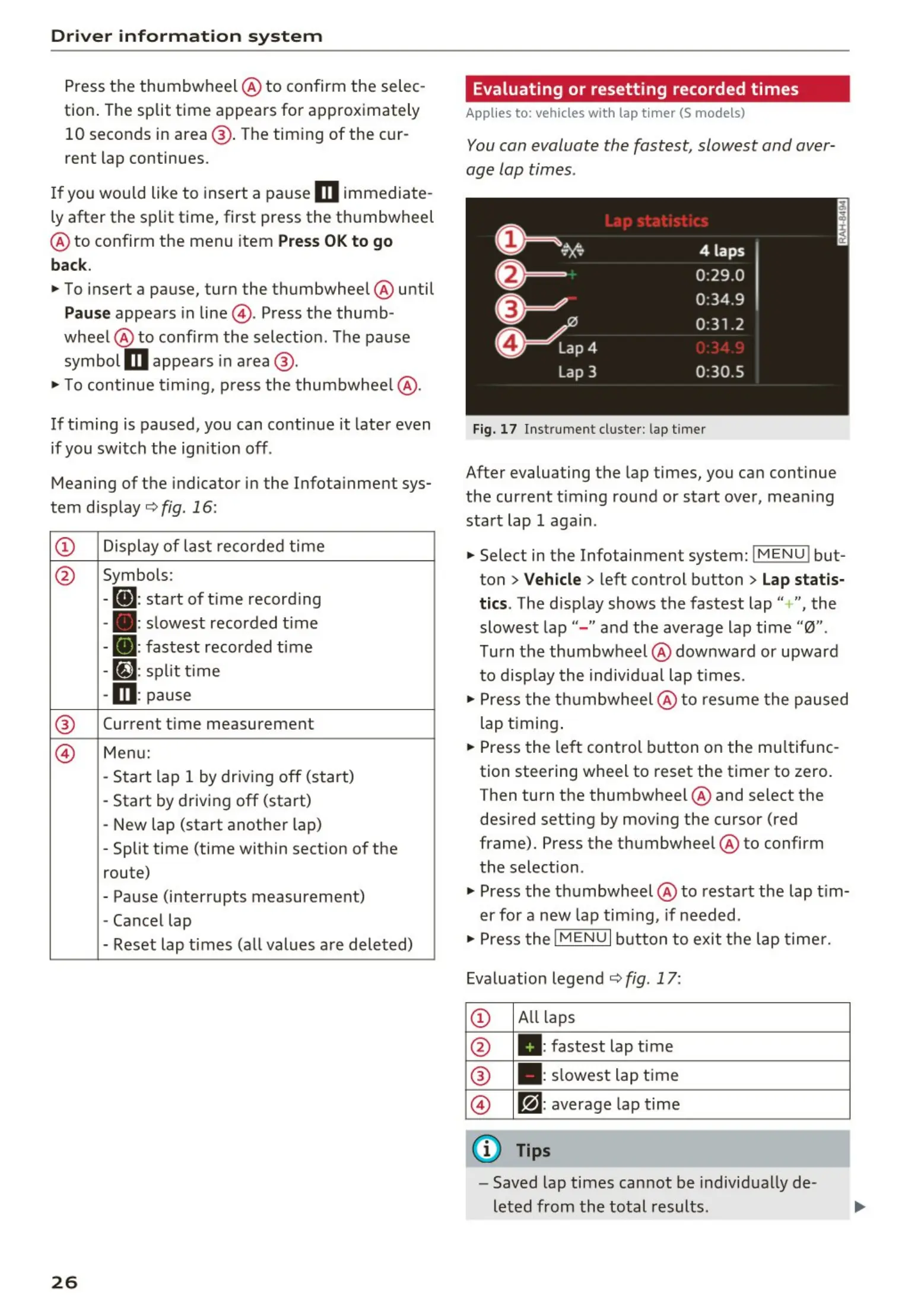
· Evaluating or resetting recorded times
Applies to: vehicles with lap timer (S models)
You can evaluate the fastest, slowest and aver-
age lap times .
Fig. 17 Ins tr ume nt cluster : lap t imer
After evaluating the lap times, you can continue
the current t iming round or start over, mean ing
start lap 1 again .
.,. Select in the Infotainment system:
IMENU ! but-
ton
> Vehicle > left control button > Lap statis -
t ics. The disp lay shows the fastest lap" +", the
slowest lap" - " and the average lap time "0 ".
Turn the thumbw heel
® downward or upward
t o disp lay t he individ ual lap t imes .
.,. Press t he t hu mbwheel @ to resume t he paused
lap t iming .
.,. Press t he left cont rol button on the mu ltifunc-
tion steering wheel to reset the timer to zero.
Then turn the thumbwheel @ and select the
desired setting by moving the cursor (red
frame). Press the thumbwheel @ to confirm
the selection .
.,. Press t he t hu mbwheel @ to restar t the lap t im-
er for a new lap tim ing, if needed .
.,. Press the
I M E NU I button to exit t he lap t ime r.
Evaluation legend
¢ fig. 17:
CD
All laps
@ II: fastest lap time
®
. : slowest lap t ime
©
~l: average lap time
(D Tips
- Saved lap times cannot be individ ually de -
leted from the total results.



 To Next Page