Lights and Vision
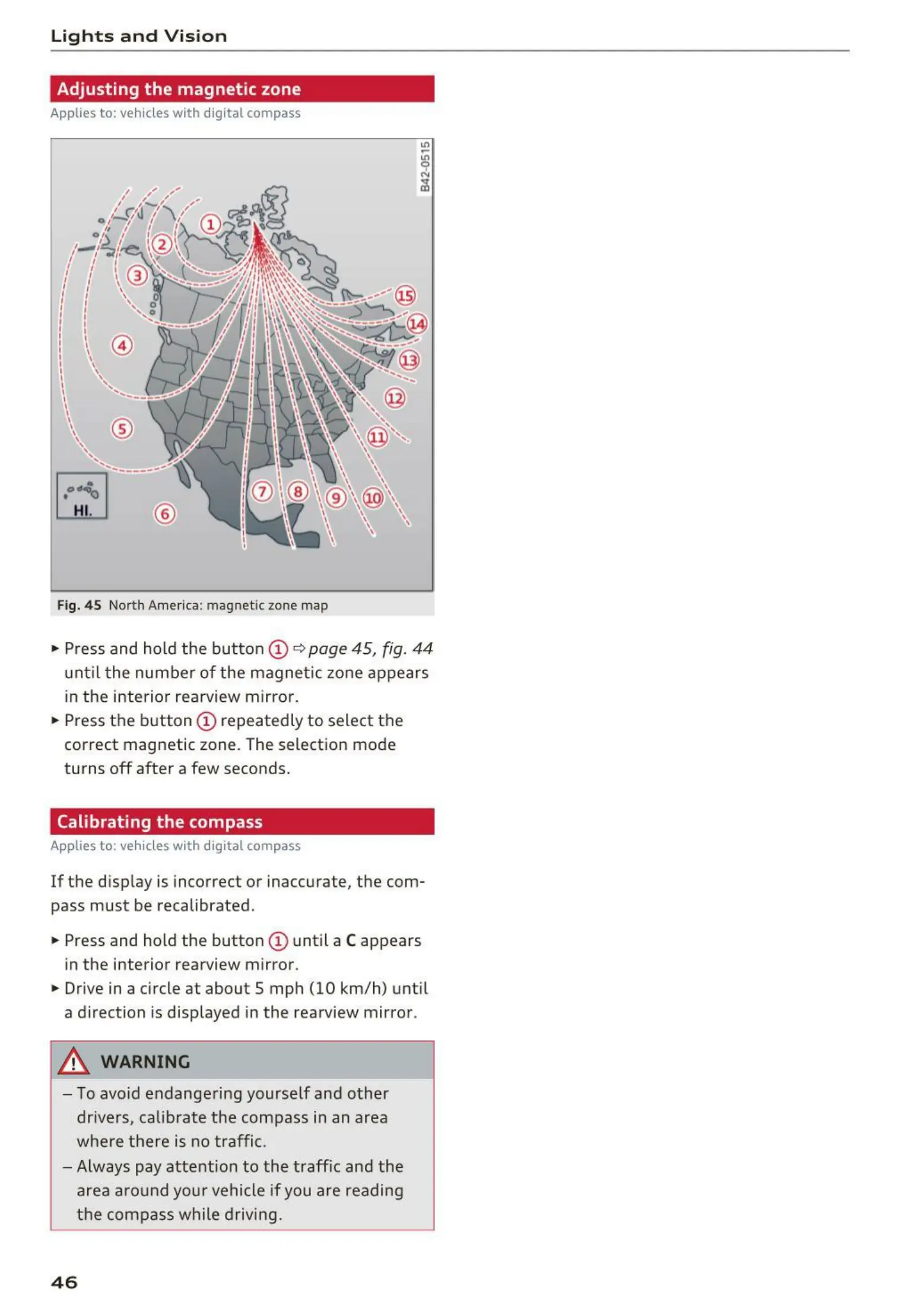
Adjusting the magnetic zone
Applies to: vehicles with digital compass
~
L!LI
®
Fig. 45 North Amer ica: magnetic zone map
• Press and hold the button CD
~
page 45, fig. 44
unt il t he number of the magnetic zon e appears
in the interior rearview mirror.
• Press the button CD repeatedly to select the
correct magnetic zone. The selection mode
turns
off after a few seconds.
Calibrating the compass
Applies to: vehicles with digital compass
If the disp lay is incorrect or inacc urate, the com-
pass must be recalibrated .
• Press and hold the button
CD until a C appears
in the interior rearview mirror .
• Drive in a circle at about 5 mph (10 km/h) until
a direction is displayed in the rearview mirror .
A WARNING
- To avoid endangering yourself and other
drivers, calibrate the compass in an area
where there is no traffic.
- Always pay attention to the traffic and the
area around you r vehicle if you are reading
the compass while driving.
46



 To Next Page