20
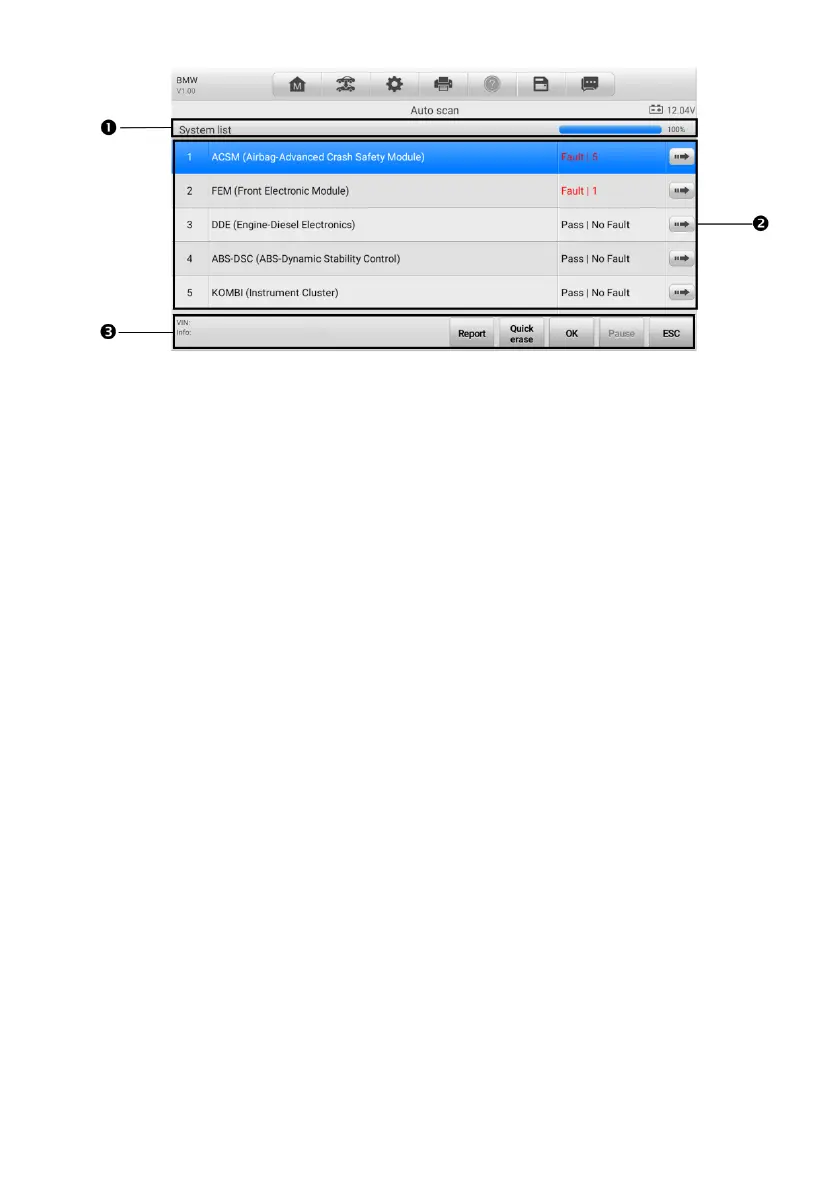
Figure 4-5 Auto Scan Screen
1. Navigation Bar
2. Main Section
3. Function Buttons
4.4.1.1 Navigation Bar
List Tab — displays the scanned data in list format.
Progress Bar — indicates the test progress.
4.4.1.2 Main Section
Column 1 — displays the system numbers.
Column 2 — displays the scanned systems.
Column 3 — displays the scan results.
Fault(s) | #: Fault(s) indicate(s) there is/are detected fault code(s) present; “#”
indicates the number of the detected faults.
Pass | No Fault: Indicates the system has passed the scanning process and no fault
has been detected.
Not Scanned: Indicates the system has not been scanned or the tablet is unable to
access this system.
Column 4 — tap to enter the related system and view the detailed information.
4.4.1.3 Function Buttons
The table below provides a brief description of how the function buttons operate:















 To Next Page