8410D User’s Guide
3 of 37
Your 8410 Voice Terminal
The 8410 voice terminal is available in two models: the 8410D has a display; the 8410B is a basic
set without a display. The display, along with the softkeys and display control buttons, offers the
user valuable added functionality. However, both models are comprehensively equipped so you
can make the best use of the many features of the DEFINITY
® Communications System.
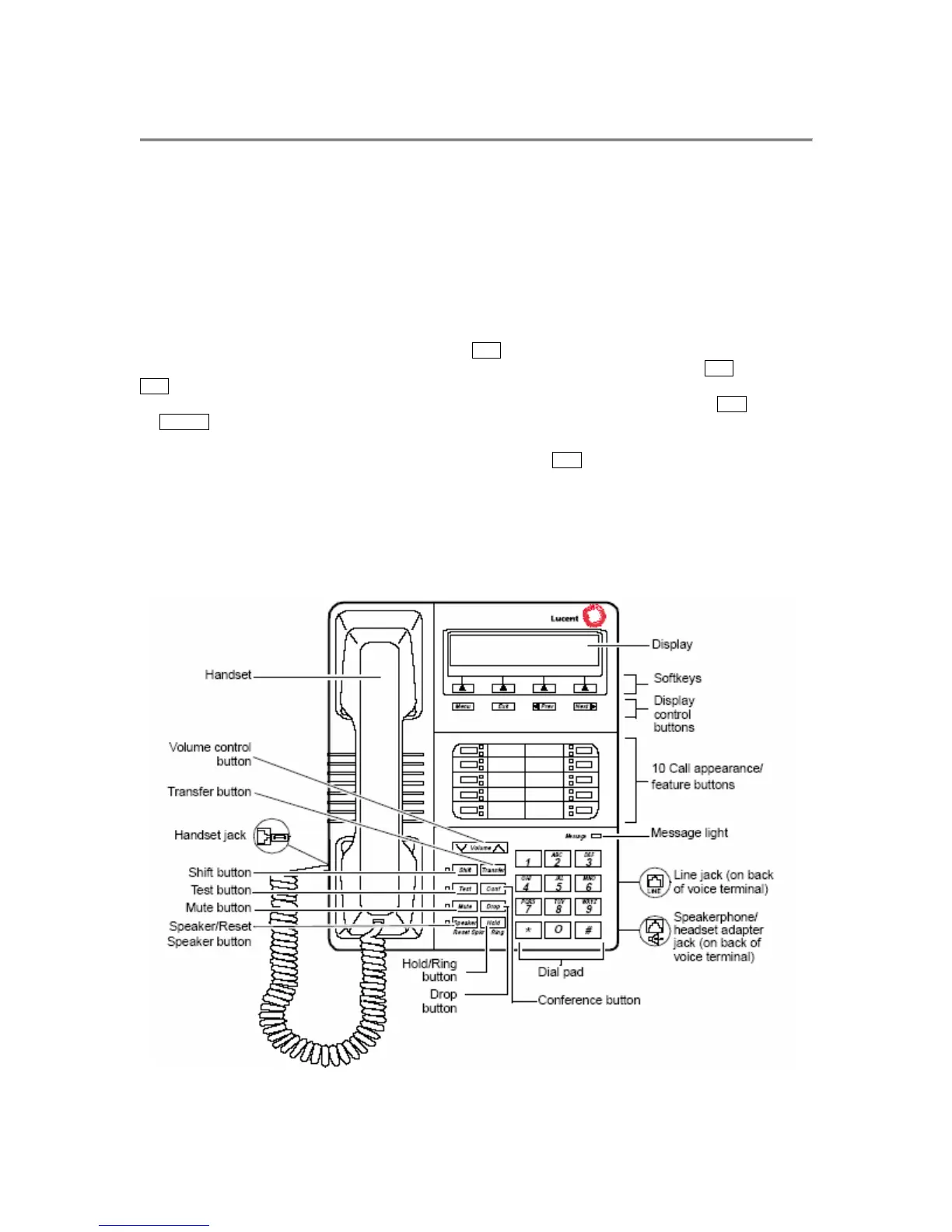
Figure 1 and Figure 2 show two different versions of the 8410, in this case, the display-equipped
model.
• On the 8410 voice terminal shown in Figure 1, the
Shift button allows you to access two additional
features. You can select a personalized ringing pattern for your voice terminal by pressing Shift and then
Hold. With this version of the 8410, you can also manually adjust the acoustical quality of the built-in
speakerphone for its surrounding environment (the Reset Speakerphone feature) by pressing Shift followed
by Speaker.
• The version of the 8410 voice terminal shown in Figure 2 has a
Ring button which allows you to select a
personalized ringing pattern for your voice terminal. You do not need to manually reset your speakerphone
with this version.
Before using your 8410 voice terminal, look at Figures 1 and 2 below and on the next page in
order to familiarize yourself with the type of voice terminal you are using and then read the
description and procedures for each feature you wish to access.
Figure 1. One Version of the 8410D Voice Terminal (with Display)


 To Next Page