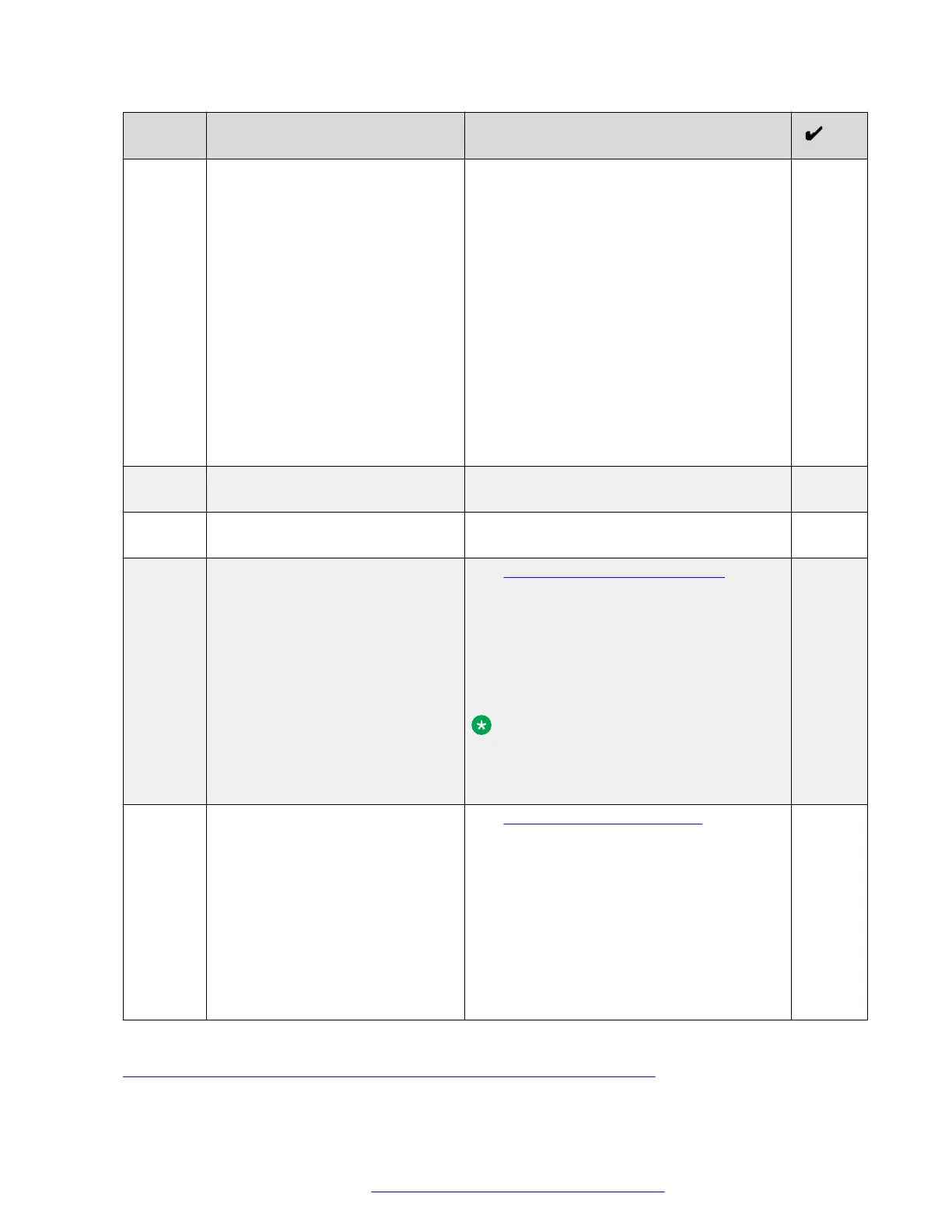
No. Task Notes
using several Web Collaboration Services
servers, you need to create a separate CSR
for each Web Collaboration Services FQDN.
Use the following options specific for this
deployment model:
• For Common Name, use the FQDN
assigned to that service. For example:
conferencing_management.company.
com for Avaya Equinox
®
Conferencing
Management service.
• For Subject Alternative Name, use the
global FQDN. For example:
DNS:conferencing_management.comp
any.com for Avaya Equinox
®
Conferencing
Management service.
2 For each CSR, download and save
created .KEY and .CSR files.
3 Send .CSR files to a public CA for
signing.
4 Install the signed certificates and
keys on the Avaya SBCE.
See Installing a certificate and a key on
page 138.
When installing certificates, use descriptive
names. For example:
conferencingManagementCert for the
Avaya Equinox
®
Conferencing Management
service certificate.
Note:
When installing a certificate, make sure
that you use the corresponding key. Do
not install keys of another certificates.
5 Create TLS server profiles using
the installed certificates.
See Creating a TLS server profile on
page 141.
When creating profiles, use certificates
installed on the Avaya SBCE in the previous
step.
Provide a descriptive name for each profile.
For example:
conferenceMgmtTlsProfile for the
Avaya Equinox
®
Conferencing Management
service profile.
Related links
Reverse proxy configuration checklist for a multiple FQDN deployment on page 109
Avaya Session Border Controller for Enterprise configuration
October 2018 Deploying the Avaya Aura
®
Web Gateway 112
Comments on this document? infodev@avaya.com



 To Next Page