IFD400 Series Pilot Guide
3-12 Map Subsystem
NOTE
Map Panning Only Via Touch
Map panning can only be accomplished via touch
screen use. There is no physical bezel control to
support map panning.
GRAPHICAL FLIGHT PLANNING (“RUBBER BANDING”)
A flight plan can be altered graphically by touching the desired leg or
the desired waypoint on the map depiction, placing your finger on the
leg for approximately 2 seconds until the leg turns cyan, and then,
without lifting your finger off the display, dragging your finger to the
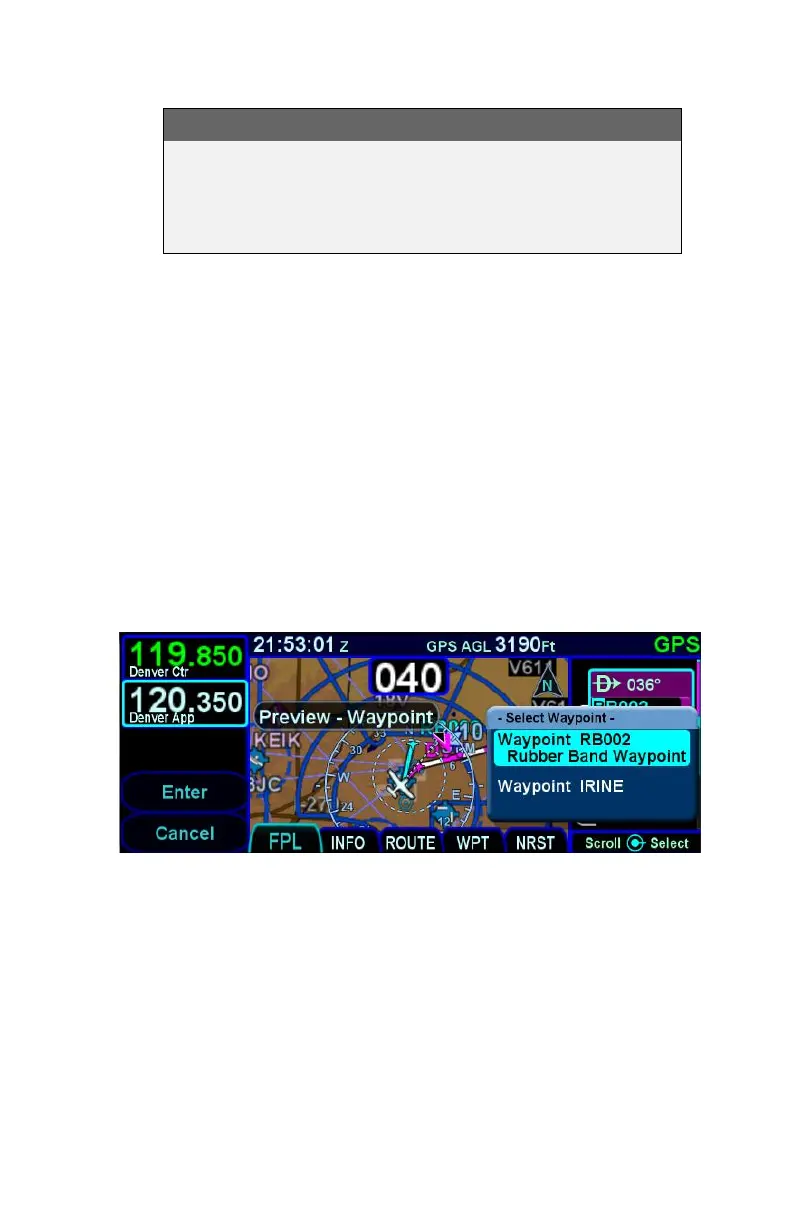
desired location. When you lift your finger off the display, a dialog
box is presented on the display for you to choose/confirm the new
waypoint being created.
If the new fix is in close proximity to a facility or facilities in the on-
board navigation database, then both the fix and the nearby facility or
facilities will appear in the dialog box list.
Rubber Banding Dialog Box
If the intended new waypoint is not listed in the dialog box to your
satisfaction, press the bezel “CLR” button to clear and restart as
required.
As soon as a fix from the presented list is selected, a new waypoint is
inserted in the FPL flight plan list and uses a default waypoint naming
mechanism (“RBxxx” where “RB” stands for Rubber Banding). This
can easily be seen if the IFD were on the FPL tab of the FMS page
and using the split Map-FPL view.



 To Next Page